
iPeng. iPhone. Spotify. And Squeezebox.

This has been one of the most fun recent everything-is-now-connected experiences: after upgrading into a Spotify Premium account, I first did find out that Spotify has a very nice mobile client for iPhone, then that there is also a plugin (still at beta though) to make Spotify work as an online radio component in my Squeezeserver/Squeezebox setup at home (making possible somewhat more hifi experiences in our library room). The only issue was the UI, and seaching for music with our trusty old Squeezebox Classic and its rubbery remote control was not so much fun. Here stepped in iPeng, an application that turns iPhone into a Wifi remote that makes browsing and playing Squeezebox’s music collections really fun — and it suits perfectly for remote controlling Spotify, too.

The only real irritation so far has been “no player connected” message that comes when the connection between iPhone and Squeezebox is lost. I have tried to set iPhone into a fixed IP address in our router, and also limit its connection into Wifi g standard only (which should make it supposedly more resilient to disturbance), but I am not sure I have managed to crack that problem completely yet. But otherwise: it is great to notice it is possible to get things — music, services, hard- and software — to interoperate, finally, at least to a certain degree.
Internet in television

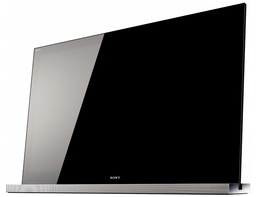
Sony-40NX700Television has its limitations, but it still remains unsurpassable as the big screen, social media for the living room. Television is also changing. It is perfectly possible to use your computer (even mobile phone) to sample video content from the internet, and the variety and quality of internet video is evolving all the time. Yet, combining lean-forward interactivity and lean-backward broadcast media experiences is not completely without its problems. It was interesting to notice that the first televisions with integrated internet video services have started to enter the market. Our choice was Sony KDL-40NX700 model. It is not one of the latest 3D models (Sony brought also some of those out during the summer), but it has rather decent image quality and I really like the way Sony has implemented the user interface. The best improvement to older televisions has proved to be Bravia Internet Video, which is Sony’s implementation of internet video into television. It provides Youtube and a load of other video sources (even one key Finnish one, YLE Areena) in an easily browsable, unified interface. Even HD video works fine, but a full HD video stream might lag and stutter for a moment if not paused for a moment for buffering the download. (We have a 8/2MB DSL connection, and television is connected using Wi-Fi, n+ standard modem.) Otherwise, with lower quality bitstreams, the video works surprisingly well.

Sony BDP-S470The television was bundled with a blu-ray player, BDP-S470 model. These things have improved as well. Unsurprisingly, KDL-40NX700 and BDP-S470 work together excellently. Also, the player upscales DVD disks so fine that the difference to blu-ray is not so great. Happy for that. Shame though that it was impossible to get all key features in one device. For example, Sony has omitted a “presence sensor” system from NX line, even while you can find it from the EX models. Weird choice.

On reception and playlists


iPhone, RadioBox, Philips
Originally uploaded by FransBadger

Working today in our cellar I developed a theory that people generally fall into two categories in their attitudes towards music: the playlist people and the radio people. While the former take care to build their own playlists and choose music to match the mood, situation and company, the latter just open the radio. I mostly belong to the latter category, but it is sometimes surprisingly difficult to get the exact radio station where you want and need it. For example, I often work with media (or do house maintenance work) in our cellar, where the earth and concrete walls block the reception. In the picture you can see one work-around: take iPhone and purchase a RadioBox app (or just use a free flash player if you have a Nokia or some open device like that), then tune up those favorite Finnish YLE radio channels, and plug it into your Philips brightlight-radio-combo-device. It works!

Site back online

It has been a really irritating week, but now this blog should be back online. The root of problems was my attempting to do a quick MySQL security update, without really having enough time to do it properly. Things went bad, and finally my server was so messed up that a reinstall or more advanced tinkering with system registry or something like that would have been necessary — and I did not have time for that, either.

So, the final step was to outsource the server tech and blog software maintenance, and reinstall the site under WordPress.com server farms. There were several technical and communication issues involved in getting the SQL backup file translated into XML that could then be imported into the new blog site. The registration of the new Finnish domain for my name (fransmayra.fi) and its linking into the WordPress.com site was another hassle, but now everything seems to be working. There are still some links leading into the old unet.fi blog site, but I have some static files still available from there, so at least images should display fine. And most of my blog photos and videos are embed code from Flickr or Youtube in any case.

But: sorry for the hassle — and if anyone drops by, and finds some broken links, or links leading to the old unet.fi blog pages, please let me know (fransmayra [at] gmail.com should work).

Nokia BTH-905

Nokia BTH-905, originally uploaded by FransBadger.

There are moments when noise cancellation headphones come in handy. I tested my new Nokia BTH-905 today as I mowed our lawn. Klippo is not the most silent of lawnmowers, but having these on my ears made the motor sound become like quiet hum. And I could enjoy my favourite music, so the damned exercise was much more tolerable.

I tested the compatibility with two mobile phones, Nokia N900 and Apple iPhone 3GS. Ironically, N900 did not fare so well. The sound started cutting and breaking up immediately, and closing the bluetooth connection actually froze the headphones so that a reset to the initial configuration was needed before I was able to continue using them. I guess the bluetooth stack in N900 is still “under construction” — there are many other people also warning against this particular phone–headphone combination in the net. Nothing like that with iPhone. After enabling the bluetooth linking, you can use the headphones for making calls and listening to music perfectly normally. The sound is pretty good, even if I think my Sony DR-BT50 actually deliver more clear and articulate soundscape. (Now, if I could only find the lost power adapter for that Sony from somewhere here…) The main attraction for Nokia BTH-905 is nevertheless the decent noise cancellation technology. The sales package of BHT-905 actually claims 99 % reduction of noise, which is probably a bit too much to promise (or something that will only be reached with precisely right kind of noise), but it is nice in any case. I haven’t tried out the popular Bose QuietComfort models, so cannot really make comparisons, though.

More about Nokia BTH-905: http://www.nokia.com/microsites/bh-905

Nokia N8

The official specs for N8, the first Symbian 3 device are now out. They have also produced a series of YouTube videos that you can access for this ‘media wall’ by clicking (let the video first load until the menu):

It is still a bit early to say what the actual use experience will be, but I hope they have managed to get the UI and user experience into more simplified and streamlined mode in this version — the tech itself is pretty impressive as that is the traditional forte (mobile media codecs & engineering) of Nokia, not so much the UX, unfortunately.

iPad unpacking

iPad unpacking, originally uploaded by FransBadger.

Here are the very first impressions: yes, Apple has created a very cool and smart device in iPad. I want one for myself (typing this with our gamelab iPad), even while I am not sure what I would be really using it for. Yet. The real power of this thing is in the user experience; it it so futuristic it feels like entering into sci-fi — and for me that is not a bad thing.

The UI logic is pretty much that of iPhone, the size makes huge difference though. The bright window into media, combined with the intuitiveness of touch, plus the fact that iPad is very fast, makes common tasks feel a bit magical.

There are the obvious downsides, too. Not having flash makes no sense to me at all. This thing would be the killer Facebook gaming device. Now, apparently Apple is trying to kill flash and make eveyone develop native iPhone OS apps. Shame on them. Also, the virtual keyboard is pretty ok, but it is not something that is intended for serious typing tasks. This is mostly a rich media plaything.

Together with rest of the UTA Gamelab folks we will continue to test iPad, but currently there is the technical limitation that there appears to be no way to get paid iPad apps (games, nor books, or movies) for testing. iPad apps are not yet available in the Finnish iTunes, and you need a US credit card or bank account to be able to buy from the US iTunes/App Store. Damn. Need to continue testing the free sample apps then.

Jane McGonical: Game us a better reality

This TED video is definitely worth sharing. Jane McGonigal, a game designer and researcher, makes a bold and entertaining claim that we actually need to play more online games to solve the world problems. Not convinced? Maybe you need to hear what she has to say:

Going back to Outlook

After several more or less happy years with Thunderbird as my default email program, I have now made the move “back” — I am now using MS Outlook. There were some mysterious crashing problems with Thunderbird: after the latest 3.x.x update, the damned program would not close without crashing. But the ultimate reason was support for synchronization and compatibility. Outlook calendar is “better” from my perspective, due to the support it receives from third parties: it is easier to make it sync with my various mobile devices and online calendars. There was the Lightning extension for Thunderbird, but even together, they just could not compete with the flexibility and range of features in Outlook (I am using Office 2007).

One obvious issue, though, that I have found out in Outlook. It does not include option to send automatically a “blind carbon-copy” (bcc) to a message of your choice — this is something that I need, because of the multiple email systems that need to keep in sync). I tried various solutions to come around this, including installing and editing some Visual Basic code, but to no functional result. There were several commercial add-ons that promised to do the job, but really: paying 20-30 dollars/euros just to get auto-bcc feature? Finally I did find this free component, Alan McGrath’s AutoBCC:

http://www.mcgrathtechnology.com/addins

This seems to work. You input the bcc: address into Tools > Options > AutoBCC settings (and it does not appear in the actual bcc field of your message that confused me a bit), but it seems to send the bcc copy nevertheless just fine. Hope it will work for you, too.

Considering migrating from Flickr to Picasa

Picasa logoThere have been several recent (and not so recent) improvements in Picasa web service that Google owns, making it serious challenger to Flickr, which I have long used. (See a list from here.) There is also a cost issue: the Pro account of Flickr is $25 per year (unlimited uploads, unlimited storage), but you can get 20 GB of disk space from Google/Picasa with $5 per year. Rather than cost, it is really the privacy controls that start to concern me more and more as the kids grow up. Picasa web albums makes it a bit easier to share private photo albums (you just enter email addresses and send the invitation link). This, and other reasons have led me to consider migrating my photo galleries from Flickr to Picasa. As I have several deep integrations set up (particularly all photos in this blog actually reside in Flickr), it is questionable whether this transition really makes sense. On the other hand, I hate being tied to any single service, without ability to change service provider when needed. Flickr has not been particularly dynamic in coming up with new functionalities recently. Yet, integration with my mobile camera phones and mail systems is something that works well with Flickr, and I am not sure how such things would appear under Picasa/Google. But we will see. I am using the holiday period to do some tests, experimenting first with the free Migratr tool to backup and transfer all my Flickr photos into the Picasa account. It appears a bit buggy/easy to crash, but lets hope for the best. It is interesting to see how the transfer works out, and having backups in several places is a good idea in any case.