The WordPress.com stats helper monkeys prepared a 2014 annual report for this blog.
Here’s an excerpt:
The concert hall at the Sydney Opera House holds 2,700 people. This blog was viewed about 35,000 times in 2014. If it were a concert at Sydney Opera House, it would take about 13 sold-out performances for that many people to see it.
Continuing to troubleshoot our persistent home networking problems: while we have got a high pile of various routers, last several years the heart of the network has been Asus RT-N56U dual-band model, which was awarded as the fastest router available in 2011. It was a slim device, and after I updated the firmware to the Padawan version, there was also more than enough room for tweaking. However, the constant connection failures and speed dropping finally pointed towards the life-cycle of our router coming to an end. The router has been located in very narrow space, without cooling, so it should not have come as a surprise that its components have started failing after a few years.
The selection of a router for a home where there are a fair number of connected devices (smartphones, tablets and computers are just one part of them) is a tricky business. I wanted to have a 802.11ac model, but otherwise I kept on reading and comparing various options. According to specs, speed and configuration options, the current top model of Asus, RT-AC87U, was for a long time my number one choice. However, the actual user reports were a rather mixed bag: there seems to have been various bugs and issues with both the software and hardware of this, 4×4 antenna configuration, dual band ac model. And I have come to learn that I have less and less time and patience for tweaking tech — or at least, I want the router and network infrastructure to “just work”, so that I can use the Internet while tweaking, testing and playing with something more interesting.
The conclusion was to get yet another Apple product, this time AirPort Time Capsule (2 TB model). It does not reach quite as extreme speeds as the RT-AC87U, but then again, there is limited support for hardware that is capable of reaching its theoretical 1,3 Gbps top speeds. I am increasingly relying on my Macbook Pro Retina also when at home, and we are actively using several iPads and other Apple devices, so having the full Apple compatibility, while not a “must”, was a nice bonus. The user reports about the new AirPort Time Capsule have been overwhelmingly positive, emphasising its robust reliability, so I am interested to see whether this router lives up to its reputation also as the backbone of our household. So far, so good. All our devices have succesfully got online, and the speeds are close to the 100/10 Mbps maximum, also in Wifi, when close to the AirPort. And the Macbook is now making its automatic backups in the background, which is nice.
Home office upgrade: our laser colour printer, Canon i-SENSYS LBP5050n was bought in summer 2009, more than 5 years ago. It had its fair share of driver problems, and connection problems in the home LAN. Recently the connection has mostly worked for the first print, but then some error mode would require rebooting the printer to get the next pages printed. The print cartridges were also expensive, and cheaper replacement ink cartridges proved to be leaky, and giving poor quality prints. It has been time to upgrade for a long time.
Our new workhorse is an office inkjet printer-scanner, one of the new generation of multifunctional devices that support multiple wired and wireless connections, including printing and scanning with email, saving scans directly to shared network drives, and printing from mobile and tablet devices. The model is called HP Officejet Pro 8620, and while not the latest or greatest in terms of advertised features, the reliable reputation of HP as a printer maker meant a lot in this case. The quality of inkjet printing was making me cautious a bit, but on the other hand, HP advertises that the printing costs of their Officejets are up to 50 % lower than the costs of laser printing. Based on tests, the “best” quality of printer is pretty decent on regular copy paper, though inkjet technology achieves its best results on special papers, or photo papers, of course.
There have been substantial delays in my advance order for iPhone 6 Plus (apparently Apple underestimated the demand), and I have had some time to reflect on why I want to get the damned thing in the first place. There are no unique technological features in this phone that really set it apart in today’s hi-tech landscape (Apple Pay, for example, is not working in Finland). The screen is nice, the phone (both models, 6 and 6 Plus) are well-designed and thin, but then again – so are many other flagship smartphones today. Feature-wise, Apple has never really been the one to play the “we have the most, we get there first” game, rather, they are famous for coming in later, and for perfecting few selected ideas that often have been previously introduced by someone else.
I have never been an active “Apple fan”, even while it has been interesting to follow what they have to offer. Apple pays very close attention to design, but on the other hand closes down many options for hacking, personalising and extending their systems, which is something that a typical power-user or geek type abhors – or, at least used to.
What has changed then, if anything? On one hand, the crucial thing is that in the tech ecosystem, devices are increasingly just interfaces and entry points to content and services that reside in the cloud. My projects, documents, photos, and increasingly also the applications I use, live in the cloud. There is simply not that much need for tweaking the operating system, installing specific software, customising keyboard shortcuts, system parameters etc. than before – or is it just that I have got lazy? Moving all the time from office to the meeting room, then to the lecture hall, next to seminar room, then to home, and next to the airport, there are multiple devices while on the road that serve as portals for information, documents and services that are needed then and there. Internet connectivity and electricity rather than CPU cycles or available RAM are the key currencies today.
While on the run, I carry four tools with me today: Samsung Galaxy S4 (work phone), iPhone 4S (personal phone), iPad Air (main work tablet device), and Macbook Pro 13 Retina (personal laptop). I also use three Windows laptops (Asus Vivobook at home, Vaio Z and Vaio Z3 which I run in tandem in the office), and in the basement is the PC workstation/gaming PC that I self-assembled in December 2011. (The video gaming consoles, alternative tablets, media servers and streaming media boxes are not included in the discussion here.) All in all, it is S4 that is the most crucial element here, simply because it is mostly at hand whenever I need to check some discussion or document, look for some fact, reply to someone – and while a rather large smartphone, it is still compact enough so that I can carry it with me all the time, and it is also fast and responsive, and it has large enough, sharp touchscreen that allows interacting with all that media and communication in timely and effortless manner. I use iPhone 4S much less, mainly because its screen is so small. (Also, since both iOS 8 and today’s apps have been designed for much speedier iPhone versions, it is terribly slow.) Yet, the Android apps regularly fall short when compared to their iOS counterparts: there are missing features, updates arrive later, the user experience is not optimised for the device. For example, I really like Samsung Note 10.1 2014 Edition, which is – with its S Pen and multitasking features – arguably a better professional tablet device than iPad; yet, I do not carry it with me daily, simply as the Android apps are still often terrible. (Have you used e.g. official Facebook app in a large-screen Android tablet? The user interface looks like it is just the smartphone UI, blown up to 10 inches. Text is so small you have to squint.)
iPhone 6, and particularly 6 Plus, show Apple rising up to the challenge of screen size and performance level that Android users have enjoyed for some time already. Since many US based tech companies still have “iOS first” strategy, the app ecosystem of iPhones is so much stronger than its Android counterpart that in my kinds of use at least, investing to the expensive Apple offering makes sense. I study digital culture, media, Internet and games by profession, and many interesting games and apps only come available to the Apple land, or Android versions come later or in stripped-down forms. I am also avid mobile photographer, and while iPhone 6 and 6 Plus have smaller number of megapixels to offer than their leading rivals, their fast auto-focus, natural colours, and good low-light performance makes the new iPhones good choices also from the mobile photographer angle. (Top Lumia phones would have even better mobile cameras in this standpoint, but Windows Phone app ecosystem is even worse than Android one, where at least the numbers of apps have been rising, as the world-wide adoption of Android handsets creates demand for low-cost apps, in particular.)
To summarise, mobile is where the spotlight of information and communication technologies lies at the moment, and where games and digital culture in general is undergoing powerful developments. While raw processing power or piles of advanced features are no longer the pinnacle or guarantee for best user experiences, it is all those key elements in the minimalistic design, unified software and service ecosystem that support smooth and effortless access to content, that really counts. And while the new iPhone in terms of its technology and UI design is frankly pretty boring, it is for many people the optimal entrance to those services, discussions and creative efforts of theirs that they really care about.
So, where is that damned 6 Plus of mine, again? <sigh>
My new pet theory is that avantouinti (literally “hole-in-the-ice-swimming”) and love of chili peppers are somehow related. At least here in Tampere I can find people who do both: go out in extreme cold, and jump to the lake, and eat extremely hot chilies. It might be that there is need for extra endorphin, if you live up in North, perhaps? Both the pain/taste of chilies and the effects of visiting hot sauna, and submerging in icy water appear to create some kind of mild shock effect to your system, which in turn releases endorphins. Endorphins in turn are natural pharmaceuticals for pain and stress, and seem to interact with the opiate receptors in somewhat similar manner like morphine does.
On the other hand, it might just be a cultural thing: heavy metal music is also popular in the North, and I have also witnessed crowds of black-clothed folks gathering in the annual chili festival in Tampere. For some, it is just that the strong things attract?
As to the health benefits, there are studies that prove both being likely good for us, see e.g. Huttunen, Pirkko; Kokko, Leena; Ylijukuri, Virpi (2004). “Winter swimming improves general well-being”. International Journal of Circumpolar Health63 (2): 140–144. And: Knotkova, H., Pappagallo, M., & Szallasi, A. (2008). Capsaicin (TRPV1 Agonist) Therapy for Pain Relief: Farewell or Revival?The Clinical Journal of Pain, 24(2), 142–154.
I have noticed that since I got myself the Macbook Pro Retina 13″, it has gradually been taking over my work travels, as well as being the main computer while at home. Since this Mac has been coming from my own pocket, and potentially not covered by any insurance while used in my university work, it is even more important than usual that I do not break it. To that effect, I recently made an order to the online Apple Store and got Tech21 “Impact Snap” case for MBPR13. I am not an expert on “smart materials” and can therefore not really comment on how credible the claims for their “Impactology” techniques really are, but at least it provides some peace of mind to have this around the Mac, while operating the device in the cramped environments like those in trains or aeroplanes. The matte surface of Impact Snap case makes it also easier to have a good hold on the Mac, which makes the device much more pleasurable to handle. And it comes in black.
Peter Gabriel had his Back to Front tour concert in Helsinki yesterday, which I had the rare pleasure to take part in. I have followed the career and music of Peter for decades, but this was the first live performance I have been in. Even while you count in the music videos and concert DVDs, the real, live concert still remains a different kind of thing.
Since the days of Genesis, Peter Gabriel has been one of the real innovators of rock music, and his solo career has included both chart-leading pop music hits, as well as sombre, politically motivated material, and more experimental music. (My personal favorites include e.g. “Passion”, the album including music produced for The Last Temptation of Christ, the film by Martin Scorsese.) This concert was focused on revisiting his most popular album, “So” (1987), but was in reality much more.
The concert is built into three parts: the first, acoustic session was styled to be more like a band in rehersal (with the harsh, full arena lights shining on the band and the audience). This session included the semi-improvisational opening song, as well as classics such as “Shock the Monkey” (1982). The second part (the more “savoury course”, as Peter introduced in his metaphor of a three-course meal), provided full-blown electronica — distorted guitar and percussion effects, accompanied by black-and-white, often stroboscopic video projections and stage lightning. The colours were introduced only at the final, third part, where all the songs from “So” were played, in their original, recorded order. This was the “dessert”, as introduced by Peter.
It would be easy to be critical about the lack of innovation in the later part of Peter Gabriel, and see the reworking of the hit album in rather trite, commercial terms. For my part, I could only wish to have similar levels of creativity and experimental spirit left at the age of 64. The adaptations of Gabriel’s classic materials were often surprising, and challenged the listener to reconsider his or her previous understanding of the song. Some, reflective parts of the concert were truly touching and moving, some were just staggering, powerful rock experiences. Great concert, overall!
I am not exactly the most experienced Mac / OS X user, and still learning my ropes. One of the weird things I have run into involve Mac slowing down after a system update (like the recent OS X 10.9.3 update I installed today). Particularly irritating was the manner in which Mac Office 2011 started the lengthy process of “upgrading identity and messages” every time after the system reboot. The only way I have been able to solve this so far is by starting the “Disk Utility” and using it to run “verify” and “repair” to the system disk. After that, it is again speedy system and easy life — until the next system update, I guess. More: http://www.cnet.com/how-to/repair-disk-permissions-to-speed-up-your-mac/
Today’s video playback world is in an “interesting” state. Some examples from our own home and life:
We have video content (ranging over a decade in age) that has been recorded using variety of mobile phones, compact digital cameras, webcams, digital SLRs, and dedicated video cameras, at least
All of these seem to have produced file formats using different video codecs, encapsulation containers, different resolutions, etc.
Some of our video content has been converted and uploaded into cloud services, such as YouTube, Flickr, Dropbox, etc.
There are multiple storage and server devices in the house: PC workstations (Windows, Mac, Linux), one PC server (Windows 2008 Server Web Edition), and one NAS (Buffalo LS-WXL)
The servers claim to be DNLA compatible (there has been several different software tools set up to the Windows Server; in NAS there is a Twonky Media Server)
The typical video streaming use situations include, but are not limited to:
Using Apple TV device to access local network disk share
Using Apple TV device to access YouTube or other cloud service
Using iPad or iPhone to stream local or cloud video content via AirPlay to Apple TV
Using PlayStation 3 to access local network disk share
Using PlayStation 3 to access cloud service
Using a laptop (PC, Mac, Linux) to access local disk share or a cloud service, possibly streaming the video to the big screen with the help of AirPlay (Mac), or Chromecast (Windows)
Using an Android phone or tablet to access local disk shares or cloud services, often streaming the video to the big screen via Google Chromecast stick
There are also a “smart” tv and a blu-ray player with embedded DNLA playback functionalities, but those work even worse than the above options
It should be noted that there are multiple, differently featured software tools in both iOS and Android devices, and Chromecast support particularly appears to be “work in progress”, AirPlay has more solid support.
When I try to play a video file e.g. from 2007 (recorded using some obscure codec that some antique compact camera then supported), the situation is more likely to fail than to succeed. I have found that the best chance to actually see the video is by copying the file to a PC and opening it in some well-supported video player. The streaming will most likely not work. Apart from the PCs, PlayStation 3 appears to support most of our video files. iPad and Android phones and tablets do not really work well with most of local video file contents, even while the support has been getting better over the years. Most recent content, created with the new Androids or iPhones, for example, is more likely to perform well also in the complex home media streaming environment. The old video files will most probably always remain tricky. One solution would be to convert (and possibly upload to an online cloud service) all videos, since e.g. YouTube is rather well supported in different device environments. In reality, the hundreds of files will never be processed in this manner, and many people will probably also prefer to keep their most private, personal videos only in local storage rather than in some cloud service.
I have been testing and using Windows 8 (and now 8.1) in most of my Windows PCs for some time now, and while I mostly fail to find any real use for the Metro style apps, there are some nice improvements (most of them “under the hood”) that make Windows 8 preferable to Windows 7, for me, at the moment. However, there remains some issues that mostly relate to how to manage the new gesture controls of Windows 8, when only one of my Windows laptops is an actual touch-screen device. Swipes from the sides of the screen need to be carried out by pointing and clicking with a mouse, which is cumbersome, or through a touchpad, which have their benefits and downsides.
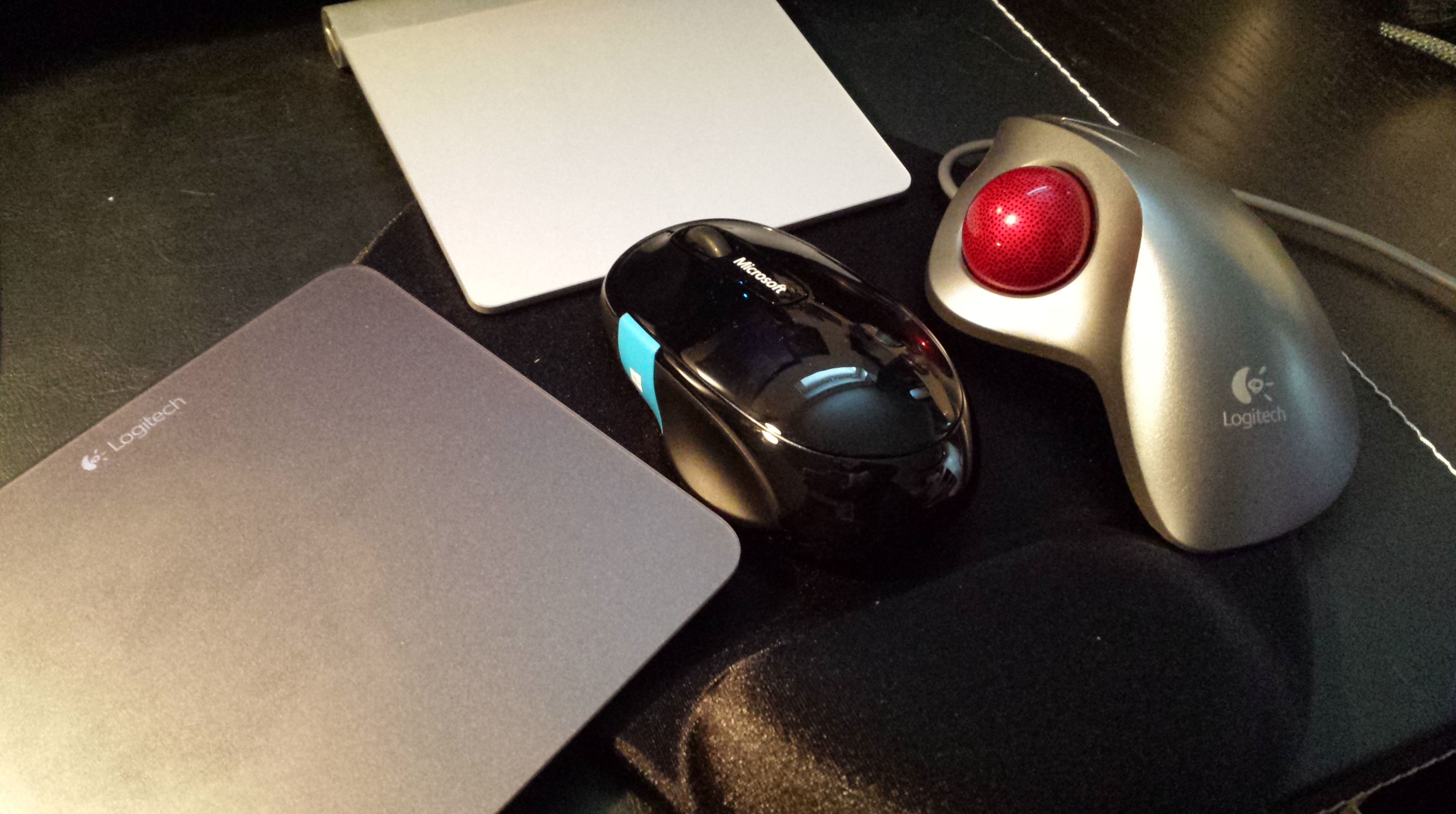
The attached picture shows by current cavalcade of optional pointing and gesturing devices that are connected and available next to the keyboard in my Windows 8.1 desktop workstation. These include the Logitech Touchpad T650, Apple Wireless Touchpad, Logitech Marble Trackball and Microsoft Sculpt Comfort Mouse, the most recent addition. The traditional mouse (with the optional Win8 button/touch area) is the most precise for pointing, the Marble trackball provides overall best ergonomics, and T650 is best compatible and supported in Windows 8 of the two touchpads (no surprises there, really). What really irritates me, is that after using one of them, there is aways some shortcoming which forces me to move to another device for a while: the touchpad is great for gestures and skimming through web pages, for example, but whenever multiple files need to be manipulated precisely, I find myself getting hold of the mouse or the trackball. And when my fingers and wrist get tired of rotating and swiping with a mouse, then I need to move a touchpad back to the mousepad.
A mobile device does not suffer from similar schizophrenia – you just use the mobile-optimized apps through a mobile-optimized UI. The touch gestures in Windows 8/8.1 desktop mode are a problem mostly since they are almost useful, so that once you have started to use them, it is hard to go back — yet, on the other hand, they do not naturally fit the desktop computer control devices capabilities. You are stuck in the middle.









 frans goes blog
You must be logged in to post a comment.