EOS M mount: interesting adapters

Attaching EF lenses to M mount camera requires an adapter – which adds a bit to the bulk of a small camera, but is also an interesting opportunity, since it is possible to fit new electronic or optical functionalities inside that middle piece.

I have both the official, Canon-made “EF-EOS M” mount adapter, which keeps the optical characteristics of the lens similar to what they would be if used on an EF-S mount camera (crop and all). The other adapter is “Viltrox EF-EOS M2 Lens Adapter 0.71x Speed Booster” (a real mouthful), which has the interesting capability of multiplying the focal length by factor of 0.71. This is a sort of “inverted teleconverter” as it reduces the image size that the lens produces, allowing more light to fit into the smaller (APS C) sensor, and almost eliminates the crop factor.

Most interestingly, as the booster collects more light into the sensor, this also has an effect of increasing the maximum aperture of my EF/EF-S lenses in an M mount camera. When I attach Viltrox into my 70-200 mm F4, it appears to my M50 camera as an F2.8 lens (with that constant aperture over the entire zoom range). The image quality that these “active speed booster adapters” produce is apparently a somewhat contested topic among camera enthusiasts. In my personal, initial tests, I have been pretty happy: the sharpness and corner vignetting also appear to be well controlled and the images produced of rather good quality – or good enough for me, at least.

When I put this into my 50 mm F2.8 portrait lens, this lens functions as having F1.2 maximum aperture. This is pretty cool, e.g. the capability to shoot in lower-light conditions is much better this way, and the narrow depth of field is similar to much more heavy and expensive, full frame camera system when using this adapter.

In my tests so far, all my Canon EF lenses have worked perfectly with Viltrox. However, when testing with the Tamron 16-300 mm F/3.5-6.3 Di II VC PZD super-zoom lens, there are issues. The adapter focuses light in a wrong manner when using this lens, and the result is that the corners are cut away from images (see the picture below). So, your mileage may vary. I have written to Viltrox customer service and asked what they suggest in the Tamron case (I have updated the adapter into the most recent available firmware – this can be done very simply using a PC and the built-in micro-usb connector in the adapter).

You can read a bit more about this technology (in connection to the first, Metabones product) from here: https://www.newsshooter.com/2013/01/14/metabones-speed-booster-adapter-gives-lenses-an-extra-fstop-and-nearly-full-frame-focal-lengths-on-aps-c-sensors/

There is no perfect camera

One of the frustrating parts of upgrading one’s photography tools is the realisation that there indeed is no such thing as “perfect camera”. Truly, there are many good, very good and excellent cameras, lenses and other tools for photography (some also very expensive, some more moderately priced). But none of them is perfect for everything, and will found lacking, if evaluated with criteria that they were not designed to fulfil.

This is particularly important realisation at a point when one is both considering of changing one’s style or approach to photography, at the same time while upgrading one’s equipment. While a certain combination of camera and lens does not force you to photograph certain subject matter, or only in a certain style, there are important limitations in all alternatives, which make them less suitable for some approaches and uses, than others.

For example, if the light weight and ease of combining photo taking with a hurried everyday professional and busy family life is the primary criteria, then investing heavily into serious, professional or semi-professional/enthusiast level photography gear is perhaps not so smart move. The “full frame” (i.e. classic film frame sensor size: 36 x 24 mm) cameras that most professionals use are indeed excellent in capturing a lot of light and details – but these high-resolution camera bodies need to be combined with larger lenses that tend to be much more heavy (and expensive) than some alternatives.

On the other hand, a good smartphone camera might be the optimal solution for many people whose life context only allows taking photos in the middle of everything else – multitasking, or while moving from point A to point B. (E.g. the excellent Huawei P30 Pro is built around a small but high definition 1/1.7″ sized “SuperSensing”, 40 Mp main sensor.)

Another “generalist option” used to be so-called compact cameras, or point-and-shoot cameras, which are in pocket camera category by size. However, these cameras have pretty much lost the competition to smartphones, and there are rather minor advances that can be gained by upgrading from a really good modern smartphone camera to a upscale, 1-inch sensor compact camera, for example. While the lens and sensor of the best of such cameras are indeed better than those in smartphones, the led screens of pocket cameras cannot compete with the 6-inch OLED multitouch displays and UIs of top-of-the-line smartphones. It is much easier to compose interesting photos with these smartphones, and they also come with endless supply of interesting editing tools (apps) that can be installed and used for any need. The capabilities of pocket cameras are much more limited in such areas.

There is an interesting exception among the fixed lens cameras, however, that are still alive and kicking, and that is the “bridge camera” category. These are typically larger cameras that look and behave much like an interchangeable-lens system cameras, but have their single lens permanently attached into the camera. The sensor size in these cameras has traditionally been small, 1/1.7″ or even 1/2.3″ size. The small sensor size, however, allows manufacturers to build exceptionally versatile zoom lenses, that still translate into manageable sized cameras. A good example is the Nikon Coolpix P1000, which has 1/2.3″ sensor coupled with 125x optical zoom – that is, it provides similar field of view as a 24–3000 mm zoom lens would have in a full frame camera (physically P1000’s lenses have a 4.3–539 mm focal length). As a 300 mm is already considered a solid telephoto range, a 3000 mm field of view is insane – it is a telescope, rather than a regular camera lens. You need a tripod for shooting with that lens, and even with image stabilisation it must be difficult to keep any object that far in the shaking frame and compose decent shots. A small sensor and extreme lens system means that the image quality is not very high: according to reviews, particularly in low light conditions the small sensor size and “slow” (small aperture) lens of P1000 translates into noisy images that lack detail. But, to be fair, it is impossible to find a full frame equivalent system that would have a similar focal range (unless one combines a full frame camera body with a real telescope, I guess). This is something that you can use to shoot the craters in the Moon.

A compromise that many hobbyists are using, is getting a system camera body with an “APS-C” (in Canon: 22.2 x 14.8 mm) or “Four-Thirds” (17.3 × 13 mm) sized sensors. These also cannot gather as much light as a full frame cameras do, and thus also will have more noise at low-light conditions, plus their lenses cannot operate as well in large apertures, which translate to relative inability to achieve shallow “depth of field” – which is something that is desirable e.g. in some portrait photography situations. Also, sports and animal photographers need camera-lens combinations that are “fast”, meaning that even in low-light conditions one can take photos that show the fast-moving subject matter in focus and as sharp. The APS-C and Four-Thirds cameras are “good enough” compromises for many hobbyists, since particularly with the impressive progress that has been made in e.g. noise reduction and in automatic focus technologies, it is possible to produce photos with these camera-lens systems that are “good enough” for most purposes. And this can be achieved by equipment that is still relatively compact in size, light-weight, and (importantly), the price of lenses in APS-C and Four-Thirds camera systems is much lower than top-of-the-line professional lenses manufactured and sold to demanding professionals.

A point of comparison: a full-frame compatible 300 mm telephoto Canon lens that is meant for professionals (meaning that is has very solid construction, on top of glass elements that are designed to produce very sharp and bright images with large aperture values) is priced close to 7000 euros (check out “Canon EF 300mm f/2.8 L IS II USM”). In comparison, and from completely other end of options, one can find a much more versatile telephoto zoom lens for APS-C camera, with 70-300 mm focal range, which has price under 200 euros (check our e.g. “Sigma EOS 70-300mm f/4-5.6 DG”). But the f-values here already tell that this lens is much “slower” (that is, it cannot achieve large aperture/small f-values, and therefore will not operate as nicely in low-light conditions – translating also to longer exposure times and/or necessity to use higher ISO settings, which add noise to the image).

But: what is important to notice is that the f-value is not the whole story about the optical and quality characteristics of lenses. And even if one is after that “professional looking” shallow depth of field (and wants to have a nice blurry background “boukeh” effect), it can be achieved with multiple techniques, including shooting with a longer focal range lens (telephoto focal ranges come with more shallow depth of fields) – or even using a smartphone that can apply the subject separation and blur effects with the help of algorithms (your mileage may vary).

And all this discussion has not yet touched the aesthetics. The “commercial / professional” photo aesthetics often dominate the discussion, but there are actually interesting artistic goals that might be achieved by using small-sensor cameras better, than with a full-frame. Some like to create images that are sharp from near to long distance, and smaller sensors suit perfectly for that. Also, there might be artistic reasons for hunting particular “grainy” qualities rather than the common, overly smooth aesthetics. A small sensor camera, or a smartphone might be a good tool for those situations.

One must also think that what is the use situation one is aiming at. In many cases it is no help owning a heavy system camera: if it is always left home, it will not be taking pictures. If the sheer size of the camera attracts attention, or confuses the people you were hoping to feature in the photos, it is no good for you.

Thus, there is no perfect camera that would suit all needs and all opportunities. The hard fact is that if one is planning to shoot “all kinds of images, in all kinds of situations”, then it is very difficult to say what kind of camera and lens are needed – for curious, experimental and exploring photographers it might be pretty impossible to make the “right choice” regarding the tools that would truly be useful for them. Every system will certainly facilitate many options, but every choice inevitably also removes some options from one’s repertoire.

One concrete way forward is of course budget. It is relatively easier with small budget to make advances in photographing mostly landscapes and still-life objects, as a smartphone or e.g. an entry-level APS-C system camera with a rather cheap lens can provide good enough tools for that. However, getting into photography of fast-moving subjects, children, animals – or fast-moving insects (butterflies) or birds, then some dedicated telephoto or macro capabilities are needed, and particularly if these topics are combined with low-light situations, or desire to have really sharp images that have minimal noise, then things can easily get expensive and/or the system becomes really cumbersome to operate and carry around. Professionals use this kinds of heavy and expensive equipment – and are paid to do so. Is it one’s idea of fun and good time as a hobbyist photographer to do similar things? It might be – or not, for some.

Personally, I still need to make up my mind where to go next in my decades-long photography journey. The more pro-style, full-frame world certainly has its certain interesting options, and new generation of mirrorless full-frame cameras are also bit more compact than the older generations of DSLR cameras. However, it is impossible to get away from the laws of physics and optics, and really “capable” full frame lenses tend to be large, heavy and expensive. The style of photography that is based on a selection of high-quality “prime” lenses (as contrasted to zooms) also means that almost every time one changes from taking photos of the landscape to some detail, or close-up/macro subject, one must also physically remove and change those lenses. For a systematic and goal oriented photographer that is not a problem, but I know my own style already, and I tend to be much more opportunistic: looking around, and jumping from subject and style to another all the time.

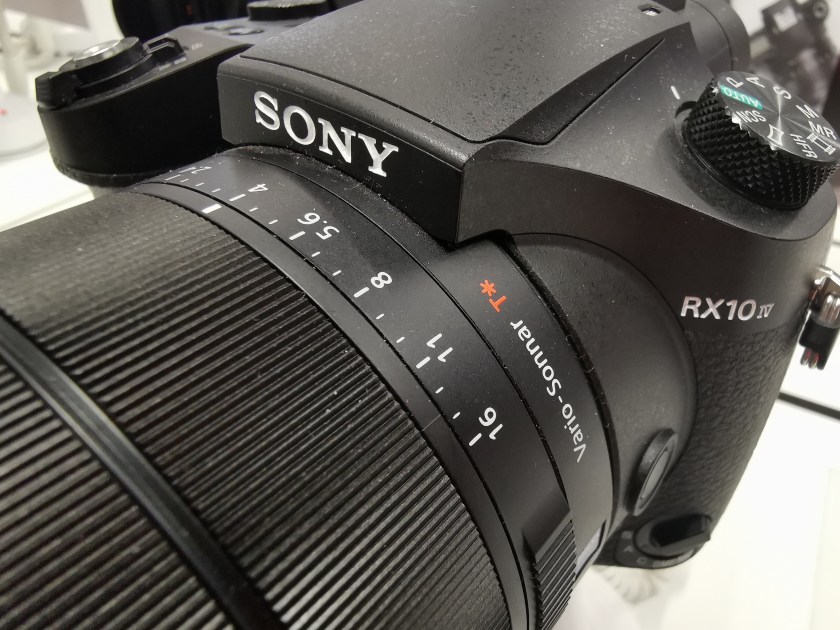
One needs to make some kinds of compromises. One option that I have been considering recently is that rather than stepping “up” from my current entry level Canon APS-C system, I could also go the other way. There is the interesting Sony bridge camera, Sony RX10 IV, which has a modern 1″ sensor and image processor that enables very fast, 315-point phase-detection autofocus system. The lens in this camera is the most interesting part, though: it is sharp, 24-600mm equivalent F2.4-4 zoom lens designed by Zeiss. This is a rather big camera, though, so like a system cameras, this is nothing you can put into your pocket and carry around daily. In use, if chosen, it would complement the wide-angle and street photography that I would be still doing with my smartphone cameras. This would be a camera that would be dedicated to those telephoto situations in particular. The UI is not perfect, and the touch screen implementation in particular is a bit clumsy. But the autofocus behaviour, and quality of images it creates in bright to medium light conditions is simply excellent. The 1″ sensor cannot compete with full frame systems in low-light conditions, though. There might be some interesting new generation mirrorless camera bodies and lenses coming out this year, which might change the camera landscape in somewhat interesting ways. So: the jury is still out!
Some links for further reading:

Learning to experiment

I have been recently thinking why I feel that I’ve not really made any real progress in my photography for the last few years. There are a few periods when some kind of leap has seemed to take place; e.g. when I moved into using my first DSRL, and also in the early days of entering the young Internet photography communities, such like Flickr. Reflecting on those, rather than the tools themselves (a better camera, software, or service), the crucial element in those perhaps has been that the “new” element just stimulated exploration, experimentation, and willingness to learn. If one does not take photos, one does not evolve. And I suppose one can get the energy and passion to continue doing things in experimental manner – every day (or: at least in sometimes) – from many things.
Currently I am constantly pushing against certain technical limitations (but cannot really afford to upgrade my camera and lenses), and there’s also lack of time and opportunity that a bit restrict more radical experiments with any exotic locations, but there are other areas where I definitely can learn to do more: e.g. in a) selecting the subject matter, b) in composition, and c) in post-production. Going to places with new eyes, or, finding an alternative perspective in “old” places, or, just learning new ways to handle and process all those photos.

I have never really bothered to study deeper the fine art of digital photo editing, as I have felt that the photos should stand by themselves, and also stay “real”, as documents of moments in life. But there are actually many ways that one can do to overcome technical limitations of cameras and lenses, that can also help in creating sort of “psychological photorealism”: to create the feelings and associations that the original situation, feeling or subject matter evoked, rather than just trying to live with the lines, colours and contrast values that the machinery was capable of registering originally. When the software post-processing is added to the creative toolbox, it can also remove bottlenecks from the creative subject matter selection, and from finding those interesting, alternative perspectives to all those “old” scenes and situations – that one might feel have already been worn out and exhausted.

Thus: I personally recommend going a bit avant-garde, now and then, even in the name of enhanced realism. 🙂

Day Pack

I probably get passionate about somewhat silly things, but (like my family has noticed) I have already amassed rather sizable collection of backbags – most optimised for travelling with a laptop computer, photography setup, or both.

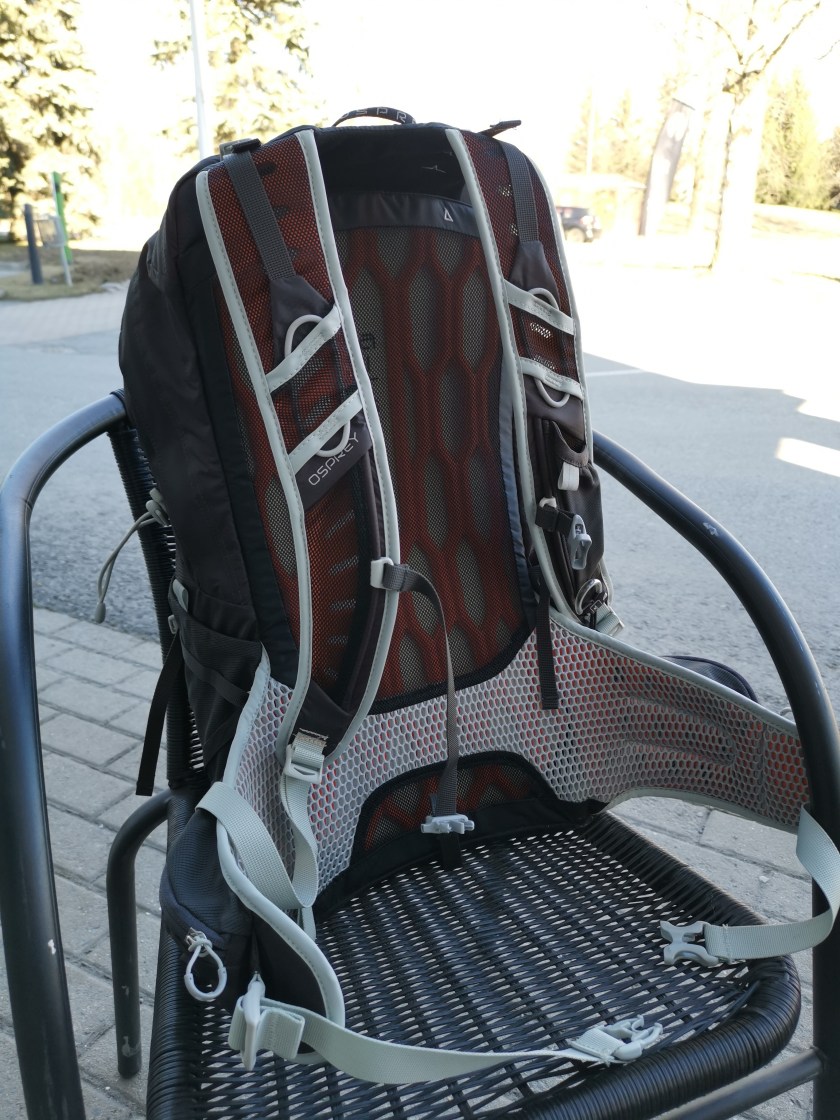
What is pictured here (below) is something a bit different, a compact and lightweight hiking backbag, Osprey Talon 22. It belongs to the “day bag” / “daypack” category, which means that while with its 22 liter dimensions it is probably too small to handle all of your stuff for a longer travel, it is perfect for all those things one is likely to carry around on a short trip.

The reason why I like this model particularly, relates to its carrying system. I have tried all sorts of straps and belts systems, but the one in Talon 22 is really good for the relatively light loads that this bag is designed for. It has an adjustable-length back plate with a foam-honeycomb structure, ergonomic shoulder straps, and the wide hipbelt also has a soft multilayered construction with air-channels. Combine this with a rich selection of various straps that allow adjusting the load into a very close, organic contact with your body, and you have a nice backbag indeed.

There are all kinds of advanced minor details in the Ospray feature list (that you can check from the link below), that might matter to more active hikers, for example, but basic feature set of this comfortable and highly adjustable all-round backbag are already something that many people can probably appreciate.

Link to info page: https://www.ospreyeurope.com/shop/fi_en/hiking/talon-series/talon-22-17

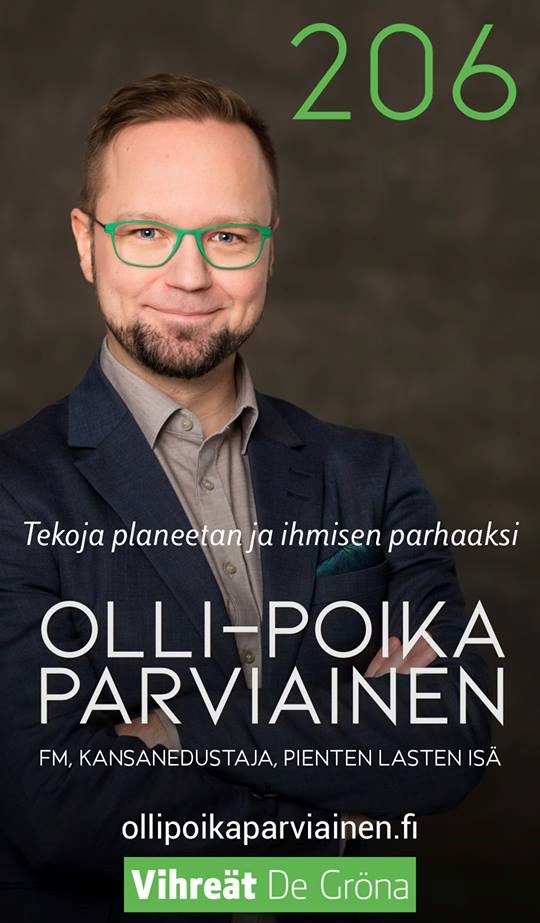
Vahva suositus: O-P Parviainen

Äänestämällä voit vaikuttaa – ääni Vihreiden ehdokkaalle on ääni maapallon tulevaisuuden, uusien työpaikkojen, suomalaisen koulutuksen ja tutkimuksen, sekä köyhyyden ja eriarvoisuuden torjunnan puolesta.

Olen oppinut tuntemaan Olli-Poika Parviaisen jo monen vuoden ajalta, niin Tampereen yliopistolla kuin sen ulkopuolella. Olli-Poika on poikkeuksellinen ihminen: kärsivällinen mutta näkemyksellinen ja sinnikäs; luotettava ja monipuolisesti osaava. Hän on valmis kuuntelemaan, oppimaan ja siten hän myös saa asioita tapahtumaan – rakentavasti ja yhteistyössä, turhaa vastakkainasettelua välttäen. O-P:n monet asiantuntemus- ja osaamisalueet jaksavat aina hämmästyttää. Hän tuntee niin tiedemaailmaa (hänellä on maisteritutkinto meidän kansainvälisestä pelitutkimuksen maisteriohjelmastamme) kuin elinkeinoelämää ja sote-maailman haasteita. Hän on luovien alojen ja digitaalisuuden puolestapuhuja, joka tietää myös miten tärkeää on laatia eettiset pelisäännöt teknologian soveltamiselle ja turvata ihmisoikeudet kaikille myös digitalisoituvassa tulevaisuudessa. O-P tekee pitkäjänteistä työtä paremmin toimivan ja tasa-arvoisemman yhteiskunnan puolesta.

Olli-Pojan osaaminen ja tietämys on noteerattu ja hänelle on kertynyt laajaa kokemusta monissa eri tehtävissä: yrittäjänä, Tampereen kaupunginvaltuutettuna ja varapormestarina, monien eri toimikuntien jäsenenä, sekä kansanedustajana vuodesta 2015 lähtien. Hän on toiminut aitiopaikalla niin eduskunnan hallintovaliokunnassa, tulevaisuusvaliokunnassa kuin mm. valvonut Euroopan ihmisoikeussopimuksen toteutumista Suomen edustajana Euroopan Neuvoston kokouksissa.

Tämän lisäksi O-P onnistuu vielä jotenkin myös navigoimaan kahden pienen lapsen isänä arjen haasteet – sekä vielä löytämään aikaa niin roolipeli- kuin musiikkiharrastuksellekin. Hatunnoston paikka.

Erittäin lämmin suositus: tässä on eduskuntaan oikein aikaansaapa ja hyvä ehdokas! Lisää Olli-Pojan (nro 206) vaaliteemoista voi lukea täältä: https://www.ollipoikaparviainen.fi/wordpress/vaalit/

Hydroponics, pt. 3

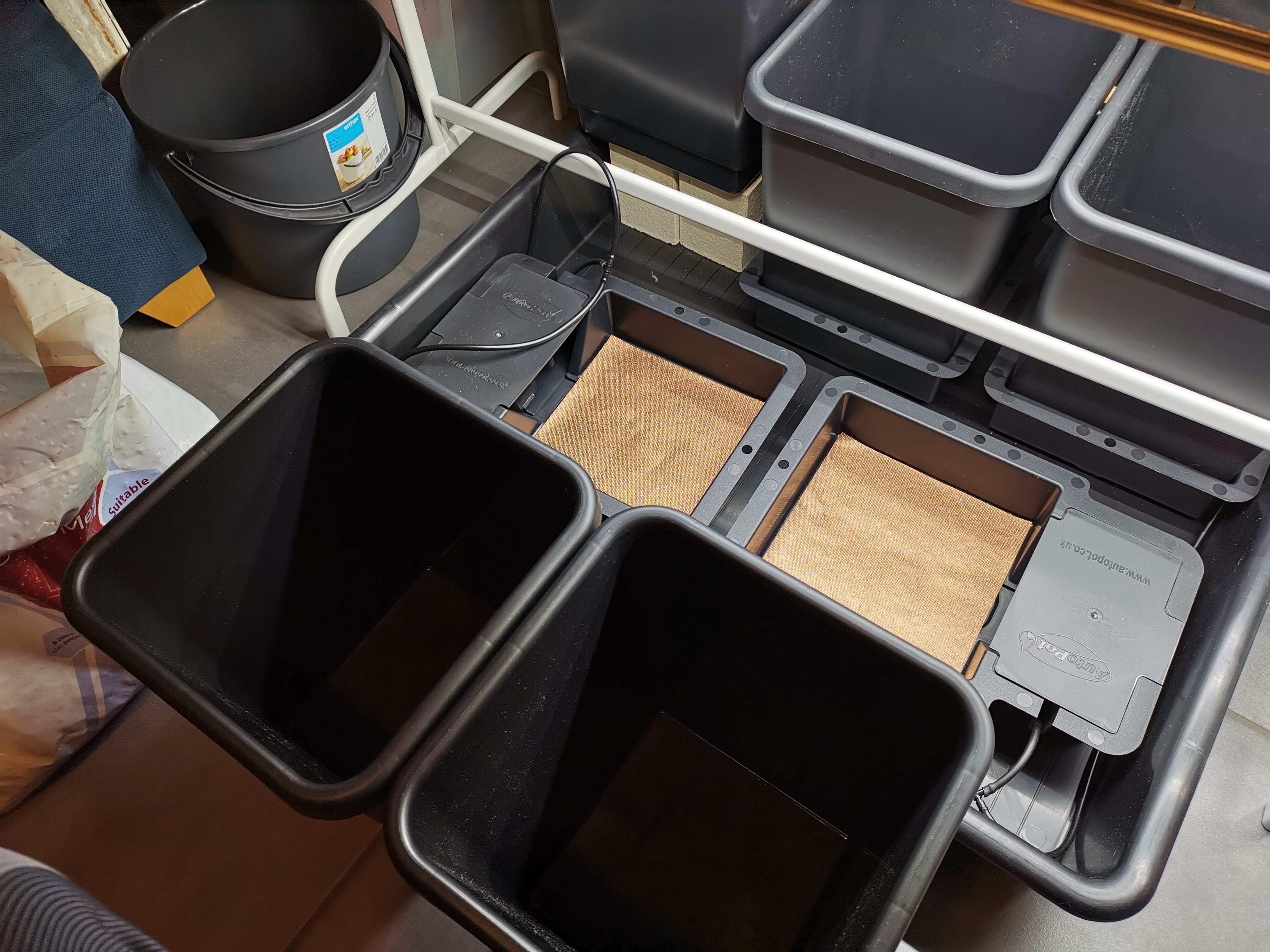
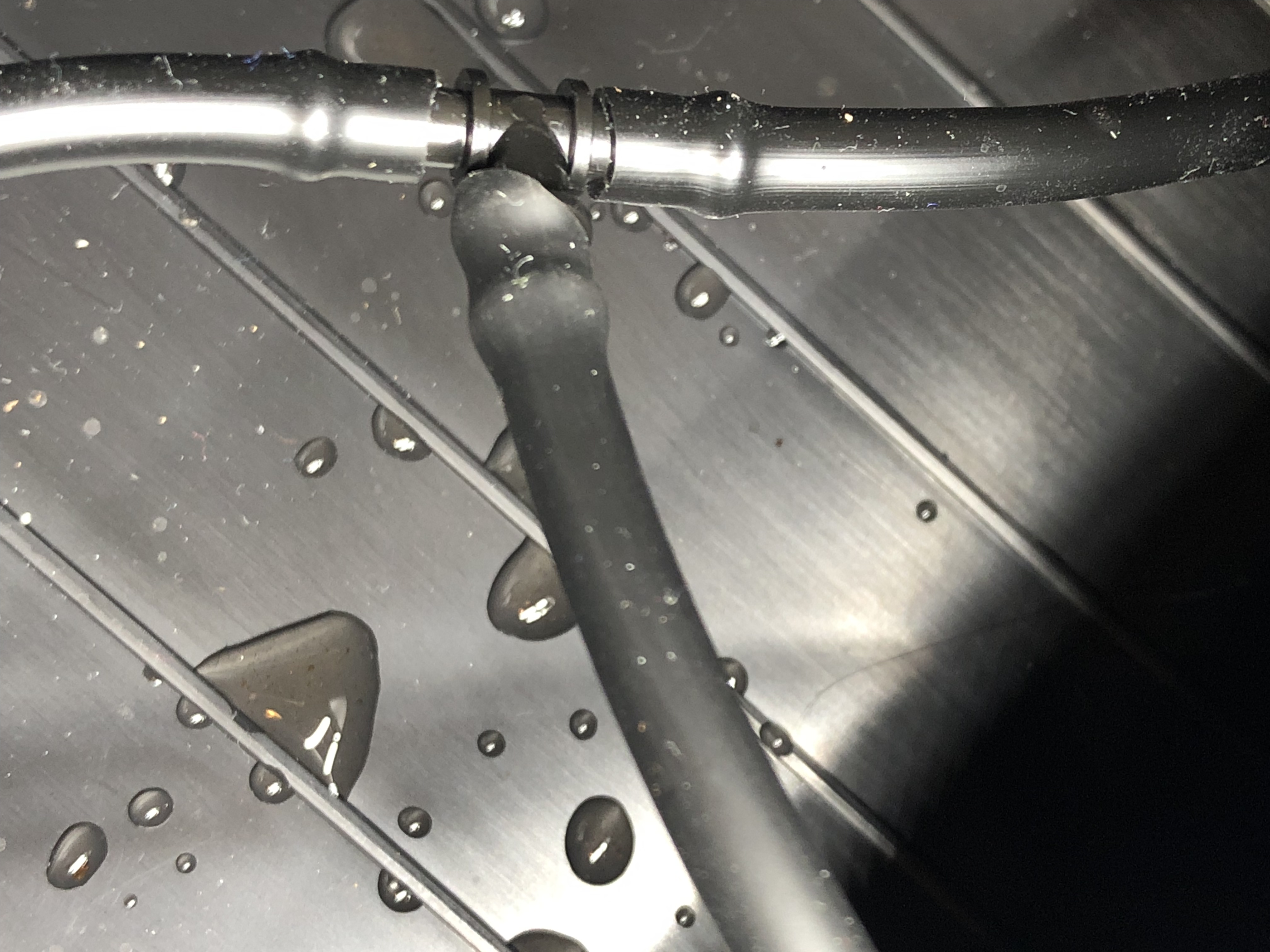
My chili project was delayed for a week or two (a nasty virus hit), so I have only now gradually been able to set up and move forward with my hydroponics system. I did get the AutoPot 4pot system by mail order (everything else was ok, except the small “tophat grommet” that is used to seal the connection of watertube into the water reservoir tank – I got that from a local store). The growing medium is 60/40 “Gold Label” HydroCoco mix, with a small layer of pure hydrocorn at the bottom.

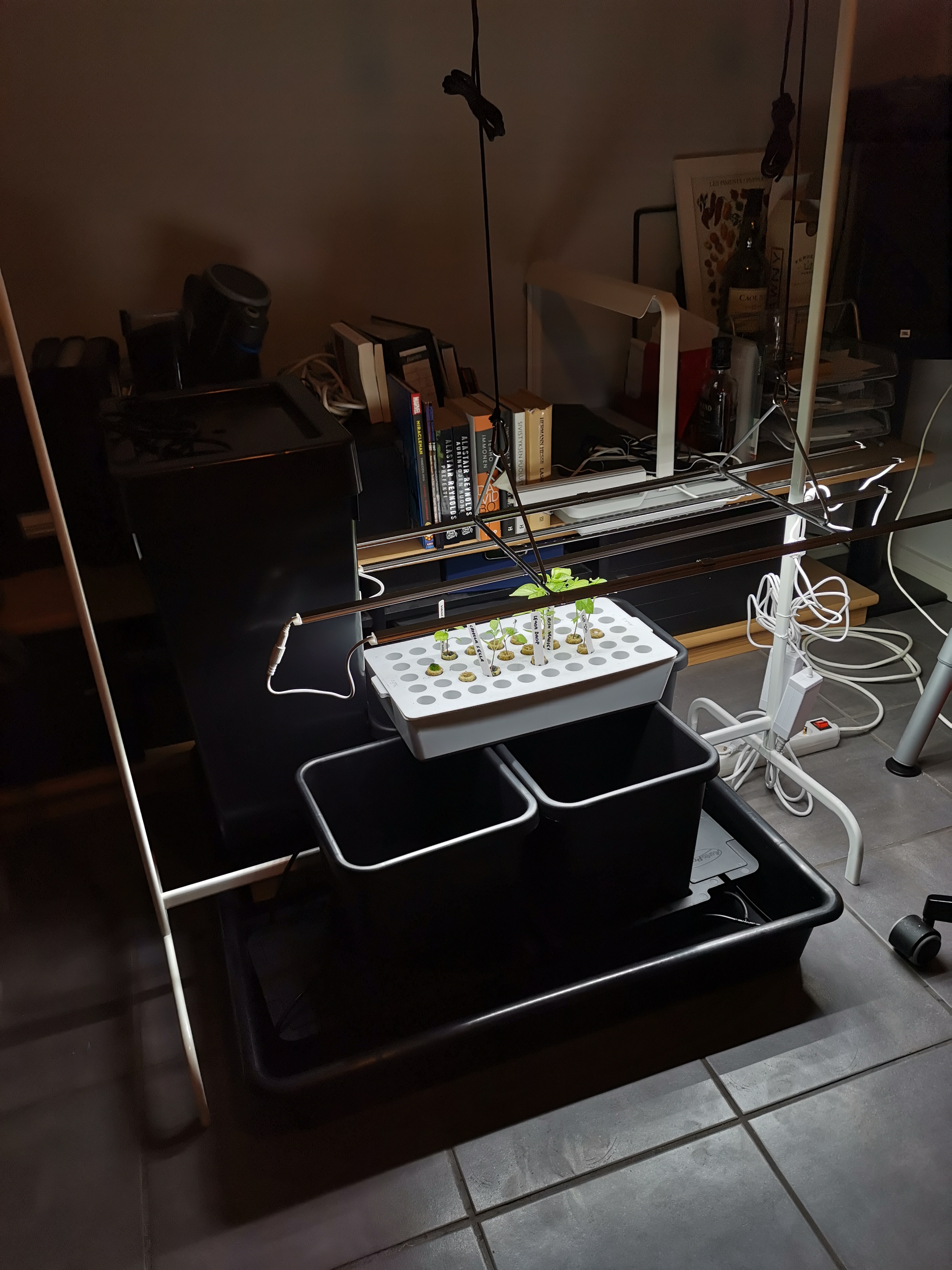
The LED light system was bit of a challenge to install so that I can adjust the right height of lamps from the tops of chili plants (without fastening anything to the ceiling, as our panels cannot take it). This time it was right spot for an “IkeaHack”: the “elevators” for LED strips were installed into a Ikea MULIG cloth rack. Underneath the entire system a 80 x 80 cm plastic vat was installed, just to be secure with all that water. The outcome is perhaps not very beautiful, but it seems functional enough. Let’s see how the Canna Coco A+B solution that I am feeding them will work out. I am following the mild, rooting phase solution recipe at this point: 20 ml of both fertilizers into a 10 L bucket of water.

My four pots finally host these: Lemon Drop, CAP 270, Sugar Rush Orange, and Hainan Yellow Lantern. (Laura has other four chili seedlings in soil pots.) Looking forward to good growth!

Hydroponics, pt. 2

Short update again on chilies and hydroponics (apologies): my current work on this is focused on three areas. Firstly, I have been trying to figure out what growing method (or sub-method) to use. As I wrote earlier, there are reasons why ‘passive hydroponics’ looks like the best in my case. There are different ways of implementing this, though. Understanding in advance e.g. the risks associated in algae growth, over- (or under-) fertilisation, and pests in passive hydroponics appears to be important. As contrasted with growing in soil, the basic situation with nutrients is very different. In principle the hydroponic growing should be free of many risks coming with soil (less risk of pests and plant diseases, no need for pesticides, etc.) However, a hydroponic farmer needs to be bit of a scientist, in that you need to understand something about physics, chemistry and some (very basic) bioengineering. The choice of growing medium (substrate) is important as in passive hydroponics one should get enough moisture (water) to the plant roots without suffocating them – thus, the material needs to be neutral (no bio-actives or fertilisers by its own), porous and spongy enough to hold suitable amounts of water when irrigated, but also get dry enough so that air can get to the roots in-between drenching.

Secondly, I have been looking into the technical solutions for implementing the hydroponic growing environment. As I wrote, I have considered building my own ‘hempy bucket’ system. However, I kept thinking about root rot, fungus and other risks: in this kind of bucket system, there is always some fertilising liquid just standing in the water reservoir. The standing water provides ideal conditions for algae growth. Stagnate water system can cause lack of oxygen; build-up of salts and decomposing algae can produce toxins. I am not sure how significant those risks are (there are many hempy bucket gardeners who appear perfectly happy with their low-cost systems), but currently I am inclining more towards a commercial passive hydroponics system that also includes some kind of water valve: the idea here is, that the water valve will allow automatic, periodic watering of the growing media (and the root system), but also flush the water away as completely as possible, so that no similar stagnate water reservoir would be in the pots, as in the hempy bucket option. There are at least two models that are widely available and used: AutoPot and PLANT!T GoGro. I am not sure if there is much fundamental different between these two – GoGro appears to be more widely available to where I am living, but some gardeners appear to consider AutoPot (the original, older system) as more robust and a bit more sophisticated.

LED strip (Nelson Garden 23W).

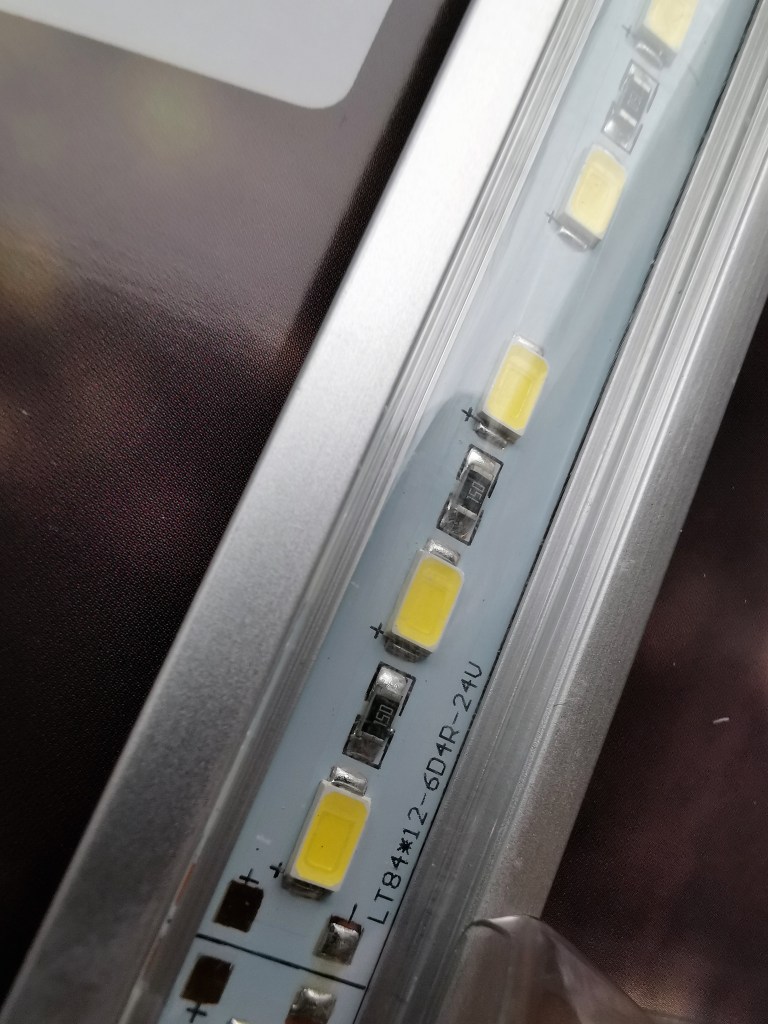
Thirdly, I need to find a plant light solution that works. Currently, the tiny seedlings can nicely fit below the small LED plant light system that I have been long using. However, doing some hydroponic gardening indoors (before the greenhouse season starts) means that I need to be ready to provide enough, and right kinds of light for growing plants. We had an old fluorescent tube lamp, left from Laura’s old aquarium. That lamp was, however, too large and heavy for my needs, and I was also a bit suspicious how safe (in electronic terms) a 10+ year-old lamp setup would be today. Some chili gardeners appear to be using rather expensive, “hi-fi lamps” where different high-intensity discharge lamps (HIDs) have taken over from older incandescents and fluorescent tube lamp systems. Ceramic metal halide lighting and full-spectrum metal halide lighting are used to create powerful light with large amounts of blue and ultraviolet wavelengths that are good for plant growth. The price of good lamps of this kind can be rather high, however. I decided to go for a lightweight but plant-optimised LED system that was a comparably budget-friendly option. I am now setting up four 23W LED strips that were sold as Nelson Garden LED plant light (No.1 and No.2 systems use the same power transformer). Each LED strip is 85 cm long, is specified for 6400 K light temperature, and should provide 2200 lumen, or, more precisely, PPFD (100 mm) 570 µmol/s/m² of lighting power. Having four of those should be enough for four AutoPot style chili growing stations, at least in the early phases of gardening, I think. I am still thinking about how to suspend and adjust these LED strips to correct height above the plants. I am doing this pre-growing phase in my home office corner, in the basement, and e.g. the ceiling panels do not allow attaching anything into them.

Measuring the nutrients.

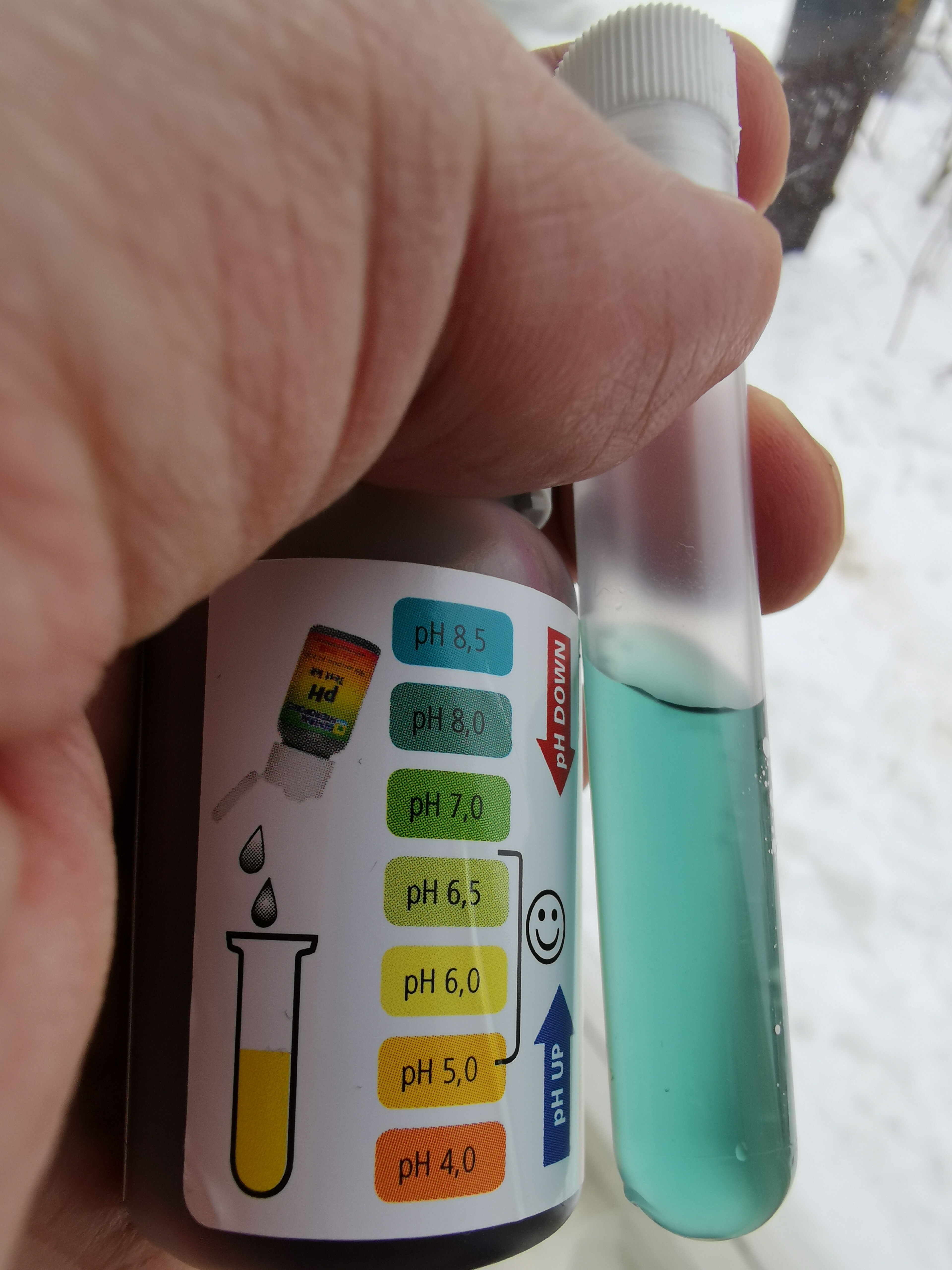
Finally, the choice of growing medium has also an effect on the style of fertilisers to use, and most hydroponic gardeners invest to both EC and pH meters and adjustment solutions, in order to control the salts and acidity levels in the nutrient solution, and to adjust the values in different stages of growth, bloom and fruit production. Some do not take this so seriously, and just try to follow some fertiliser manufacturer’s guidelines and make no measurements at all, just trying to monitor how plants look like. Some study this very scientifically, measuring and adjusting various nutrients, starting from the “key three”: Nitrogen (N), Phosphorus (P) and Potassium (K), which are commonly referred to as the fertilizing products’ NPK value. All these three are needed: nitrogen boosts growth, phosphorous is needed by plant for photosynthesis, cell communication and reproduction; and potassium is crucial for plant’s water regulation. But there are also “micronutrients” (sometimes called “trace elements”) that are needed in smaller amounts, but which still are important for healthy growth – these include, e.g. magnesium. Popular fertilisers for hydroponic gardening often come in multiple components, where e.g. the mixtures for growth, bloom and then the micronutrients are sold and apportioned separately. It is possible to find quite capable all-in-one fertiliser products, however. I am currently planning of using coco coir (neutral side-product of coconut manufacturing) as the growing medium, so I picked “Canna Coco A+B” by Canna Nutrients as my starting hydroponic fertiliser solution. I also bought a simple pH tester for checking the acidity of fertilising solution, and I probably should also invest in a reliable EC meter, at some point. The starting solution for seedlings should be very mild in any case, to avoid over-fertilising.

Testing the pH of our tap water.

Merry Wintertime

Merry Mid-Winter to all readers – of this, and other blogs!

Keep moving – keep warm.

Personal Computers as Multistratal Technology

HP-Sure-Run-Error
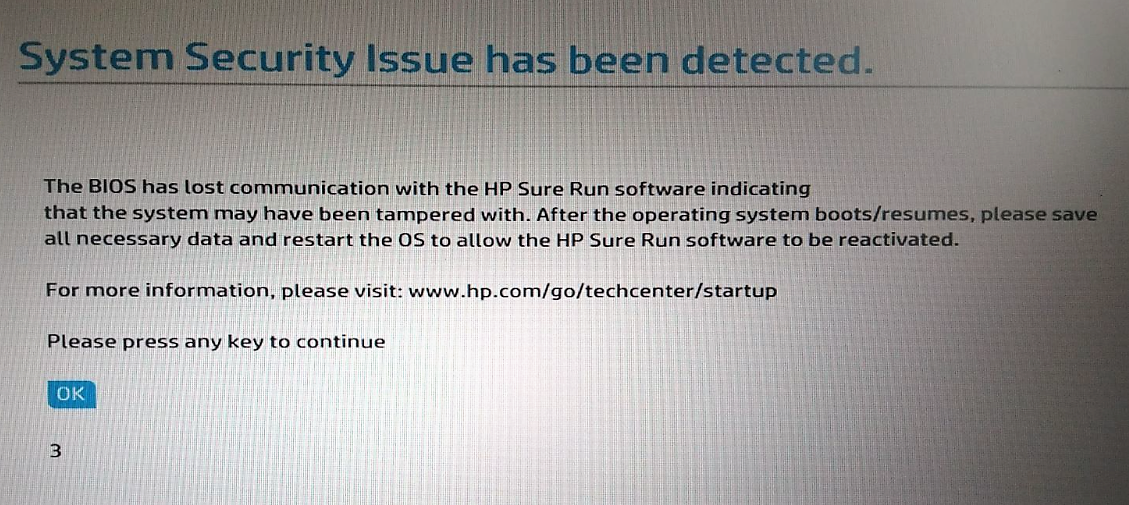
HP “Sure Run” technology here getting into conflicts with the OS and/or computer BIOS itself.

As I was struggling through some operating system updates and other installs (and uninstalls) this week, I was again reminded about the history of personal computers, and about their (fascinating, yet often also frustrating) character as multistratal technology. By this I mean their historically, commercially and pragmatically multi-layered nature. A typical contemporary personal computer is a laptop more often than a desktop computer (this has been the situation for numerous years already, see e.g. https://www.statista.com/statistics/272595/global-shipments-forecast-for-tablets-laptops-and-desktop-pcs/). Whereas a personal computer in a desktop format is still something that one can realistically consider to construct by combining various standards-following parts and modules, and expect to start operating after installation of an operating system (plus typically some device drivers), the laptop computer is always configured and tweaked into particular interpretation of what a personal computing device should be – for this price group, for this usage category, with these special, differentiating features. The keyboard is typically customised to fit into the (metal and/or plastic) body so that the functions of a standard 101/102-key PC keyboard layout (originally by Mark Tiddens of Key Tronic, 1982, then adopted by IBM) are fitted into e.g. c. 80 physical keys of a laptop computer. As the portable computers have become smaller, there has been increased need to do various customised solutions, and a keyboard is a good example of this, as different manufacturers appear to resort each into their own style of fitting e.g. function keys, volume up/down, brightness controls and other special keys into same physical keys, using various keyboard press combinations. While this means that it is hard to be a complete touch-typist if one is changing from one brand of laptops to another one (as the special keys will be in different places), one should still remember that in the early days of computers, and even in the era of early home and personal computers, the keyboards were even much more different from each other, than they are in today’s personal computers. (See e.g. Wikipedia articles for: https://en.wikipedia.org/wiki/Computer_keyboard and https://en.wikipedia.org/wiki/Function_key).

The heritage of IBM personal computers (the “original PCs”) coupled with the Microsoft operating systems, (first DOS, then various Windows versions) has meant that there is much shared DNA in how the hardware and software of contemporary personal computers is designed. And even Apple Macintosh computers share much of similar roots with those of IBM PC heritage – most importantly due to the influential role that the graphical user interface and with its (keyboard and mouse accessed) windows, menus and other graphical elements originating in Douglas Engelbart’s On-Line System, then in Xerox PARC and Alto computers had for both Apple’s macOS and Microsoft Windows. All these historical elements, influences and (industry) standards are nevertheless layered in complex manner in today’s computing systems. It is not feasible to “start from an empty table”, as the software that organisations and individuals have invested in using needs to be accessible in the new systems, as also the skill sets of human users themselves are based on similarity and compatibility with the old ways of operating computers.

Today Apple with its Mac computers and Google with the Chromebook computers that it specifies (and sometimes also designs to the hardware level) are most optimally positioned to produce a harmonious and unified whole, out of these disjointed origins. And the reliability and generally positive user experiences provided both by Macs and Chromebooks indeed bears witness to the strength of unified hardware-software design and production. On the other hand, the most popular platform – that of a personal computer running a Microsoft Windows operating system – is the most challenging from the unity, coherence and reliability perspectives. (According to reports, the market share of Windows is above 75 %, macOS at c. 20 %, Google’s ChromeOS at c. 5 % and Linux at c. 2 % in most markets of desktop and laptop computers.)

A contemporary Windows laptop is set up in a complex network of collaborative, competitive and parallel operations networks of multiple operators. There is the actual manufacturer and packager of computers that markets and delivers certain, branded products to users: Acer, ASUS, Dell, HP, Lenovo, and numerous others. Then there is Microsoft who develops and licences the Windows operating system to these OEMs (Original Equipment Manufacturers), collaborating to various degrees with them, and with the developers of PC components and other device makers. For example, a “peripheral” manufacturer like Logitech develops computer mice, keyboards and other devices that should install and run in a seamless manner when connected to desktop or laptop computer that has been put together by some OEM, which, in turn, has been combining hardware and software elements coming from e.g. Intel (which develops and manufactures the CPUs, Central Processing Units, but also affiliated motherboard “chipsets”, integrated graphics processing units and such), Samsung (which develops and manufactures e.g. memory chips, solid state drives and display components) or Qualcomm (which is best known for their wireless components, such as cellular modems, Bluetooth products and Wi-Fi chipsets). In order for the new personal computer to run smoothly after it has been turned on for the first time, the operating system should have right updates and drivers for all such components. As new technologies are constantly introduced, and the laptop computer in particular follows the evolution of smartphones in sensor technologies (e.g. in using fingerprint readers or multiple camera systems to do biometric authentication of the user), there are constant needs for updates that involve both the operating system itself, and the firmware (deep, hardware-close level software) as well as operating system level drivers and utility programs, that are provided by the component, device, or computer manufacturers.

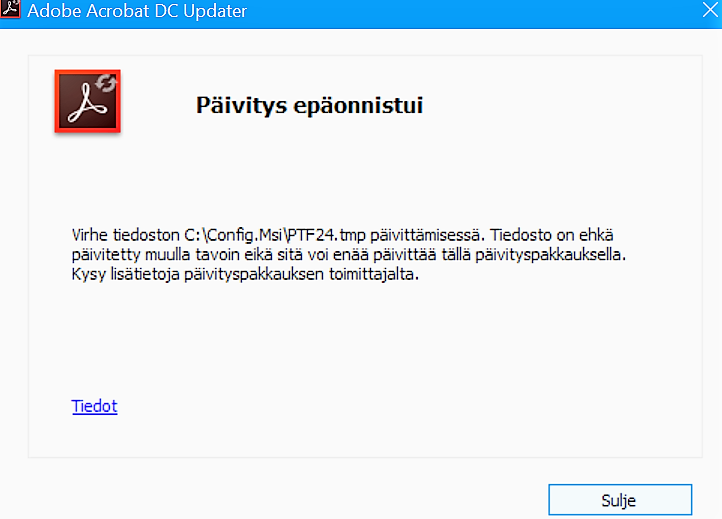
The sad truth is, that often these updates do not work out that fine. There are endless stories in the user discussion and support forums in the Internet, where unhappy customers describe their frustrations while attempting to update Windows (as Microsoft advices them), the drivers and utility programs (as the computer manufacturer instructs them), and/or the device drivers (that are directly provided by the component manufacturers, such as Intel or Qualcomm). There is just so much opportunity for conflicts and errors, even while the big companies of course try to test their software before it is released to customers. The Windows PC ecosystem is just so messy, heterogeneous and historically layered, that it is impossible to test beforehand every possible combination of hardware and software that the user might be having on their devices.

Adobe-Update-Issue
Adobe Acrobat Reader update error.

In practice there are just few common rules of thumb. E.g. it is a good idea to postpone installing the most recent version of the operating system as long as possible, since the new one will always have more compatibility issues until it has been tested in “real world”, and updated a few times. Secondly, while the most recent and advanced functionalities are something that are used in marketing and in differentiation of the laptop from the competing models, it is in these new features where most of the problems will probably appear. One could play safe, and wipe out all software and drivers that the OEM had installed into their computer, and reinstall a “pure” Windows OS into the new computer instead. But this can mean that some of the new components do not operate in advertised ways. Myself, I usually test the OEM recommended setup and software (and all recommended updates) for a while, but also do regular backups, restore points, and keep a reinstall media available, just in case something goes wrong. And unfortunately, quite often this happens, and returning to the original state, or even doing a full, clean reinstall is needed. In a more “typical” or average combination of hardware and software such issues are not so common, but if one works with new technologies and features, then such consequences of complexity, heterogeneity and multistratal character of personal computers can indeed be expected. Sometimes, only trial and error helps: the most recent software and drivers might be needed to solve issues, but sometimes it is precisely the new software that produces the problems, and the solution is going back to some older versions. Sometimes disabling some function helps, sometimes only way into proper reliability is just completely uninstalling an entire software suite by a certain manufacturer, even if it means giving up some promised, advanced functionalities. Life might just be simpler that way.

Zombies and the Shared Sensorium

I have studied immersive phenomena over the years, and still am fascinated by what Finnish language so aptly catches with the idiom “Muissa maailmoissa” (literally: “in other worlds” – my dictionary suggests as an English translation “away with the fairies”, but I am not sure about that).

There is a growing concern with the effects of digital technologies, social media, and with games and smartphones in particular, as they appear to be capable of transporting increasing numbers of people into other worlds. It is unnerving to be living surrounded by zombies, we are told: people who stare into other realities, and do not respond to our words, need for eye contact or physical touch. Zombies are everywhere: sitting in cafeterias and shopping centres, sometimes slowly walking, with their eyes focused in gleaming screens, or listening some invisible sounds. Zombies have left their bodies here, in our material world, but their minds and mental focus has left this world, and is instead transported somewhere else.

The problem with the capacity to construct mental models and living the life as semiotic life-forms has always included somewhat troublesome existential polyphony – or, as Bakhtin wrote, it is impossible for the self to completely coincide with itself. We are inaccessible to ourselves, as much as we are to others. Our technologies have not historically remedied this condition. The storytelling technologies made our universes polyphonic with myths and mythical beings; our electronic communication technologies made our mental ecosystems polyphonic with channels, windows, and (non-material) rooms; and our computing technologies made our distributed cognition polyphonic with polyphonic memory and intelligence that does not coincide with our person, even when designed to be personalized.

Of course, we need science fiction for our redemption, like it has always been. There are multiple storyworlds with predictive power that forecast the coming of shared sensorium: seeing what you see, with your eyes, hearing your hearings. We’ll inevitably also ask: how about memory, cognition, emotion – cannot we also remember your remembering, and feel your thinking? Perhaps. Yet, the effect will no doubt fail to remedy our condition, once more. There can be interesting variations of mise-en-abyme: shared embeddedness into each other’s feeds, layers, windows and whispers. Yet, all that sharing can still contain only moments of clear togetherness, or desolate loneliness. But the polyphony of it all will be again an order of magnitude more complex than the previous polyphonies we have inhabited.