Professor of Information Studies and Interactive Media, esp. Digital Culture and Game Studies in the Tampere University, Finland. Occasional photographer and gardener.
Apply Now for the Editor-in-Chief of Fafnir – Nordic Journal of Science Fiction and Fantasy Research
The position of the editor-in-chief in Fafnir – Nordic Journal of Science Fiction and Fantasy Research is now open from 1 January 2017. Currently, the journal has two editors-in-chief who will continue in their posts in 2017.
The journal
Fafnir – Nordic Journal of Science Fiction and Fantasy Research is a peer-reviewed, interdisciplinary academic journal published by the Finnish Society of Science Fiction and Fantasy Research (Suomen science fiction- ja fantasiatutkimuksen seura ry, http://finfar.org) from 2014 onwards. The journal is published in electronic format four times a year.
Fafnir aims at serving as an international forum for scholarly exchange on science fiction and fantasy and for discussion on current issues on the field. In order to achieve this, the journal introduces and develops research focusing on science fiction and fantasy literature, audiovisual art and media, games, and fan culture by providing an interdisciplinary perspective into the research within these genres. Fafnir publishes various texts ranging from peer-reviewed research articles to short overviews, essays, interviews, opinion pieces and academic book reviews on any subject suited to the paper. The main language of the journal is English, but articles are also published in Finnish or in the Scandinavian languages.
Publication Forum for the Federation of Finnish Learned Societies has given Fafnir Level 1 Classification as an academic publication channel important in Finnish research perspective. Fafnir is indexed in MLA International Bibliography and international The Science Fiction and Fantasy Research Database (SFFRD).
Fafnir now seeks an editor-in-chief who is familiar with the field of speculative fiction. Experience working with the publishing process of an academic journal and with electronic journals is desirable but not essential.
The post as an editor-in-chief of Fafnir offers an excellent vantage point to the field of speculative fiction and an opportunity for the international scholarly exchange. As an editor-in-chief, you get an opportunity to develop the journal and to promote the visibility of the science fiction and fantasy research.
The three editors-in-chief are in charge of the general academic emphasis of the journal and of the content of individual issues in co-operation with the advisory board. The editors-in-chief also usually author the editorial of each issue.
The editors-in-chief work closely with the 16-membered advisory board and the sub-editor, whose main responsibility is the visual editing of the journal and publishing it online.
The editors-in-chief are not paid any money.
The Application
Please write a short (maximum one page in length) description of yourself and your reasons for applying the post as the editor-in-chief of Fafnir.
Send your application at the latest 30 November 2016 either by email to submissions@finfar.org OR by mail to the address Finfar c/o Jyrki Korpua, Teljotie 12, 90560 Oulu, FINLAND.
The board of the Finnish Society of Science Fiction and Fantasy Researchers will choose the new editor-in-chief in 5 December 2016 and the applicants are informed of the decision by 7 December 2016.
For more information on the application process, please contact
Aino-Kaisa Koistinen, aino-kaisa.koistinen@jyu.fi
Jyrki Korpua, jyrki.korpua@oulu.fi
Hanna-Riikka Roine, hanna.roine@uta.fi
Apple has been developing their television offerings in multiple fronts: in one sense, much television content and viewers have already moved into Apple (and Google) platforms, as online video and streaming media keeps on growing in popularity. According to one market research report, in 18-24 age group (in America), between 2011 and 2016, traditional television viewing has dropped by almost 40 %. At the same time, subscriptions to streaming video services (like Netflix) are growing. Particularly among the young people, some reports already suggest that they are spending more time watching streaming video as contrasted to watching live television programs. Just in the period from 2012 to 2014, mobile video views increased by 400 %.
Still, the television set remains as the centrepiece of most Western living rooms. Apple TV is designed to adapt games, music, photos and movies from the Apple ecosystem to the big screen. After some problems with the old, second generation Apple TV, I got today the new, 4th generation Apple TV. It has more powerful processor, more memory, a new remote control that has a small touch surface, and runs a new version of tvOS. The most important aspect regarding expansions into new services is the ability to download and install apps and games from thousands that are available in the App Store for tvOS.
After some quick testing, I think that I will prefer using the Remote app in my iPhone 6 Plus, rather than navigating with the small physical remote, which feels a bit finicky. Also, for games the dedicated video game controller (Steelseries Nimbus) would definitely provide a better sense of control. The Nimbus should also play nice with iPhone and iPad games, in addition to Apple TV ones.
Setup of the system was simple enough, and was most easily handled via another Apple device – iCloud was utilized to access Wi-Fi and other registered home settings automatically. Apart from the bit tricky touch controls, the user experience is excellent. Even the default screensavers of the new system are this time high-definition video clips, which are great to behold in themselves. This is not a 4k system, though, so if you have already upgraded the living room television into 4k version, the new Apple TV does not support that. Ours is still a Full HD Sony Bravia, so no problem for us. Compared to some other competing streaming media boxes (like Roku 4, Amazon Fire TV, Nvidia Shield Android TV), the feature set of Apple TV in comparison to its price might seem a bit lacklustre. The entire Apple ecosystem has its own benefits (as well as downsides) though.
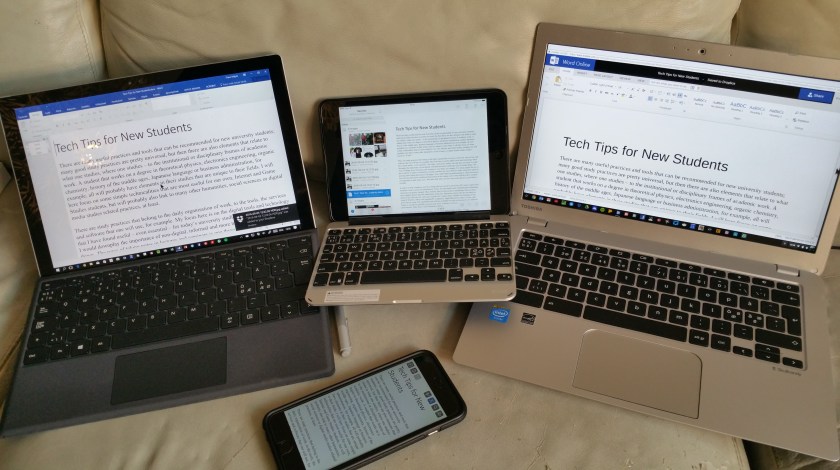
Going cross-platform: same text accessed via various versions of MS Word and Dropbox in Surface Pro 4, iPad Mini (with Zagg slim book keyboard case), Toshiba Chromebook 2, and iPhone 6 Plus, in the front.
There are many useful practices and tools that can be recommended for new university students; many good study practices are pretty universal, but then there are also elements that relate to what one studies, where one studies – to the institutional or disciplinary frames of academic work. A student that works on a degree in theoretical physics, electronics engineering, organic chemistry, history of the Middle Ages, Japanese language or business administration, for example, all will probably have elements in their studies that are unique to their fields. I will here focus on some simple technicalities should be useful for many students in the humanities, social sciences or digital media studies related fields, as well as for those in our own, Internet and Game Studies degree program.
There are study practices that belong to the daily organisation of work, to the tools, the services and software that one will use, for example. My focus here is on the digital tools and technology that I have found useful – even essential – for today’s university studies, but that does not mean I would downplay the importance of non-digital, informal and more traditional ways of doing things. The ways of taking notes in lectures and seminars is one thing, for example. For many people the use of pen or pencil on paper is absolutely essential, and they are most effective when using their hands in drawing and writing physically to the paper. Also, rather than just participating in online discussion fora, having really good, traditional discussions in the campus café or bar with the fellow students are important in quite many ways. But taken that, there are also some other tools and environments that are worth considering.
It used to be that computers were boxy things that were used in university’s PC classes (apart from terminals, used to access the mainframes). Today, the information and communication technology landscape has greatly changed. Most students carry in their pockets smartphones that are much more capable devices than the mainframes of the past. Also, the operating systems do not matter as much as they did only a few years ago. It used to be a major choice whether one went and joined the camp of Windows (Microsoft-empowered PC computers), that of Apple Macintosh computers, those with Linux, or some other, more obscure camp. The capabilities and software available for each environment were different. Today, it is perfectly possible to access same tools, software or services with all major operating environments. Thus, there is more freedom of choice.
The basic functions most of us in academia probably need daily include reading, writing, communicating/collaborating, research, data collecting, scheduling and other work organisation tasks and use of the related tools. It is an interesting situation that most of these tasks can be achieved already with the mobile device many of us carry with us all the time. A smartphone of iOS or Android kind can be combined with an external Bluetooth keyboard and used for taking notes in the lectures, accessing online reading materials, for using cloud services and most other necessary tasks. In addition, smartphone is of course an effective tool for communication, with its apps for instant messaging, video or voice conferencing. The cameraphone capabilities can be used for taking visual notes, or for scanning one’s physical notes with their mindmaps, drawings and handwriting into digital format. The benefit of that kind of hybrid strategy is it allows taking advantage both of the supreme tactile qualities of physical pen and paper, while also allowing the organisation of scanned materials into digital folders, possibly even in full-text searchable format.
The best tools for this basic task of note taking and organisation are Evernote and MS OneNote. OneNote is the more fully featured one – and more complex – of these two, and allows one to create multiple notebooks, each with several different sections and pages that can include text, images, lists and many other kinds of items. Taking some time to learn how to use OneNote effectively to organise multiple materials is definitely worth it. There are also OneNote plugins for most internet browsers, allowing one to capture materials quickly while surfing various sites.
MS OneNote, Microsoft tutorial materials.
Evernote is more simple and straightforward tool, and this is perhaps exactly why many prefer it. Saving and searching materials in Evernote is very quick, and it has excellent integration to mobile. OneNote is particularly strong if one invests to Microsoft Surface Pro 4 (or Surface Book), which have a Surface Pen that is a great note taking tool, and allows one to quickly capture materials from a browser window, writing on top of web pages, etc. On the other hand, if one is using an Apple iPhone, iPad or Android phone or tablet, Evernote has characteristics that shine there. On Samsung Note devices with “S Pen” one can take screenshots and make handwritten notes in mostly similar manner than one can do with the MS Surface Pen in the Microsoft environment.
In addition to the note solution, a cloud service is one of the bedrocks of today’s academic world. Some years ago it was perfectly possible to have software or hardware crash and realize that (backups missing), all that important work is now gone. Cloud services have their question marks regarding privacy and security, but for most users the benefits are overwhelming. A tool like Dropbox will silently work in the background and make sure that the most recent versions of all files are always backed up. A file that is in the cloud can also be shared with other users, and some services have expanded into real-time collaboration environments where multiple people can discuss and work together on shared documents. This is especially strong in Google Drive and Google Docs, which includes simplified versions of familiar office tools: text editor, spreadsheet, and presentation programs (cf. classic versions of Microsoft Office: Word, Excel, and PowerPoint; LibreOffice has similar, free, open-source versions). Microsoft cloud service, Office 365 is currently provided for our university’s students and staff as the default environment free of charge, and it includes the OneDrive storage service as well as Outlook email system, and access to both desktop as well as cloud-hosted versions of Office applications – Word Online, Excel Online, PowerPoint Online, and OneNote Online. Apple has their own iCloud system, with Mac office tools (Pages, Numbers, and Keynote) also can be operated in browser, as iCloud versions. All major productivity tools have also iOS and Android mobile app versions of their core functionalities available. It is also possible to save, for example, MS Office documents into the MS OneCloud, or into Dropbox – a seamless synchronization with multiple devices and operating systems is an excellent thing, as it makes possible to start writing on desktop computer, continue with a mobile device, and then finish things up with a laptop computer, for example.
Microsoft Windows, Apple OS X (Macintosh computers) and Linux have a longer history, but I recommend students also having a look at Google’s Chrome OS and Chromebook devices. They are generally cheaper, and provide reliable and very easy to maintain environment that can be used for perhaps 80 % or 90 % of the basic academic tasks. Chromebooks work really well with Google Drive and Google Docs, but principally any service that be accessed as a browser-based, cloud version also works in Chromebooks. It is possible, for example, to create documents in Word or PowerPoint Online, and save them into OneDrive or Dropbox so that they will sync with the other personal computers and mobile devices one might be using. There is a development project at Google to make it possible to run Android mobile applications in Chrome OS devices, which means that the next generation of Chromebooks (which will all most likely support touchscreens) will be even more attractive than today’s versions.
For planning, teamwork, task deadlines and calendar sharing, there are multiple tools available that range from MS Outlook to Google Calendar. I have found that sharing of calendars generally works easier with the Google system, while Outlook allows deeper integration into organisation’s personnel databases etc. It is really good idea to plan and break down all key course work into manageable parts and set milestones (interim deadlines) for them. This can be achieved with careful use of calendars, where one can mark down the hours that are required for personal, as well as teamwork, in addition to lectures, seminars and exercise classes your timetable might include. That way, not all crucial jobs are packed next to the end of term or period deadlines. I personally use a combination of several Google Calendars (the core one synced with the official UTA Outlook calendar) and Wunderlist to-do list app/service. There are also several dedicated project management tools (Asana, Trello, etc.), but mostly you can work the tasks with basic tools like Google Docs, Sheets (Word, Excel) and then break down the tasks and milestones into the calendar you share with your team. Communications are also essential, and apart from email, people today generally utilize Facebook (Messenger, Groups, Pages), Skype, WhatsApp, Google+/Hangouts, Twitter, Instagram and similar social media tools. One of the key skills in this area is to create multiple filter settings or more fine-grained sharing settings (possibly even different accounts and profiles) for professional and private purposes. The intermixing of personal, study related and various commercial dimensions is almost inevitable in these services, which is why some people try to avoid social media altogether. Wisely used, these services can be nevertheless immensely useful in many ways.
All those tools and services require accounts and login details that are easily rather unsafe, by e.g. our tendency to recycle same or very similar passwords. Please do not do that – there will inevitably be a hacking incident or some other issue with some of those services, and that will lead you into trouble in all the others, too. There are various rules-based ways of generating complex passwords for different services, and I recommend using two-factor authentication always when it is available. This is a system where typically a separate mobile app or text messages act as a backup security measure whenever the service is accessed from a new device or location. Life is also much easier using a password manager like LastPass or 1Password, where one only needs to remember the master password – the service will remember the other, complex and automatically generated passwords for you. In several contemporary systems, there are also face recognition (Windows 10 Hello), fingerprint authentication or iris recognition technologies that are designed to provide a further layer of protection at the hardware level. The operating systems are also getting better in protecting against computer viruses, even without a dedicated anti-virus software. There are multiple scams and social engineering hacks in the connected, online world that even the most sophisticated anti-virus tools cannot protect you against.
Finally, a reference database is an important part of any study project. While it is certainly possible to have a physical shoebox full of index cards, filled with quotes, notes and bibliographic details of journal articles, conference papers and book chapters, it is not the most efficient way of doing things. There are comprehensive reference database management services like RefWorks (supported by UTA) and EndNote that are good for this job. I personally like Zotero, which exists both as cloud/browser-based service in Zotero.org, but most importantly allows quick capture of full reference details through browser plugins, and then inserting references in all standard formats into course papers and thesis works, in simple copy-paste style. There can also be set up shared, topics based bibliographic databases, managed by teams in Zotero.org – an example is Zotero version of DigiPlay bibliography (created by Jason Rutter, and converted by Jesper Juul): https://www.zotero.org/groups/digiplay .
As a final note, regardless of the actual tools one uses, it is the systematic and innovative application of those that really sets excellent study practices apart. Even the most cutting edge tools do not automate the research and learning – this is something that needs to be done by yourself, and in your individual style. There are also other solutions, that have not been explored in this short note, that might suit your style. Scrivener, for example, is a more comprehensive “writing studio”, where one can collect snippets of research, order fragments and create structure in more flexible manner than is possible than in e.g. MS Word (even while its Outline View is too underused). The landscape of digital, physical, social and creative opportunities is all the time expanding and changing – if you have suggestions for additions to this topic, please feel free to make those below in the comments.
My chillies are producing chillies – of many varieties, and enough for any reasonable uses I can personally come up with. Here are again some photos, both of ripe and fresh chillies, and also about the preparation for preservation. I have decided to dry and make rough, spicy powders of two most high-yielding chilli varieties, Fire Flame and Thai Rawit. Those should be good for hot pots, curries and other similar uses. Those selected chillies that have provided only small number of fruit, I decided to freeze as whole. Dropping a thawed chilli into a meal is an optional use for those. My dehydrator is a cheap “House” model from local Prisma department store, but it has quiet operation, nice temperature controls and appears to do it job well enough. Slicing chillies for dryer takes its time, but has also somewhat meditative character.
Spreading the Call for Papers, Academic Track at the 75th World Science Fiction Convention – “100 Years of Estrangement”
9–13 August, 2017
Messukeskus, the Helsinki Expo and Convention Centre, Helsinki, Finland
Estrangement, or defamiliarization (ostranenie), has long been a crucial concept in our understanding of speculative fiction. Since its first appearance in Viktor Shklovsky’s essay “Art as Technique” (or “Art as Device”) in 1917, estrangement has made its way into the theories of prose fiction, of theatre, and of film, and it forms the core of some of the foundational works in the theory of science fiction, such as Darko Suvin’s definition of SF as cognitive estrangement.
To celebrate the centenary of Shklovsky’s essay, the Worldcon 75 Academic Track calls for proposals for scholarly presentations from any academic discipline to examine, interrogate, and expand research related to the concept of estrangement, to related terms such as cognitive estrangement, the uncanny, the unnatural, Brecht’s Verfremdungseffekt or Derrida’s différance, and to their role in the analysis of speculative fiction in any medium. We hope for a broad, interdisciplinary discussion on the many ways in which estrangement or defamiliarization relates to the genres of science fiction, fantasy and horror, and on how those genres form a particularly fertile ground for extending our understanding of how the familiar is made new, or the strange comprehensible.
To examine these phenomena, we invite proposals addressing e.g. the following questions:
What is the status of Shklovsky’s original ostranenie in contemporary theories of speculative fiction (widely understood)?
How does defamiliarization or estrangement function in different fantastic (sub)genres?
What are the differences and similarities between the techniques or strategies of defamiliarization in different media (e.g. prose fiction, graphic narratives, theatre, films, games)? How does defamiliarization relate to inter- or transmedial storytelling?
What is the dynamic between defamiliarization, mental transportation and identification? How do estranging and fantastical effects impact the reader’s perception of the storyworld or sympathy towards the characters?
How do works of speculative fiction balance estranging or defamiliarizing techniques and the naturalizing effects inherent to its worldbuilding and characterization? How does defamiliarization relate to the realistic illusions created by speculative fiction?
How does estrangement help us to describe metafiction and formal self-reflection in speculative fiction?
Are there different scholarly traditions around estrangement in different academic fields (e.g. literary studies, aesthetics, film theory) and in different language areas (e.g. Anglo-American, Russian, German, French)?
Arising from Russian formalism and the avant-garde, estrangement has strongly political roots that have to do with the freedom of art within society. How does this political aspect of estrangement fare today?
How is defamiliarization used in fantastic genres to question or critique societal issues and/or social identity categories (e.g. gender, sexuality, ethnicity, age, social class)?
What can the study of defamiliarizing techniques offer to the posthumanist line of interdisciplinary research and its interest in the relations between humans and nonhumans?
What commercial functions does estrangement have, and how do those interact with its aesthetic and ideological functions in speculative fiction?
In addition to these theoretical questions, we call for analyses of the effects of estrangement in specific works of speculative fiction in any medium. Beyond the specific conference theme of defamiliarization, proposals on all other topics to do with speculative fiction are also welcome.
Submission guidelines:
Papers will be allowed a maximum presentation time of 20 minutes, with 10 minutes for discussion. All presentations will be given in English.
For an individual paper, please submit
– a max. 500-word abstract, outlining your argument and the grounding of your scholarly approach
– a max. 100-word description of your academic affiliation(s) and publications (i.e. a ‘bio note’).
For a pre-arranged session of three or four presentations (3×20 minutes or 4×15 minutes), please submit a proposal including
– a summary paragraph of the central purpose of the session
– the name of the session chair
– the individual abstracts of all speakers
– bio notes of all speakers.
Please note that we will accept only one presentation per scholar, but you can submit both an individual abstract and a full session proposal, if you wish.
All proposals should be sent as e-mail attachments (Word or PDF) to merja.polvinen@worldcon.fi by October 31st, 2016.
We hope to announce the selections to the programme by 30th November, 2016. All selected speakers will be responsible for their own travel and accommodation. There is no separate conference fee, but all speakers in the Academic Track must join Worldcon 75 as attending members. For more information on purchasing memberships, please see the convention website at http://www.worldcon.fi/memberships/.
About the event:
Worldcon, or the World Science Fiction Convention is the annual convention of the World Science Fiction Society (WSFS). The first Worldcon was held in 1939 and, after a hiatus during WWII, has been held continuously since 1946. The convention brings together thousands of science fiction and fantasy aficionados from all around the world, and the programming includes five multi-track days of panel discussions, presentations, workshops and art exhibitions, as well as the annual Hugo Awards ceremony. For more information on Worldcon75 and on the venue in Helsinki, please see http://www.worldcon.fi/.
The Academic Track is organised by Worldcon 75 in cooperation with FINFAR, The Finnish Society for Science Fiction and Fantasy Research. For more information on submissions, or any other aspect of the Academic Track, please contact merja.polvinen@worldcon.fi.
I am proud to be among the the inaugural group of DiGRA Distinguished Scholars, as recently appointed by the DiGRA executive board:
Ian Bogost
Mia Consalvo
Suzanne DeCastell
Jussi Holopainen
Jesper Juul
Aphra Kerr
Tanya Krzywinska
Jonas Linderoth
Esther MacCallum-Stewart
Frans Mäyrä
Annika Waern
Jose Zagal
There are similar recognitions that established scholarly associations award in their fields, and I am happy to see game studies also now having this kind of instrument for strengthening the community. – Thank you, everyone, the nomination is a great honour!
It is late August and the first batch of chillies is getting ready for harvesting. The first ones to produce good yield were Fire Flame and Thai Rawit. Others that also had produced some ripe chillies at this point were: Habanero Hot Lemon, Madame Jeannette, Lemon Drop, Fatalii, Trepadeira da Werner and Moruga Scorpion. There are also Aji Cristal and Aji Fantasy crops coming along, bit later. The giant of them all was Moruga Scorpion, which really flourished in the heat of this summer. Most habaneros and thai chillies remained small in contrast, but still producing nice pods. The only real failure this summer was my excess watering almost killing the sole Trepadeira da Werner. Next summer, the automatic irrigation with the Blumat system is probably in order. This summer it was all manual, since we were close at home whole summer.
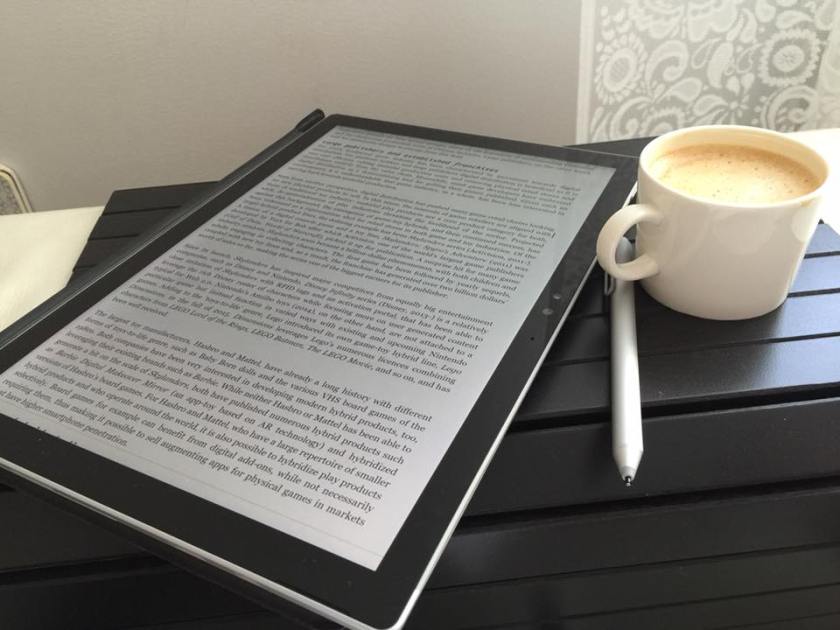
[Edit: there is a suggested solution to the issue now at the end] The Surface Pro 4 that I am using is a versatile device and particularly strong in reading and commenting digital documents. I am regularly working on articles, seminar essays, thesis manuscripts and book lenght work, and it is really nice to be able to type text quickly like with a regular laptop, then flip the device over and start reading in full screen mode. When the PDF document is open, it is really handy to do the highlighting and scribble the review comments in the margins with the Surface Pen. However, the software does not currently support this fully. Adobe Reader Touch and Acrobat XI Pro that I am using both can be used with the Pen, but only to a limited manner, and through rather complex function selections. The best support for the Pen is built into the Microsoft OneNote, but there is one serious issue currently: when you open a PDF file in OneNote 2016 for editing (New Page > Insert > PDF Printout), a longer file will take literally hours to process. OneNote makes some kind of image file from each page and each letter, and does this very very slowly. This is simply not feasible. I have read that the older, 2013 version worked fast – I wonder what has gone wrong with the new, updated OneNote?
Edit (27 July, 2016): Marjolein Hoekstra from the OneNote Central (@OneNoteC) kindly reached out to me via Twitter and suggested a solution for the jamming PDF import issue – one needs to go to File > Options > Advanced, then look for Printout options group (at the very bottom of the list), disable the first option about printing to multiple pages, and then click ok/save the settings. This indeed appears to make the PDF import work for me, so: many thanks for the tip! Surface Pro 4 still struggles a bit to keep long, 300+ page PDF documents visible (rendering of the typefaces jams occasionally), but this is now at least a working solution.
For those of us who started doing r&d on location-based mobile games decade or two ago, the exploding popularity of Pokémon Go has been exciting, but also perhaps a bit bewildering to follow. There have been many games that have exploited the collaborative, competitive, user-created or spatially based functionalities of augmented reality play in more innovative manner than Pokémon Go, but none of them have managed to grow their player base as fast and into the scale this Niantic’s game has done. Our own research in University of Tampere included work with The Songs of North prototype which our team designed and implemented in the Mogame research project in 2003-2004. Before that, there had been e.g. Botfighters (2001) by the Swedish company It’s Alive, which was neither not yet based on GPS technology, but rather on the use of cell triangulation and SMS messages. It has been interesting to follow how the motif of “city shamans”, teamed up into competing factions and using might and magic to struggle for control of urban areas has developed, varied and re-emerged, starting from our The Songs of North (2003), followed by the Shadow Cities (2010), and then by Ingress (2013), which adopted many of the basic key elements from Shadow Cities. Pokémon Go, in turn, is based on Ingress on its location-based game mechanics.
Some of the comments of pioneering location-based or augmented reality game developers I have read have sounded even a bit irritated that a rather simple and clearly derivative game makes such a breakthrough, supposedly solely on the basis of association with a popular IP (intellectual property). What we witness here is related to the nature of innovation processes, though. Again and again, it is necessarily not the first implementations that become the great success stories; rather, it is the “second penguin” jumping in later, who can learn from the experiences from the pioneers, and implement something that is perhaps not as ambitious, but that is designed and suitable for large-scale, mainstream adoption. The detailed analyses of Pokémon Go will no doubt start appearing soon in game studies conferences and journals, and it is interesting to see how the key elements of its popularity will be described and interpreted. Simplicity is no doubt one such element, but there is more.
The holding power of Pokémon Go is perhaps relatively easy to explain in terms of certain key player motivation theories, plus counting in certain love or nostalgia with the revived transmedial Pokémon phenomena itself – plus certainly some novelty effect from augmented reality, location-based mobile game play, which is still new experience for many people. In player motivations, there are classic achievement motivations, pleasures of accumulating advancement, repetition and variably rewarded effort (a well-known addictive mechanic), that Pokémon games tap into; there is a long series of these games, starting from the 1996 releases of Red and Green games for Game Boy in Japan, continuing through what is now considered seven generations of video games, and also a popular trading card game, plus manga, anime, films, and other related Pokémon branded products. It is often quoted how Satoshi Tajiri, the producer and main creator of the original concept, based Pokémon on his childhood hobby of insect collecting. What is perhaps not so often noted is that Satoshi has also spoken about how exploration into urban wastelands was one of the key inspirations for Pokémon games, and how urban developments according to him had driven away all these fascinating life-forms – Pokémon games were thus designed from the start to mimic exploration into “urban nature” and stimulate the joy of discovery of both common and rare creatures of all kinds, and of learning about their individual characteristics and even potentials for (insect-like) metamorphosis.
Even if the range of Pokémon creatures is large and understanding their characteristics provides plenty of room for learning and improvement, the basic game in Pokémon Go game is so simple that it can be immediately comprehended: move around, catch Pokémon, collect them, power them up, evolve them into new species, and join teams for tournament style battles for the domination of certain key spots (marked as “Gyms” in the game). Thus, Pokémon Go shows key virtues of classic “casual” games: easy to learn, difficult to complete or totally master, leading to near-infinite replay value, or even addictive potential. What remains to be seen, however, is how many of the millions of players will continue to play the game when the novelty effect wears off. The location-based games in the past have remained in the margins, and one of the key reasons is that the extra effort of going out (sometimes also when it is raining, dark, or the surroundings are otherwise not so inviting or even safe) has meant that only the most dedicated parts of “core gamers” audiences have stuck with these games in the past.
In addition to analysing what features Pokémon Go has as a game, it is also interesting to see what features it does not have. Joining teams (blue, red, or yellow) is part of the game, but coordinating or communicating with team members is not part of the game. This is something that happens naturally between people who play in same locations and meet each other, when there is a critical mass of them, and social media also plays an important role for assisting players in this kind of contemporary “pervasive game”. Thus, playing alone in isolated locations, or disconnected from popular media services would inevitably have an effect on the Pokémon Go player experiences. This is a game that is designed for populated, urban areas and there is also heavy reliance on the location data and sites recorded for the earlier Niantic game, Ingress.
The “perfect storm” of Pokémon Go is, in my quick analysis so far thus mainly a combination of two things: the successful simplification of earlier, tested location-based game design features so that they are clear and straightforward enough for mainstream adoption, and secondly, of the critical mass provided by fans of the second-best selling digital game franchise in the world (only Mario games have sold more). There is also the additional boost from its associated, widely familiar “transmedial storyworld” that millions of people who have not played Pokémon video games will also recognize. The threshold for stepping into the shoes of a Pokémon hunter and trainer is low, and pleasures of real-world exploration, rare creature hunting, collecting, points and levels accumulation, competition and collaboration mean that Pokémon Go provides highly accessible and enjoyable combination of real world and gaming fantasy.
This is the first summer when our greenhouse is in use. So far everything seems to have gone just fine, even while we have been so busy in other areas that we have not really got so much time for the garden or the greenhouse. Even with just minimal care, most greenhouse plants seem to do well – Laura’s tomatoes exceedingly so, they have grown into real giants. My chillies would had profited from earlier change to the greenhouse and to larger pots, but I did not have the electric heater at that time. So my plants are mostly small to medium in size, but on the other hand the idea of this first summer was not so much to maximise the crop, but to test a wide variety of plants, and then see where to specialize in the future. For that purspose, my small but fruit-filled plants suit very well. Here are some photos taken from the greenhouse today.



















 frans goes blog
You must be logged in to post a comment.