CFP: Fanitutkimuksen konferenssi “Nörttikulttuurin nousu” (3.-4.3.2016)

Levittäkää sanaa: Esitelmäkutsu/CFP:

NÖRTTIKULTTUURIN NOUSU
Kuudes valtakunnallinen fandom-tutkimuksen konferenssi

Jyväskylän yliopiston Taiteiden ja kulttuurin tutkimuksen laitoksella
3.–4.3.2016

Ketä voi haukkua nörtiksi – ja kuka puolestaan on “todellinen nörtti”?
Haittaako, että yhä useampi vastaantulija tuntee nettislangia ja
kulttifiktion sankareita? Entä onko tytöillä mitään asiaa videopeli-
ja sarjakuvakulttuureiden maskuliinisina pidettyihin maailmoihin?

Nörttikulttuuri (engl. geek culture) on viime vuosina kaapattu
marginaalista valtamedian materiaaliksi: niin sarjakuvat, genrefiktio
kuin video- ja roolipelitkin ovat löytäneet uuden teknologian kautta
uusia yleisöjä ja saattaneet samalla yhteen vanhoja faneja. Tämä yhä
jatkuva kasvu ja monimuotoistuminen on herättänyt monet pohtimaan
“nörttimäisten” harrastustensa motiiveja ja muuttanut nörttiyden
merkitystä. Eri sukupuolet, sukupolvet ja kulttuurit tuntuvat
käsittävän nörttiyden hyvin eri tavoin, mutta tavallisin nörtin
tuntomerkki  on tiedollinen omistautuminen jollekin (arkielämän
kannalta hyödyttömälle) asialle. Juuri perehtyminen tuntuu yhä
erottavan “todelliset” nörtit ja fanit tavallisista kuluttajista ja
satunnaisista harrastajista, mutta eri perehtymisen kohteet ovat
edelleen eri tavoin arvokkaita ja sallittuja eri ryhmille. Tämä on
paljastanut uudella tavalla myös eskapistisina pidettyjen,
nörttimäisten kulttuurimuotojen poliittisuuden.

Vaikka nörttiys on muodostunut keskeiseksi, joko valituksi tai
annetuksi identiteettitekijäksi lukemattomille ihmisille ympäri
maailman, sen muuttuva merkitys on edelleen sumea. Jyväskylän
yliopiston Taiteiden ja kulttuurin tutkimuksen laitoksella
järjestettävässä kaksipäiväisessä kansallisessa konferenssissa
haluamme avata suomalaisen akateemisen keskustelun siitä, mitä
nörttikulttuuri oikeastaan on, miten se on muuttunut ja miten se
vuorovaikuttaa niin sanotun valtavirran kanssa.

Etsimme tapahtumaan esitelmiä tai paneeleja, jotka tarkastelevat
nörttikulttuuria, eli erilaisten (aiemmin) marginaalisena pidettyjen
mediailmiöiden aktiivista ja/tai sosiaalista kuluttamista, minkä
tahansa tieteenalan näkökulmasta. Aiheet voivat liittyä esimerkiksi:

-nörttiyden ja nörttikulttuurin historiaan, määritelmiin ja
murroksiin; eroaako nörttiys tavallisesta faniudesta?
-sarjakuvakulttuuriin ja -markkinoihin, sarjakuvien keräilyyn tai
sarjakuvan transmedialisoitumiseen
– lauta- ja roolipelikulttuurien näkymiseen populaarikulttuurissa
– videopelien harrastajayhteisöihin ja videopelikulttuurin valtavirtaistumiseen
– hakkereihin, verkkoaktivismiin ja internet- ja hakkerikulttuurin
näkymiseen valtavirta- tai populaarikulttuurissa
– japanilaisen otaku-kulttuurin kansainvälisiin ja suomalaisiin
ilmenemismuotoihin
– kirjallisen, audiovisuaalisen ja muunlaisen genrefiktion ympärille
kehittyviin (verkko)keskusteluihin ja fanitoiminnan muotoihin, myös
antifaniuteen
– fanitapahtumiin eli coneihin, fanituotantoon, cosplayihin tai muihin
nörttikulttuurille leimallisiin harraste- ja fanitoimintoihi
– populaarikulttuurin sukupuolittumiseen ja poliittisuuteen.

Lähetä 200–300 sanan abstrakti n. 20 minuutin esitelmästä pdf-muodossa
10.1.2016 mennessä Jonne Arjorannalle (jonne.arjoranta[ät]jyu.fi).
Otamme vastaan ehdotuksia myös paneeleista ja muista laajemmista
esitelmäkokonaisuuksista. Laitathan liitetiedostoon näkyviin nimesi,
sähköpostiosoitteesi ja koti-instituutiosi.

Lisätietoja antaa Katja Kontturi (katja.j.kontturi[ät]jyu.fi).
Esitelmäkutsua saa levittää vapaasti.

Fanitutkijoiden tapaamisia on aiemmin järjestetty Tampereen ja
Jyväskylän yliopiston tutkijoiden yhteistyönä vuodesta 2006 lähtien.

Clash of Realities, keynote

Next week, I will be in Cologne, presenting a keynote in the fascinating Clash of Realities conference. My title is “Playful Culture: Are We Undergoing a Ludic Turn?” Other speakers include e.g. Janet Murray, Jussi Holopainen and Rachel Kowert. More at: http://www.clashofrealities.com/.

DiGRA 2016: joint DiGRA/FDG conference

This actually makes great sense: “For the first time, the Digital Games Research Association (DiGRA) and the Foundation of Digital Games (FDG) will partner in an unprecedented gathering of games researchers. We invite researchers and educators within game research, broadly construed, to submit their work.” More at: http://www.digra.org/145807/#more-145807

CEEGS 2015, keynote 

I will be speaking in the CEEGS 2015 conference in Krakow, Poland tomorrow – my keynote is titled “The Identity of Game Studies: The Widening Range of Research in Games and Play;”. You can find the full conference program at: http://ceegs.eu.

Gestures and multi-touch: Logitech T650

As operating systems evolve, so do the ways of interacting with them. While older laptops might have still the processing power or even the disk space to run e.g. Win8 or Win10, it is often in the control, or human interface hardware where the support is lacking. Adding an external keyboard and touchpad might be a way to give some extra life to an older system, while the downside of such “hybrid system” will unavoidably be that you’ll lose the simplicity of being able to just open the laptop cover and quickly start working. Setting up the external keyboard and external touchpad might make nevertheless sense for longer working sessions. In my case, I suffer from chronic carpal tunnel syndrome and simply cannot work with non-ergonomic mouses, keyboards or touchpads – and I regularly rotate and try all sorts of mouse replacements and other add-ons.

Logitech T650
Logitech T650.

My optimal system at the moment is based on some very nice gear Logitech has developed. Both on my Macbook Pro and Vaio Z3 I have now set up the illuminated bluetooth keyboard by Logitech: K810 model for Vaio, K811 for Mac. The key travel in either of these, otherwise pretty excellent PCs is just too shallow to allow for high-speed typing – at least for me, your mileage may vary. Logitech K810/K811 is so excellent piece of design and engineering, with such an outstanding typing experience, that I just cannot stop marvelling at it every day I use these things – and I have purchased several, despite the rather steep price. My lurking nightmare is that Logitech will some day cancel this product, or somehow alter and ruin the design and functionality – so I just might again go out and get a couple extra ones to my spare parts closet, just to be on the safe side.

While I really like the touchpads of Macbooks, the touch behaviour in Windows systems has been much more problematic. In modern Windows 10 systems the touchpads apparently are getting closer to the Mac standard, and there is also the additional interaction affordance of touch screen in many Win10 models (something that Apple has stayed away in their laptops, while the touch interface of iPads and iPhones is of course very good). I happen to like the combination of touch screen and mouse/touchpad – it feels natural to handle screen directly, and it is also good for ergonomics to change the manner of manipulation every now and then – even while if touch screen would be the only mouse replacement, it would not really work.

For older Windows 7 devices like my Vaio Z3 there is no luxury of truly working multitouch gestures or anything like that – the touchpad in this Vaio is small, cramped and operates so erratically that it can pretty much drive you crazy, particularly if you have used something like Macbook Pro, with a really good touchpad and multigesture OS X that supports it.

While originally purchased for my other, Windows 8.1 equipped home computer, I recently took the Logitech T650 external touchpad to work and tried setting it up with my Vaio. While the small “Unifying” connector now takes up one precious USB port (no bluetooth in T650), I was surprised how well this Logitech touchpad works with Windows 7. The newest version of Logitech’s SetPoint software works really well also under Windows 7, and the two-finger, three-finger and even four-finger gestures really transform the speed and ease of use for scrolling and handling many documents and different software running simultaneously in my Vaio. The operating system is originally not really optimised for this kind of use, and there is no e.g. “expose” style overview mode in Win7, but Logitech add-on software provides that feature, as well as several others. The main problem is that if you are constantly running from meeting room to another like I do, there is not really time to set up the laptop, set up the keyboard and touchpad, switch on all of them, make sure that they connect correctly (sometimes they do not – a reboot might be required); and then, at the end of meeting to switch off and repack all three things again – just to repeat everything at the next room. But I guess I’ll just need to live with that at the moment. The multitouch gestures and solid typing experience that Logitech provides are so much better than the alternatives.

Logitech T650 multitouch gestures
Logitech T650 multitouch gestures.

Verkkolähetys: Professoriliiton seminaari

Tänään Kansallismuseon auditoriossa on klo 13 alkaen Professoriliiton syysseminaari “Tutkimusta kaikkien hyödyksi”. Itse puhun siitä miten perustutkimus kohtaa innovaatiot pelitutkimuksessa. Seminaaria voi seurata ilmaiseksi verkkolähetyksenä osoitteesta: http://video.helsinki.fi/Arkisto/flash.php?id=20485. Seminaarin kutsu ja ohjelma ovat täällä: http://www.professoriliitto.fi/@Bin/412110/Professoriliitto_Syysseminaari_webversion.pdf.

UTAgamelab has new website!

The website of University of Tampere Game Research Lab has been redesigned, with updated information about our research projects, research staff, the university degree education we provide, plus with information about seminars, conferences, public talks and other activities that we engage in. Check them out at: http://gameresearchlab.uta.fi.

Pelialan tulevaisuuden osaamistarpeet

[Our team collaborated in the Finnish Board of Education (OPH) working group in planning for the future education needs for game industry; the final report is now published.]

OPETUSHALLITUS

Tiedotusvälineille 16.9.2015 Julkaistavissa heti

Peliteollisuus tarvitsee monipuolista osaamista ja joustavaa oppimista

Suomalainen peliteollisuus tarvitsee lisää tuotteistamisen osaamista. Maailmanlaajuisilla markkinoilla tuotteiden pitää erottua hyvin, ja skaalautuvuus kohderyhmän mukaan eli kyky soveltaa samaa tuoteideaa eri kohderyhmille on tärkeää.

Eri aloille tuotettujen hyötypelien merkitys kasvaa koko ajan. Se edellyttää pelialalta hyötypelien suunnitteluosaamisen sekä pelillistämisen taitojen lisäksi kykyä hoitaa yrityksen sosiaalisia suhteita. Tällä hetkellä pelillistymisen näkökulmasta keskeisiä ovat opetus-, koulutus- ja hyvinvointialat, mutta pelien ja pelillisyyden hyödyntäjien joukko laajenee koko ajan.

Opetushallituksen toteuttamassa ennakointihankkeessa on kartoitettu peliteollisuudessa seuraavan 10– 15 vuoden aikana edellytettävää osaamista. Tulevaisuustyössä hyödynnettiin VOSE-ennakointimallia. Siinä asiantuntijaryhmä työskentelee ennakointityöpajoissa ja määrittelee alan keskeiset muutosvoimat, laatii vaihtoehtoisia skenaarioita ja johtaa niistä osaamistarpeita sekä ehdotuksia koulutuksen kehittämiseksi ammatillisessa koulutuksessa ja korkea-asteella. Ennakointiryhmä koostui usean koulutustoimikunnan edustajista sekä pelialan asiantuntijoista.

Teknologian kehityksen kannalta erityisen ajankohtaista on päälle puettaviin peleihin, sensori- ja anturiteknologiaan sekä lisättyyn todellisuuteen liittyvä osaaminen. Kehitys on kuitenkin valtavan nopeaa ja arvaamatonta. Sen takia alan ammattilaisilla täytyy olla valmius seurata ja tulkita teknologian kehityksen uusia tuulia aktiivisesti.

Kuten monilla muillakin aloilla, big datan ja data-analyytikan hyödyntäminen ovat tärkeitä myös peliteollisuudessa. Niiden avulla voidaan tunnistaa asiakkaan syvällisemmät tarpeet ja kehittää niihin yhä paremmin vastaavia tuotteita. Psykologiaa, käyttäytymistieteitä ja kuluttajatutkimusta tulisi hyödyntää pelialalla nykyistä enemmän. Asiakkaita koskevan tiedon käsittely edellyttää eettistä osaamista ja asiakaskunnan heterogeenisyys kulttuurien tuntemusta.

Peliteollisuuden työyhteisöt ovat hyvin monimuotoisia, mikä lisää monikulttuurisuuteen liittyvien taitojen merkitystä. Niiden jäseniltä edellytetään valmiuksia kehittää uudenlaisia yhteistyömuotoja eri toimijoiden välillä. Projektit koko ajan elävissä työyhteisöissä ovat nopeatempoisia, ja niissä tulee hallita ketteriin kehitysmenetelmiin perustuvia projektityökaluja. Luovan organisaation johtaminen poikkeaa perinteisestä autoritäärisestä johtamisesta.

Pelien luominen on monialaista yhteistyötä. Eri alojen opiskelijoita ja ammattilaisia tulee törmäyttää. Tähän voidaan koulutuksessa vaikuttaa esimerkiksi game jam- ja hackathlon-tyyppisten tapahtumien avulla sekä lisäämällä eri toimijoiden kesken toteutettavia projekteja. Mahdollisuutta valita sujuvasti opintoja eri aloilta ja asteilta tulee parantaa. Informaalin oppimisen merkitys pitää tunnustaa ja kehittää sen siihen uusia keinoja. Uusia toimintatapoja tulee kehittää myös oppilaitosten työelämäyhteistyöhön.

Peliteollisuuden osaamistarveraportti  http://www.oph.fi/julkaisut/2015/peliteollisuuden_osaamistarveraportti

Lisätietoa Opetushallituksessa:

Opetusneuvos Ulla Taipale-Lehto, ulla.taipale-lehto@oph.fi, puh. 029 533 1207

Erityisasiantuntija Jukka Vepsäläinen, jukka.vepsalainen@oph.fi, puh 029 533 1450

Building a greenhouse, pt. 6. Ready?

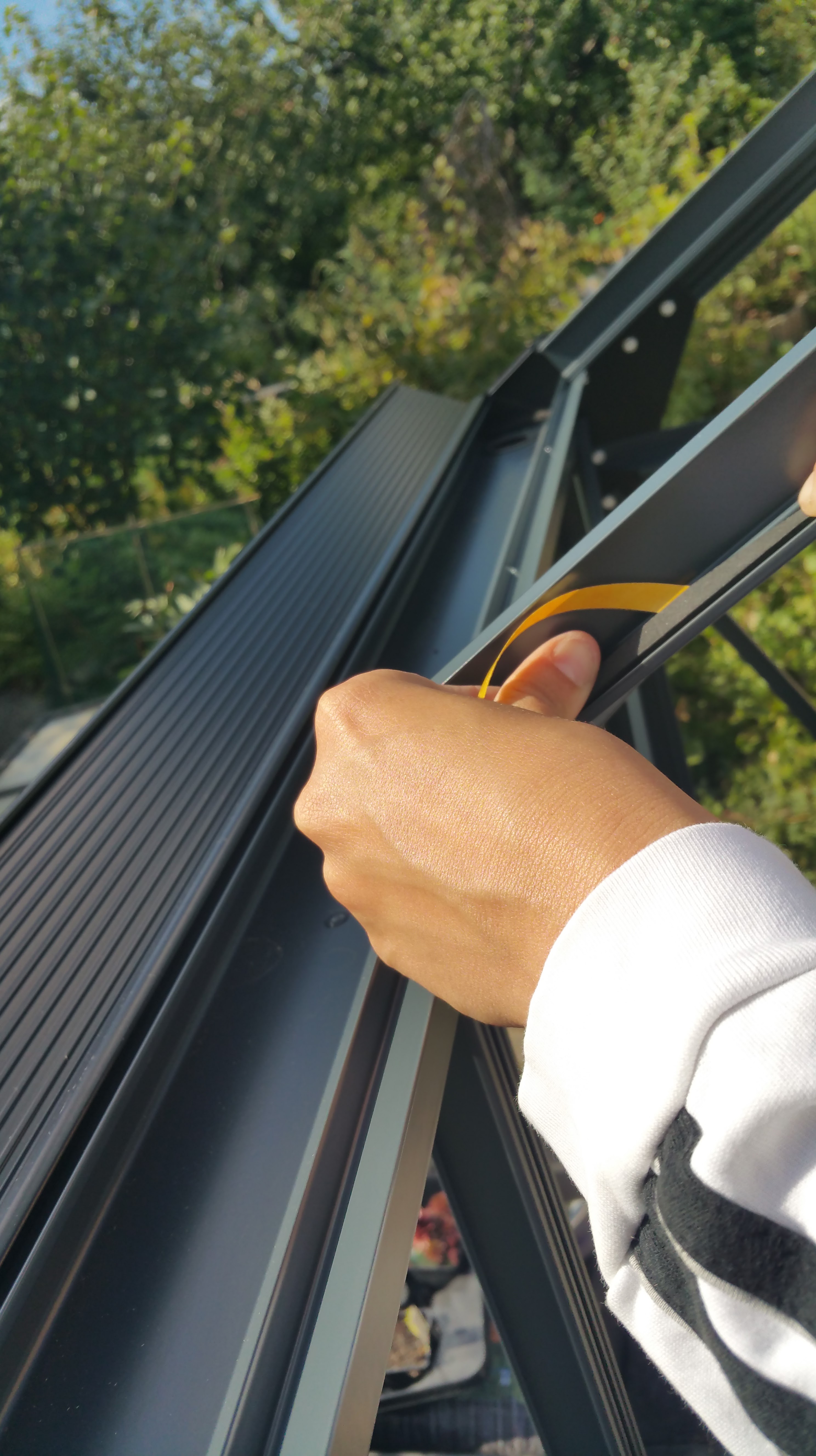
The final part of setting up the Juliana Compact greenhouse kit involved fitting and fixing the actual glass parts. This was pretty simple and straightforward in theory: if the base structure is correct in every regard, then one just needs to place the tempered glass pieces into the right holes at the aluminium frame and lock them into place. In practice this was not quite so easy, of course. The sealing of glass into the frame requires using either silicone gun or weatherstripping (stips of soft thermoplastic rubber) to provide an elastic base, and then applying the plastic lock strips (“M strips”) to lock glass sheets into place. (The lock strip plastic hardens in low temperatures, so this was a rush against time – setting sun and dropping temperatures would make the installation impossible.) We decided to use the weatherstripping option, which proved to be a good choice – even while the base and aluminium frame appeared to be pretty straight, there was still need to carefully move each sheet of glass several times during their installation attempts, and this would have been really difficult to do with messy silicone hardening and complicating things up. We decided also not to use acetone or any other strong solvent to clean the aluminium strips of grease, even while Juliana’s instructions told so (we were tipped by an expert that acetone actually ruins the cover paint from the frame, so using it would be a bad idea).

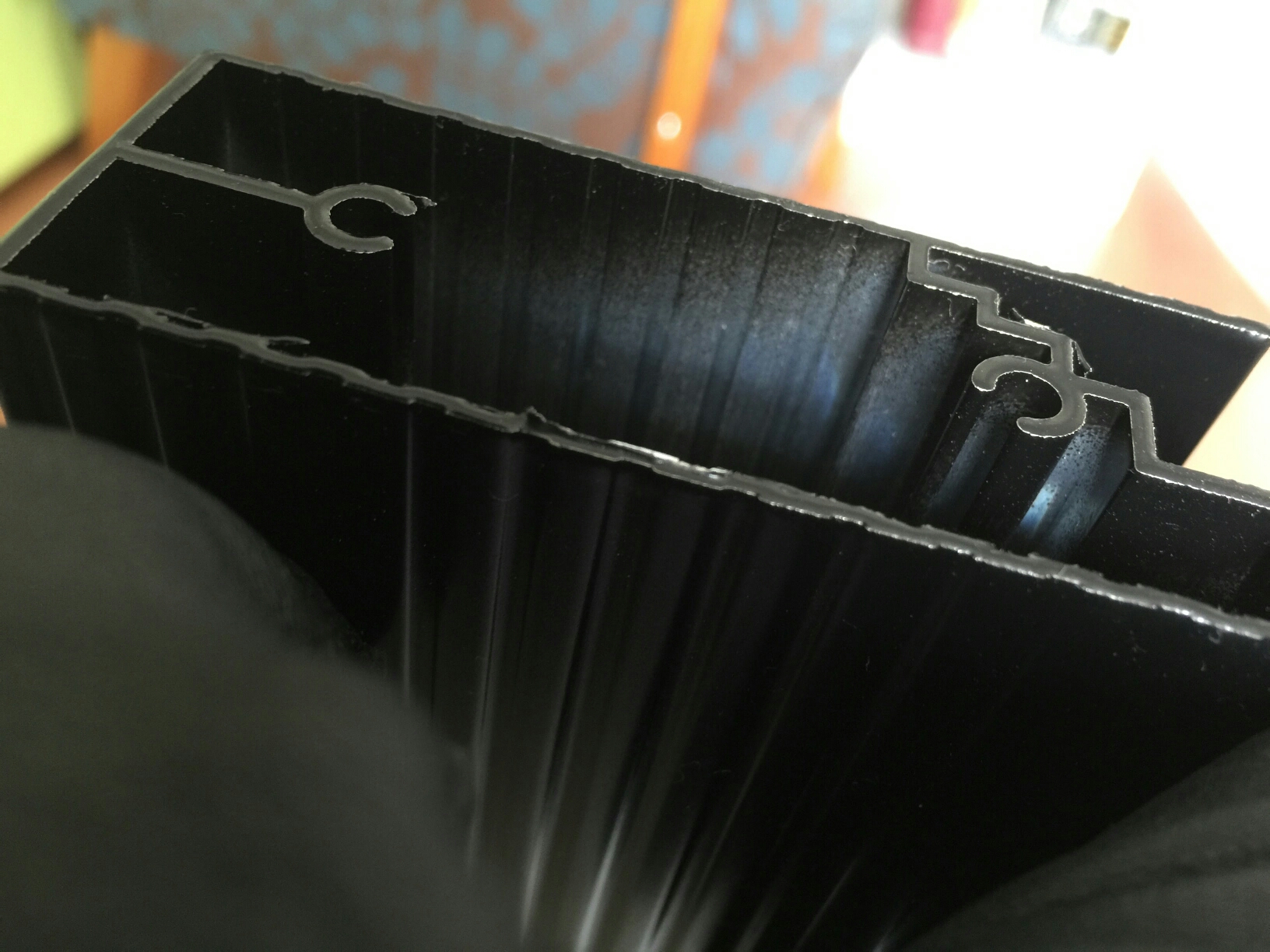
The need for repeated moving and fine-tuning of each glass related to the final precision test required by the Juliana kit: the “M strips” used for locking glasses need suitable, c. 1 mm insets or slots that go down all the way on both sides of each glass sheet, otherwise the M strips do not lock into place. That evenly distributed one millimeter tolerance proved to be rather tough challenge to reach. In our case we got majority of glass sheets installed with only moderate trouble, but in few, last glass installations we had to use tricks like matchsticks as holders that kept glass in place, while two persons – working in sync – both gently twisted and pressed powerfully inwards two M lock strips at both sides of a glass sheet, moving from top towards bottom at even pace, so that the 1 mm gap remained evenly distributed at both sides even while M stips tended to press and move glass sheets sideways. There is a picture below that hopefully illustrates this – there needs to be a suitable gap between the aluminium profile and the edge of glass sheet, while the glass sheet must rest on top of the weatherstipping, that is fixed very close to the inner edge of aluminium profile. At one point we were simultaneously fine-tuning three large sheets of glass, holding them with one hand in place, while pressing the M strips into place. And we did it!

There are so many pitfalls waiting in both printed instruction guidelines and online Juliana guides that it is perhaps surprising that people actually manage to put these things together, in more or less satisfactory manner. Apparently many customers actually end up either calling the importer for help, or order a professional to set things up. Which might be a good idea. But: if you do all this yourself, it will be a real-life 3D spatial and problem-solving challenge and a good way to spend several days (or: weeks) of your precious free time – so why not enjoy it?

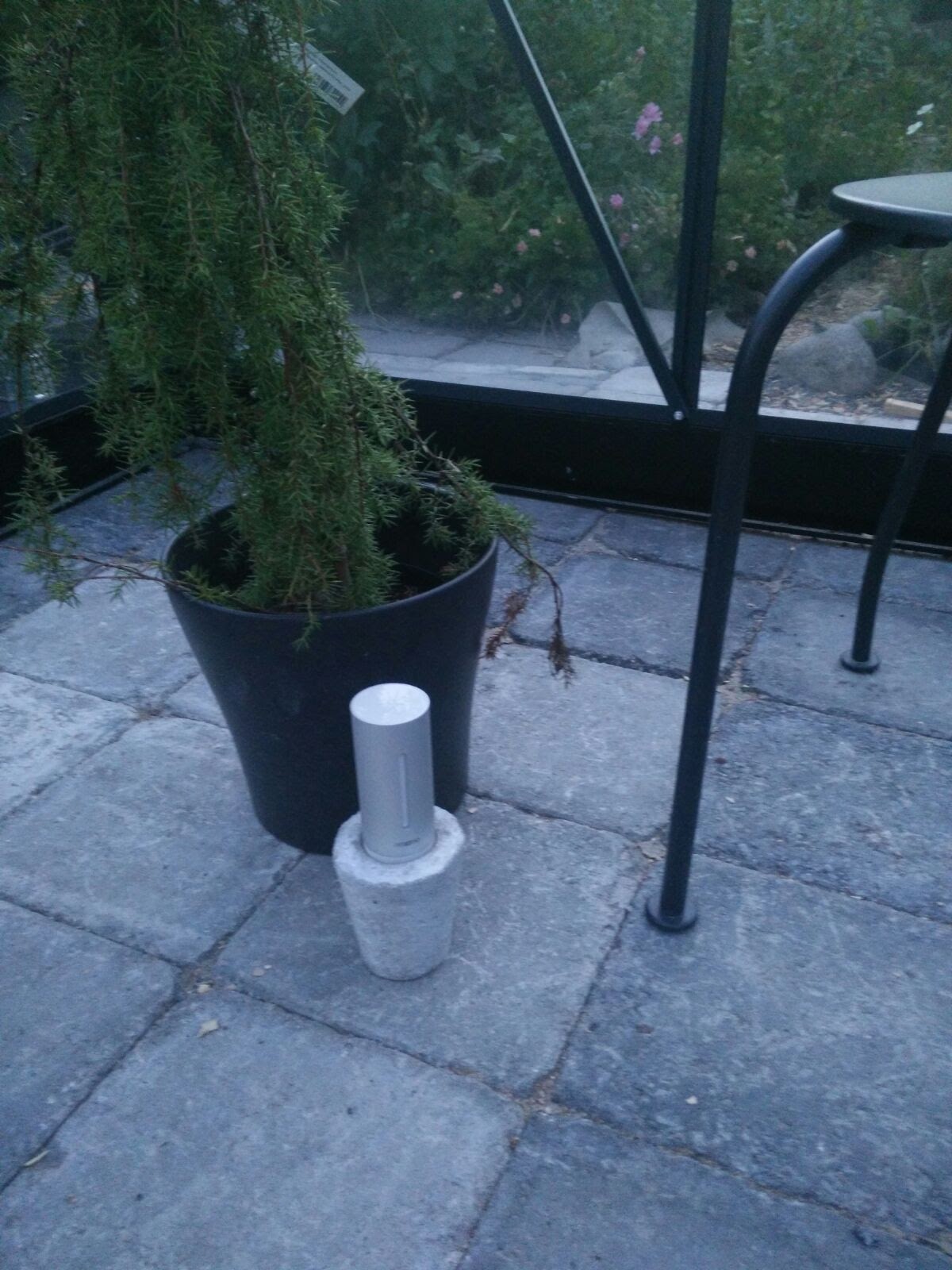
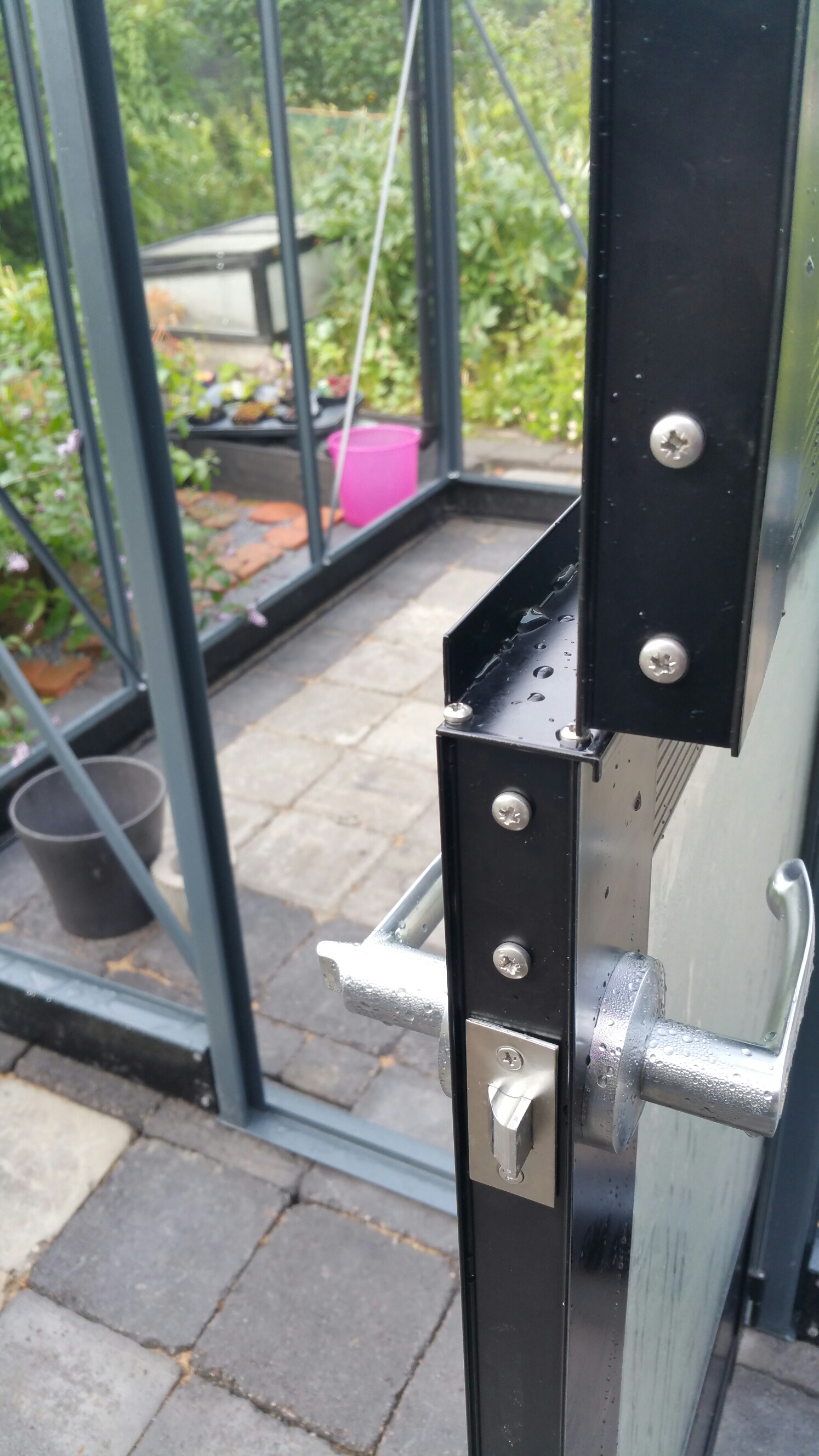
When the final sheet of glass was locked in place, it turned out that the door did not work properly any more (framework had tilted or shifted slightly during the glass installation, so that the door now slightly grinds against its frame when closed). But I do not care so much any more, no doubt we will find some solution to that also, eventually. I am already thinking of the next summer, and how to monitor temperature, humidity, and how to maintain the correct irrigation level in my chili pots. I have already the Blumat automatic watering system, and there is now also an extra wireless Netatmo sensor unit set up in the greenhouse for testing purposes, plus a solar cell powered led lights for some ambience and night time illumination of this “glass box”. – Thanks for reading, and I hope you have enjoyed your garden of summer, too!

20150912_162301

20150912_155711

20150912_153823

20150912_131936

20150912_131919

20150912_164850

20150912_180539

IMG_7204

IMG_7207

20150912_184705

20150912_190616

20150912_195023

20150912_205527

IMG_7209

Building a greenhouse, pt. 5

The actual greenhouse construction has been going on for some time now (myself again more in the assistant roles). I must admit that there are times when I am getting tired of the entire project, even if I am not even carrying the main burden. There are several issues in the Juliana greenhouse kit that make things more complex, confusing and difficult than they need to be. The instructions leaflet is one thing: it might be that all the aluminum parts are indeed painted black, but it is not optimal to print everything as black in the instructions with small details and bars with complex profiles. There is too much guesswork in the construction now. There are mysterious gaps in the instructions, where you just need to make a guess how to get from phase A to C,  and trial and error is not good in system that is put together with soft, aluminium nuts and bolts – fastening and loosening them just a couple of times can lead to threads of nuts breaking and bolts getting stuck. Also, if there is a gap between parts in one part of the aluminium framework, it is often very hard to figure out where the source of problem is, when there are dozens of parts that connect to each other like a giant ‘himmeli’. – But, we are making slow progress, pictures below.

image

image

image

image

image

image

image

image

image

image

image

image

image

image

image

image

image