Professor of Information Studies and Interactive Media, esp. Digital Culture and Game Studies in the Tampere University, Finland. Occasional photographer and gardener.
I am not exactly the most experienced Mac / OS X user, and still learning my ropes. One of the weird things I have run into involve Mac slowing down after a system update (like the recent OS X 10.9.3 update I installed today). Particularly irritating was the manner in which Mac Office 2011 started the lengthy process of “upgrading identity and messages” every time after the system reboot. The only way I have been able to solve this so far is by starting the “Disk Utility” and using it to run “verify” and “repair” to the system disk. After that, it is again speedy system and easy life — until the next system update, I guess. More: http://www.cnet.com/how-to/repair-disk-permissions-to-speed-up-your-mac/
Today’s video playback world is in an “interesting” state. Some examples from our own home and life:
We have video content (ranging over a decade in age) that has been recorded using variety of mobile phones, compact digital cameras, webcams, digital SLRs, and dedicated video cameras, at least
All of these seem to have produced file formats using different video codecs, encapsulation containers, different resolutions, etc.
Some of our video content has been converted and uploaded into cloud services, such as YouTube, Flickr, Dropbox, etc.
There are multiple storage and server devices in the house: PC workstations (Windows, Mac, Linux), one PC server (Windows 2008 Server Web Edition), and one NAS (Buffalo LS-WXL)
The servers claim to be DNLA compatible (there has been several different software tools set up to the Windows Server; in NAS there is a Twonky Media Server)
The typical video streaming use situations include, but are not limited to:
Using Apple TV device to access local network disk share
Using Apple TV device to access YouTube or other cloud service
Using iPad or iPhone to stream local or cloud video content via AirPlay to Apple TV
Using PlayStation 3 to access local network disk share
Using PlayStation 3 to access cloud service
Using a laptop (PC, Mac, Linux) to access local disk share or a cloud service, possibly streaming the video to the big screen with the help of AirPlay (Mac), or Chromecast (Windows)
Using an Android phone or tablet to access local disk shares or cloud services, often streaming the video to the big screen via Google Chromecast stick
There are also a “smart” tv and a blu-ray player with embedded DNLA playback functionalities, but those work even worse than the above options
It should be noted that there are multiple, differently featured software tools in both iOS and Android devices, and Chromecast support particularly appears to be “work in progress”, AirPlay has more solid support.
When I try to play a video file e.g. from 2007 (recorded using some obscure codec that some antique compact camera then supported), the situation is more likely to fail than to succeed. I have found that the best chance to actually see the video is by copying the file to a PC and opening it in some well-supported video player. The streaming will most likely not work. Apart from the PCs, PlayStation 3 appears to support most of our video files. iPad and Android phones and tablets do not really work well with most of local video file contents, even while the support has been getting better over the years. Most recent content, created with the new Androids or iPhones, for example, is more likely to perform well also in the complex home media streaming environment. The old video files will most probably always remain tricky. One solution would be to convert (and possibly upload to an online cloud service) all videos, since e.g. YouTube is rather well supported in different device environments. In reality, the hundreds of files will never be processed in this manner, and many people will probably also prefer to keep their most private, personal videos only in local storage rather than in some cloud service.
The Critical Evaluation of Game Studies seminar closed today, leaving a full house of tired but intellectually stimulated games scholars to debate and reflect on the outcomes and overall synthesis of the varied papers and discussions. One of the threads of the discussion concerned the identity and character of Game Studies (or “game studies”, or: games research? Or: ludology, even?) In his keynote, Espen Aarseth talked about Game Studies as a field, and argued (with explicit comment against my earlier published views) that a “discipline” is something that he particularly does not want to see Game Studies developing into.
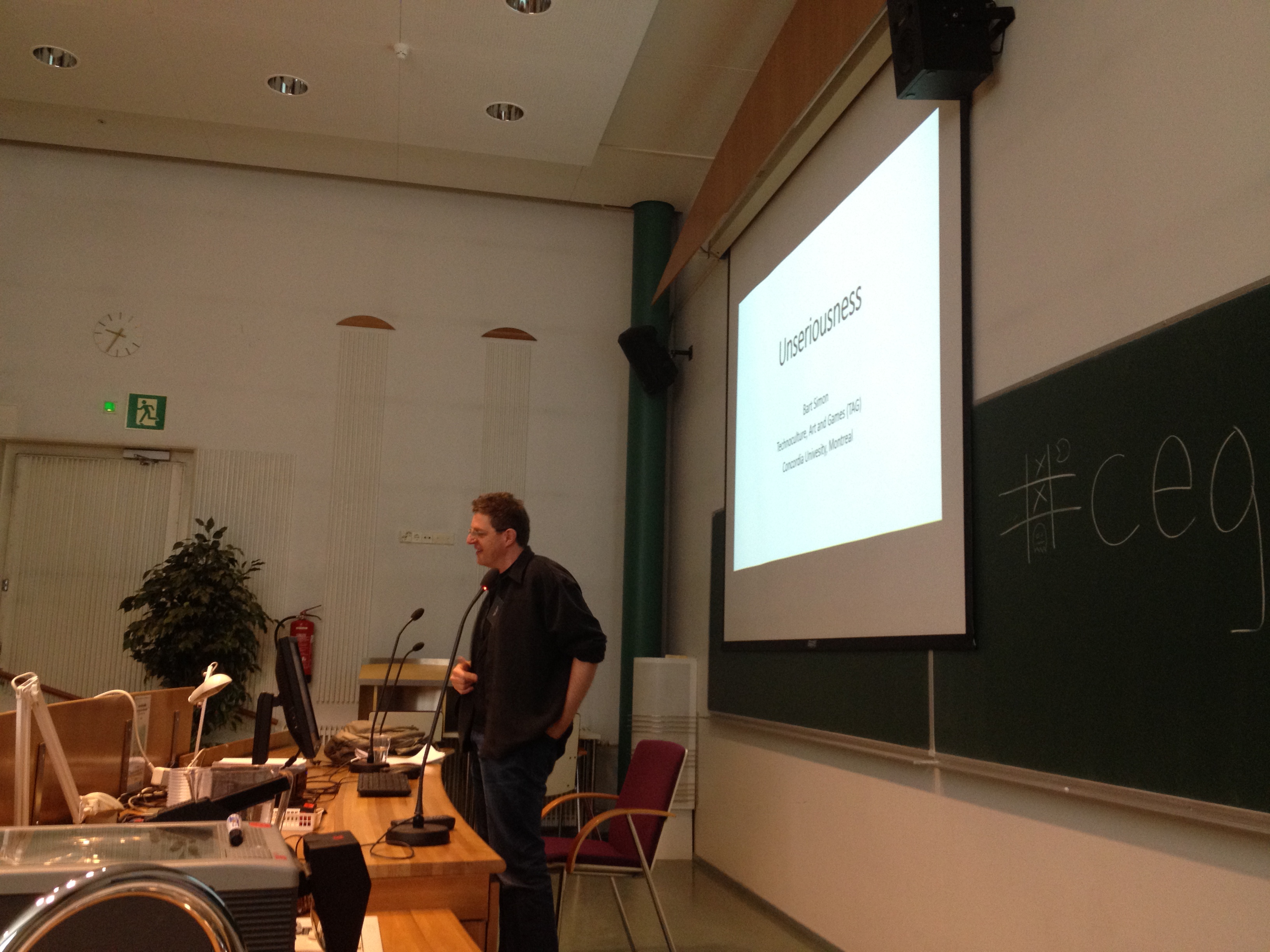
This particular, anti-disciplinary view can in a way be grounded on the existing polyphony in this field: there has not emerged any single, unified school of thought that would encompass everything that is going around games and play in academia. On the other hand, one could also – again following Espen – argue that a discipline that produces its own undergraduates as well as postgraduates would need a more solid methodological basis, and also more established work market to guarantee the employment of such “native graduates”. (Sebastian Deterding had an interesting analysis and proposal in his paper, suggesting that since there are not much guarantees of employment, or not so many well-established publication venues in the “core” areas of Game Studies, people are escaping back to more established academic fields, such as HCI or Communication Studies, which have already opened up for games related research, and provide more institutional work opportunities – and that Game Studies should merge with Design Research so that it would have better opportunities for survival.) Or, one could follow Bart Simon who in his speech talked about the “unseriousness” inherent in games and play as an object of study, and go against the instrumentalization and reification of disciplinary knowledge by principle.
While I see the point of all these, well-grounded arguments, I just want to emphasize again that Game Studies needs both dimensions and movements: both the elements that pull people towards each other and focus at organizing the knowledge production and educational activities in Game Studies into some, hopefully rather unified wholes, as well as more interdisciplinary elements that fertilize and stimulate the growth of new approaches and innovations – both within Game Studies, as well as in other fields of learning. While there is enough anarchist in most game scholars today to make us stand up and go against any attempt at governance or “central control” in this daring, iconoclastic intellectual project that has been set into motion, it is also important, I think, to carry enough responsibility to aim at positive conditions for such project, and sometimes this will also require setting up “disciplinary versions” of the fast-moving research field, so that it can engage with various academic institutions and neighbouring disciplines at even terms. While such “freeze frame” simplifications of the field probably always do some violence to the plurality, coverage and dynamism of Game Studies, they are probably necessary illusions that we also need. Textbooks, lectures and articles are all good places to construct such, identity creating moments of Game Studies, as well as for deconstructing and questioning them. After the seminar, I think that the deconstructionist momentum is currently stronger than the constructivist one, but it just may be my impression.
In any case, I came out of the seminar invigorated and energized, believing even more that before to the need and enormous potential Game Studies has to offer, not only to academia, but also to the surrounding society. If we do not try to fit together and negotiate the multiple aspects that complicate the superficial, commonplace perceptions of what games are, or what game playing means, who is going to do that? Also, I do not think that the other academic disciplines that I know about are that much more unified, or less polyphonic than Game Studies is, actually. As years and decades go past, academics tend to question the truths of their fields from multiple angles, and come up with dozens of different, mutually competing and incompatible theories and approaches into their fields of inquiry. And that is a very good thing. Long live Game Studies, one and many!
Pelaajabarometrissa uutta tietoa pelaamisen muutossuunnista
Nyt julkaistu, vuoden 2013 aikana kerättyä aineistoa raportoiva uusin Pelaajabarometri kertoo pelaamisen suosion kokonaisuudessaan pysyneen ennallaan. Jos huomioidaan kaikki erilaiset pelimuodot ja satunnainenkin pelaaminen lähes jokainen suomalainen pelaa ainakin jotakin. Aktiivisia, vähintään kerran kuukaudessa jotain peliä pelaavia suomalaisia on noin 88 prosenttia.
Digitaalisten pelien päätyypeistä älypuhelimilla ja tablet-laitteilla pelattavat mobiilipelit olivat tutkimuksen mukaan merkittävästi kasvattaneet suosiotaan Suomessa. Vuonna 2009 ensimmäisessä Pelaajabarometrissa aktiivisia, vähintään kerran kuussa mobiilipelejä pelaavia vastaajia oli noin 13 %, mutta vuoden 2013 aineistossa tämä osuus jo vajaat 29 %. Käytännössä siis jo lähes joka kolmas suomalainen pelaa vähintään kerran kuussa jotain mobiilipeliä.
Sen sijaan niin tietokonepelit, selaimessa pelattavat pelit (Facebook-pelejä lukuun ottamatta) sekä konsolivideopelit ovat selkeästi menettäneet aktiivisia pelaajia. Esimerkiksi kun yksin pelattavien tietokonepelien aktiivisten pelaajien osuus suomalaisista vuonna 2011 oli yli 40 prosenttia, on se nyt 2013 barometriaineistossa alle 28 prosenttia. Vastaavasti aktiivisten konsolipelaajien osuus on pudonnut kahdessa vuodessa vajaasta 30 prosentista alle 19 prosentin osuuteen tutkittavasta väestöstä. Digitaalisessa pelaamisessa on nähtävissä selvää painopisteen siirtymää konsolivideopeleistä ja tietokonepeleistä tablet-laitteilla ja älypuhelimella pelattavien pelien pariin.
Perinteisten pelimuotojen suosiossa ei ole Pelaajabarometrin mukaan tapahtunut merkittäviä muutoksia, lukuun ottamatta paperilla pelattavia pulmapelejä, jotka ovat menettäneet suosiotaan vuonna 2011 havaitusta vajaasta 48 prosentista vuoden 2013 aineiston vajaaseen 42 prosenttiin aktiivisia pelaajia. Perinteisten rahapelien kohdalla on myös havaittavissa vähenevää suosiota: niin Veikkauksen, RAY:n kuin Fintotonkin järjestämät rahapelit ovat kaikki menettäneet muutaman prosenttiyksikön pelaajasuosiotaan vuoteen 2011 verrattuna. RAY:n perinteisten kolikkoautomaattipelien kohdalla suosion lasku on ollut suurinta. Verkkorahapelit eivät ole vastaavalla tavalla kasvattaneet pelaajamääriään.
Kun kaikkien suomalaisten pelaajien keski-ikä on yli 42 vuotta, on keskimääräinen digitaalisten pelien pelaaja yli 37-vuotias. Miesten ja naisten välisessä pelaamisessa ei kaikki pelaamisen tyypit huomioiden ole merkittävää eroa. Digitaalisen pelaamisen aktiivisuus on kuitenkin miesten ja poikien keskuudessa hieman tyttöjä ja naisia suurempaa.
Kun tarkastellaan yksittäisiä pelejä ja pelisarjoja, nousevat pasianssipelit jälleen ylivoimaisesti suosituimmiksi digitaalisiksi peleiksi. Suomalaisen Rovion Angry Birds -sarjan pelit ovat pelisuosiossa toisella sijalla ja veikkauspelit kolmantena. Suosituimpia pelejä pelataan niin mobiililaitteilla kuin tietokoneillakin.
Barometrissä tutkittiin nyt ensimmäistä kertaa pelien ostamista ja pelien lisäominaisuuksiin kohdistuvaa virtuaalihyödykkeiden ostamista. Digitaalinen jakelu esimerkiksi mobiilipelien verkkokaupoissa (”app stores”) on yleistynyt viime vuosina, mutta nyt toteutettu pelien hankintakysely kertoo että perinteinen, kaupasta tapahtuva pelin ostaminen on edelleen tyypillisin tapa hankkia digitaalinen peli. Kaupasta pelinsä ainakin toisinaan hankki kaikista vastaajista noin 43 prosenttia, aktiivisten digipelaajien joukosta yli puolet.
Lisäksi ilmaispelaaminen (”free-to-play”) ja pelien mikromaksut ovat olleet uudistamassa tuotteista verkkopalveluiksi muuttuvien digitaalisten pelien käytänteitä. Aktiivisista digipelaajista ainakin toisinaan verkkopalvelusta pelejä latasi noin 41 prosenttia, ja ilmaispelien lisäominaisuuksista rahaa oli maksanut 19 prosenttia. Kaikkien vastaajien joukosta vastaavat prosenttiosuudet olivat 27 ja 12 prosenttia. Eri ikäryhmistä aktiivisimpia digitaalisten viihdepelien ostajia olivat 30–39-vuotiaat, aktiiviset digiviihdepelaajat.
Nyt neljättä kertaa toteutettu Pelaajabarometri on kyselytutkimus pelaamisen eri muotojen yleisyydestä Suomessa. Tampereen, Turun ja Jyväskylän yliopistojen pelitutkijoiden yhteistyönä syntynyt tutkimus tarjoaa kattavaa ja ajankohtaista tietoa pelaamisen eri muodoista ja pelaamisen suosioon liittyvistä muutostrendeistä. Vuonna 2013 tutkimukseen kerätty 972 vastaajan aineisto pohjautuu Väestörekisterikeskuksen satunnaisotantaan 10–75–vuotiaista Manner-Suomen asukkaista.
Professori Frans Mäyrä, frans.mayra@uta.fi, puh. 050 336 7650
Tampereen yliopisto, informaatiotieteiden yksikkö, Game Research Lab www.uta.fi/sis, http://gamelab.uta.fi
Fafnir – Nordic Journal of Science Fiction and Fantasy Research invites authors to submit papers for the upcoming edition 3/2014.
Fafnir – Nordic Journal of Science Fiction and Fantasy Research is a new, peer-reviewed academic journal which is published in electronic format four times a year. The purpose of Fafnir is to join up the Nordic field of science fiction and fantasy research and to provide a forum for discussion on current issues on the field. Fafnir is published by FINFAR Society (Suomen science fiction- ja fantasiatutkimuksen seura ry).
Now Fafnir invites authors to submit papers for its edition 3/2014. Fafnir publishes various texts ranging from peer-reviewed research articles to short overviews and book reviews in the field of science fiction and fantasy research.
The submissions must be original work, and written in English (or in Finnish or in Scandinavian languages). Manuscripts of research articles should be between 20,000 and 40,000 characters in length. The journal uses the most recent edition of the MLA Style Manual. The manuscripts of research articles will be peer-reviewed. Please note that as Fafnir is designed to be of interest to readers with varying backgrounds, essays and other texts should be as accessibly written as possible. Also, if English is not your first language, please have your article reviewed or edited by an English language editor.
The deadline for submissions is 31 May 2014.
In addition to research articles, Fafnir constantly welcomes text proposals such as essays, interviews, overviews and book reviews on any subject suited for the journal.
Please send your electronic submission (saved as RTF-file) to the following address: submissions(at)finfar.org. For further information, please contact the editors: jyrki.korpua(at)oulu.fi, hanna.roine(at)uta.fi and paivi.vaatanen(at)helsinki.fi.
This edition is scheduled for September 2014. The deadline for the submissions for the next edition is scheduled at 31 August (4/2014).
Best regards,
Jyrki Korpua, Hanna-Riikka Roine and Päivi Väätänen
Editors, Fafnir – Nordic Journal of Science Fiction and Fantasy Research
After some technical delays, the special ToDiGRA journal issue based on the Nordic DiGRA 2012 conference best papers is now online. You can find the table of contents below, and the direct link to journal is: http://todigra.org/index.php/todigra/issue/view/2
Transactions of Digital Games Research Association, Vol 1, No 2 (2014)
Special Issue, Selected articles from Nordic DIGRA 2012
Guest editors: Raine Koskimaa, Frans Mäyrä and Jaakko Suominen.
[Keynote on the future of learning in Jyväskylä] Olen kutsuttuna puhujana Peda.net-tapahtumassa Jyväskylässä ensi viikolla. “Tulevaisuus haastaa oppimisen ja verkko-opettajan” -seminaarissa 28.3. puhun otsikolla “Pelillisyys ja oppiminen – murrosten aika”. Linkki ohjelmaan: http://peda.net/veraja/tulevaisuushaastaaoppimisen/ohjelma
I have been testing and using Windows 8 (and now 8.1) in most of my Windows PCs for some time now, and while I mostly fail to find any real use for the Metro style apps, there are some nice improvements (most of them “under the hood”) that make Windows 8 preferable to Windows 7, for me, at the moment. However, there remains some issues that mostly relate to how to manage the new gesture controls of Windows 8, when only one of my Windows laptops is an actual touch-screen device. Swipes from the sides of the screen need to be carried out by pointing and clicking with a mouse, which is cumbersome, or through a touchpad, which have their benefits and downsides.
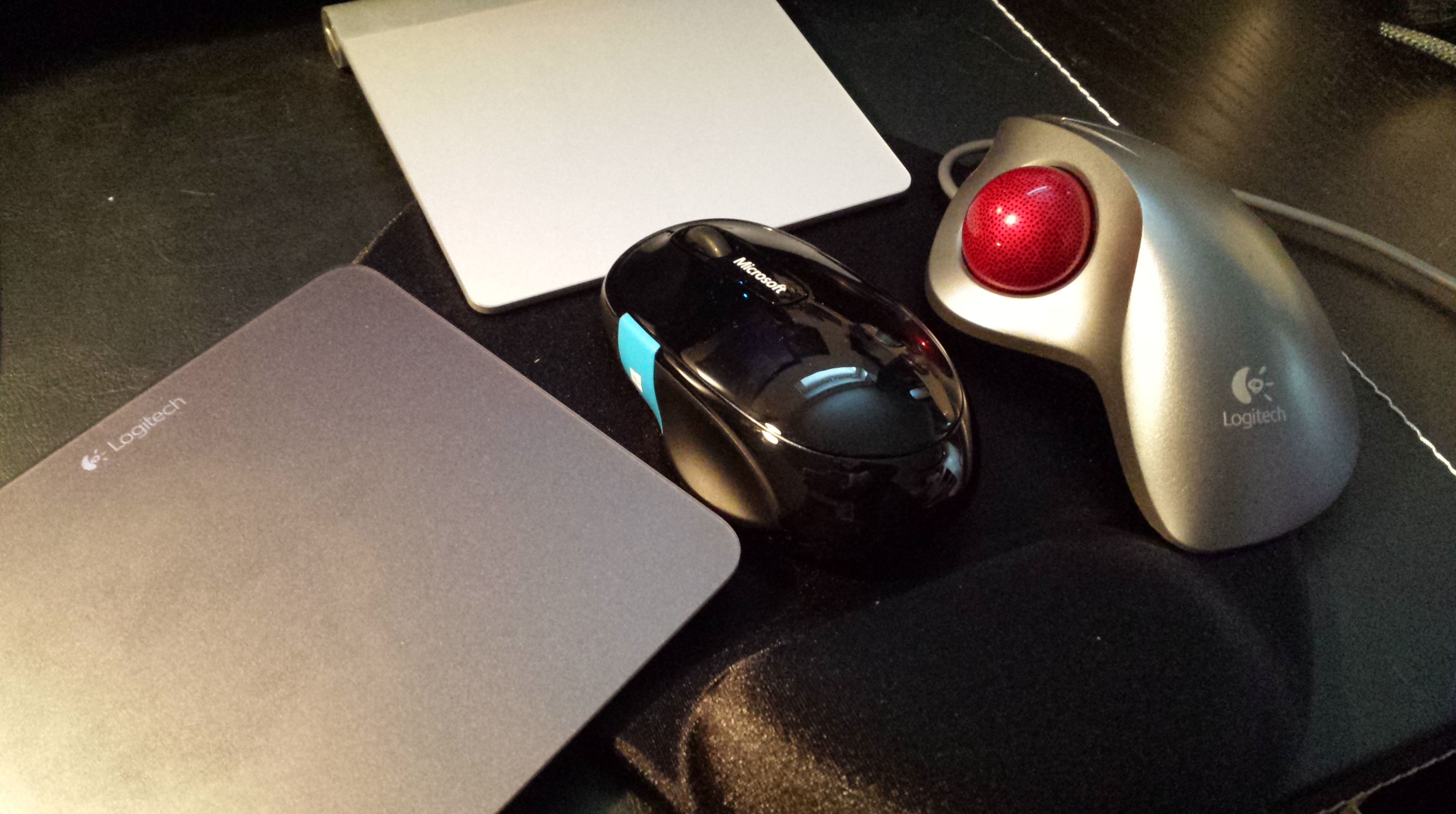
The attached picture shows by current cavalcade of optional pointing and gesturing devices that are connected and available next to the keyboard in my Windows 8.1 desktop workstation. These include the Logitech Touchpad T650, Apple Wireless Touchpad, Logitech Marble Trackball and Microsoft Sculpt Comfort Mouse, the most recent addition. The traditional mouse (with the optional Win8 button/touch area) is the most precise for pointing, the Marble trackball provides overall best ergonomics, and T650 is best compatible and supported in Windows 8 of the two touchpads (no surprises there, really). What really irritates me, is that after using one of them, there is aways some shortcoming which forces me to move to another device for a while: the touchpad is great for gestures and skimming through web pages, for example, but whenever multiple files need to be manipulated precisely, I find myself getting hold of the mouse or the trackball. And when my fingers and wrist get tired of rotating and swiping with a mouse, then I need to move a touchpad back to the mousepad.
A mobile device does not suffer from similar schizophrenia – you just use the mobile-optimized apps through a mobile-optimized UI. The touch gestures in Windows 8/8.1 desktop mode are a problem mostly since they are almost useful, so that once you have started to use them, it is hard to go back — yet, on the other hand, they do not naturally fit the desktop computer control devices capabilities. You are stuck in the middle.
Today I had a chance to do a very quick test of Google Glass in local PC/tech store. The situation was hardly optimal for any real user testing, but at least this was a possibility to try on this coveted/hated device. Despite its largish frame, the eyewear is actually rather light and easy to carry. The screen (when you finally get it in your field of vision, it requires some adjustment first) is bright and sharp enough and seems to float up there, few virtual meters away. My main frustration was with the voice control: I kept on repeating “Ok Glass”, but at least this model requires that you first activate the specs through the touchpad in the right side, navigate into the correct menu mode, which displays the time of clock and the text “Ok Glass”, and it is only after this when you can give voice commands (e.g. “take photo”, “record video”, “google University of Tampere” – which actually produced wikipedia entry for “University of Tampa” – close enough…) This is not good, and I hope this was only a feature of some out-of-date firmware (?) Otherwise, I cannot see it as very convenient to use your hand to flip through the menus (displayed in a tiny, semi-transparent floating screen) in order to get into mode where you can “naturally” enter commands. Also, the voice output from Glass was at such low level that it was almost impossible to hear anything at the noisy store environment.
Ok, Glass. Interesting, but we will have a closer look again at some future event.





 frans goes blog
You must be logged in to post a comment.