Going mirrorless (EOS M50)

I have today started to learn to take photos with an ultra-compact EOS M50, after using the much bigger SLR or DSLR cameras for decades. This is surely an interesting experience. Some of the fundamentals of photography are still the same, but some areas I clearly need to study more, and learn new approaches.

Canon EOS M50 (photo credit: Canon).

These involve particularly learning how to collaborate with the embedded computer (DIGIG 8 processor) better. It is fascinating to note how fast e.g. the automatic focusing system is – I can suddenly use an old lens like my trusty Canon EF 70-200mm f/4 L USM to get in-flight photos of rather fast birds. The new system tracks moving targets much faster and in a more reliable manner. However, I am by no means a bird photographer, having mostly worked with still life, landscapes and portraits. Getting to handle the dual options of creating the photo either through the electronic viewfinder, or, the vari-angle touchscreen takes some getting used to.

Also, there are many ways to use this new system, and finding the right settings among many different menus (there must be hundreds of options in all) takes some time. Also, coming from much older EOS 550D, it was weird to realise that the entire screen is now filled with autofocus points, and that it is possible to slide the AF point with a thumb (using the touchscreen as a “mouse”) into the optimal spot, while simultaneously composing, focusing, zooming and shooting – 10 frames per second, maximum. I am filling up the memory card fast now.

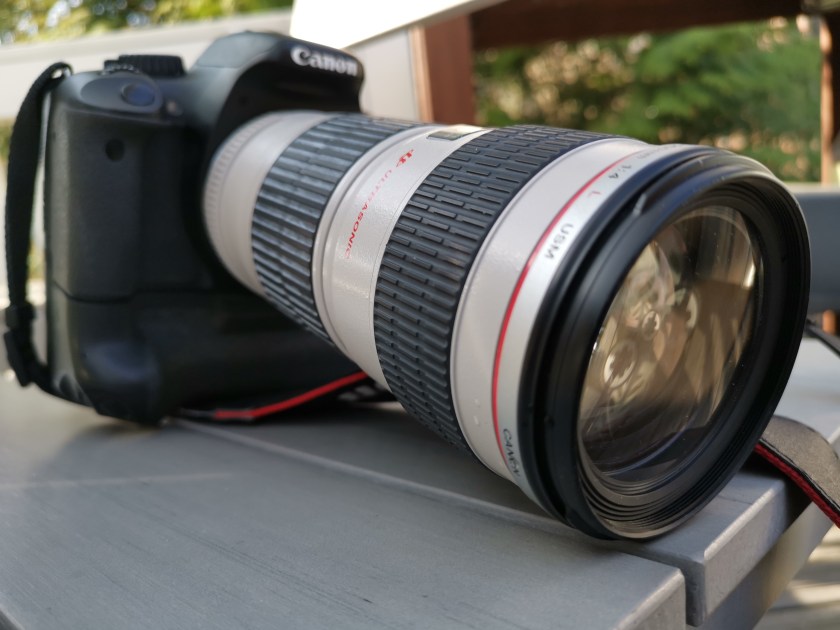
My Canon EOS 550D and M50, side by side. Note that I am using a battery grip on 550D, which is rather small DSLR camera in itself.

It is easy to do many basic photo editing tasks in-camera now. It actually feels like there is small “Photoshop” built into the camera. However, there is a fundamental decision that needs to be made: of either using photos as they come, directly from camera, or after some post-processing in the computer. This is important since JPG or RAW based workflows are a bit different. These days, I am using quite a lot of mobile apps and tools, and the ability to wirelessly copy photos from the camera into a smartphone or tablet computer (via Wi-Fi, Bluetooth + NFC), in the field, is definitely something that I like doing. Currently thus the JPG options make most sense for me personally.

There is no perfect camera

One of the frustrating parts of upgrading one’s photography tools is the realisation that there indeed is no such thing as “perfect camera”. Truly, there are many good, very good and excellent cameras, lenses and other tools for photography (some also very expensive, some more moderately priced). But none of them is perfect for everything, and will found lacking, if evaluated with criteria that they were not designed to fulfil.

This is particularly important realisation at a point when one is both considering of changing one’s style or approach to photography, at the same time while upgrading one’s equipment. While a certain combination of camera and lens does not force you to photograph certain subject matter, or only in a certain style, there are important limitations in all alternatives, which make them less suitable for some approaches and uses, than others.

For example, if the light weight and ease of combining photo taking with a hurried everyday professional and busy family life is the primary criteria, then investing heavily into serious, professional or semi-professional/enthusiast level photography gear is perhaps not so smart move. The “full frame” (i.e. classic film frame sensor size: 36 x 24 mm) cameras that most professionals use are indeed excellent in capturing a lot of light and details – but these high-resolution camera bodies need to be combined with larger lenses that tend to be much more heavy (and expensive) than some alternatives.

On the other hand, a good smartphone camera might be the optimal solution for many people whose life context only allows taking photos in the middle of everything else – multitasking, or while moving from point A to point B. (E.g. the excellent Huawei P30 Pro is built around a small but high definition 1/1.7″ sized “SuperSensing”, 40 Mp main sensor.)

Another “generalist option” used to be so-called compact cameras, or point-and-shoot cameras, which are in pocket camera category by size. However, these cameras have pretty much lost the competition to smartphones, and there are rather minor advances that can be gained by upgrading from a really good modern smartphone camera to a upscale, 1-inch sensor compact camera, for example. While the lens and sensor of the best of such cameras are indeed better than those in smartphones, the led screens of pocket cameras cannot compete with the 6-inch OLED multitouch displays and UIs of top-of-the-line smartphones. It is much easier to compose interesting photos with these smartphones, and they also come with endless supply of interesting editing tools (apps) that can be installed and used for any need. The capabilities of pocket cameras are much more limited in such areas.

There is an interesting exception among the fixed lens cameras, however, that are still alive and kicking, and that is the “bridge camera” category. These are typically larger cameras that look and behave much like an interchangeable-lens system cameras, but have their single lens permanently attached into the camera. The sensor size in these cameras has traditionally been small, 1/1.7″ or even 1/2.3″ size. The small sensor size, however, allows manufacturers to build exceptionally versatile zoom lenses, that still translate into manageable sized cameras. A good example is the Nikon Coolpix P1000, which has 1/2.3″ sensor coupled with 125x optical zoom – that is, it provides similar field of view as a 24–3000 mm zoom lens would have in a full frame camera (physically P1000’s lenses have a 4.3–539 mm focal length). As a 300 mm is already considered a solid telephoto range, a 3000 mm field of view is insane – it is a telescope, rather than a regular camera lens. You need a tripod for shooting with that lens, and even with image stabilisation it must be difficult to keep any object that far in the shaking frame and compose decent shots. A small sensor and extreme lens system means that the image quality is not very high: according to reviews, particularly in low light conditions the small sensor size and “slow” (small aperture) lens of P1000 translates into noisy images that lack detail. But, to be fair, it is impossible to find a full frame equivalent system that would have a similar focal range (unless one combines a full frame camera body with a real telescope, I guess). This is something that you can use to shoot the craters in the Moon.

A compromise that many hobbyists are using, is getting a system camera body with an “APS-C” (in Canon: 22.2 x 14.8 mm) or “Four-Thirds” (17.3 × 13 mm) sized sensors. These also cannot gather as much light as a full frame cameras do, and thus also will have more noise at low-light conditions, plus their lenses cannot operate as well in large apertures, which translate to relative inability to achieve shallow “depth of field” – which is something that is desirable e.g. in some portrait photography situations. Also, sports and animal photographers need camera-lens combinations that are “fast”, meaning that even in low-light conditions one can take photos that show the fast-moving subject matter in focus and as sharp. The APS-C and Four-Thirds cameras are “good enough” compromises for many hobbyists, since particularly with the impressive progress that has been made in e.g. noise reduction and in automatic focus technologies, it is possible to produce photos with these camera-lens systems that are “good enough” for most purposes. And this can be achieved by equipment that is still relatively compact in size, light-weight, and (importantly), the price of lenses in APS-C and Four-Thirds camera systems is much lower than top-of-the-line professional lenses manufactured and sold to demanding professionals.

A point of comparison: a full-frame compatible 300 mm telephoto Canon lens that is meant for professionals (meaning that is has very solid construction, on top of glass elements that are designed to produce very sharp and bright images with large aperture values) is priced close to 7000 euros (check out “Canon EF 300mm f/2.8 L IS II USM”). In comparison, and from completely other end of options, one can find a much more versatile telephoto zoom lens for APS-C camera, with 70-300 mm focal range, which has price under 200 euros (check our e.g. “Sigma EOS 70-300mm f/4-5.6 DG”). But the f-values here already tell that this lens is much “slower” (that is, it cannot achieve large aperture/small f-values, and therefore will not operate as nicely in low-light conditions – translating also to longer exposure times and/or necessity to use higher ISO settings, which add noise to the image).

But: what is important to notice is that the f-value is not the whole story about the optical and quality characteristics of lenses. And even if one is after that “professional looking” shallow depth of field (and wants to have a nice blurry background “boukeh” effect), it can be achieved with multiple techniques, including shooting with a longer focal range lens (telephoto focal ranges come with more shallow depth of fields) – or even using a smartphone that can apply the subject separation and blur effects with the help of algorithms (your mileage may vary).

And all this discussion has not yet touched the aesthetics. The “commercial / professional” photo aesthetics often dominate the discussion, but there are actually interesting artistic goals that might be achieved by using small-sensor cameras better, than with a full-frame. Some like to create images that are sharp from near to long distance, and smaller sensors suit perfectly for that. Also, there might be artistic reasons for hunting particular “grainy” qualities rather than the common, overly smooth aesthetics. A small sensor camera, or a smartphone might be a good tool for those situations.

One must also think that what is the use situation one is aiming at. In many cases it is no help owning a heavy system camera: if it is always left home, it will not be taking pictures. If the sheer size of the camera attracts attention, or confuses the people you were hoping to feature in the photos, it is no good for you.

Thus, there is no perfect camera that would suit all needs and all opportunities. The hard fact is that if one is planning to shoot “all kinds of images, in all kinds of situations”, then it is very difficult to say what kind of camera and lens are needed – for curious, experimental and exploring photographers it might be pretty impossible to make the “right choice” regarding the tools that would truly be useful for them. Every system will certainly facilitate many options, but every choice inevitably also removes some options from one’s repertoire.

One concrete way forward is of course budget. It is relatively easier with small budget to make advances in photographing mostly landscapes and still-life objects, as a smartphone or e.g. an entry-level APS-C system camera with a rather cheap lens can provide good enough tools for that. However, getting into photography of fast-moving subjects, children, animals – or fast-moving insects (butterflies) or birds, then some dedicated telephoto or macro capabilities are needed, and particularly if these topics are combined with low-light situations, or desire to have really sharp images that have minimal noise, then things can easily get expensive and/or the system becomes really cumbersome to operate and carry around. Professionals use this kinds of heavy and expensive equipment – and are paid to do so. Is it one’s idea of fun and good time as a hobbyist photographer to do similar things? It might be – or not, for some.

Personally, I still need to make up my mind where to go next in my decades-long photography journey. The more pro-style, full-frame world certainly has its certain interesting options, and new generation of mirrorless full-frame cameras are also bit more compact than the older generations of DSLR cameras. However, it is impossible to get away from the laws of physics and optics, and really “capable” full frame lenses tend to be large, heavy and expensive. The style of photography that is based on a selection of high-quality “prime” lenses (as contrasted to zooms) also means that almost every time one changes from taking photos of the landscape to some detail, or close-up/macro subject, one must also physically remove and change those lenses. For a systematic and goal oriented photographer that is not a problem, but I know my own style already, and I tend to be much more opportunistic: looking around, and jumping from subject and style to another all the time.

One needs to make some kinds of compromises. One option that I have been considering recently is that rather than stepping “up” from my current entry level Canon APS-C system, I could also go the other way. There is the interesting Sony bridge camera, Sony RX10 IV, which has a modern 1″ sensor and image processor that enables very fast, 315-point phase-detection autofocus system. The lens in this camera is the most interesting part, though: it is sharp, 24-600mm equivalent F2.4-4 zoom lens designed by Zeiss. This is a rather big camera, though, so like a system cameras, this is nothing you can put into your pocket and carry around daily. In use, if chosen, it would complement the wide-angle and street photography that I would be still doing with my smartphone cameras. This would be a camera that would be dedicated to those telephoto situations in particular. The UI is not perfect, and the touch screen implementation in particular is a bit clumsy. But the autofocus behaviour, and quality of images it creates in bright to medium light conditions is simply excellent. The 1″ sensor cannot compete with full frame systems in low-light conditions, though. There might be some interesting new generation mirrorless camera bodies and lenses coming out this year, which might change the camera landscape in somewhat interesting ways. So: the jury is still out!

Some links for further reading:

The right camera lens?

Currently in the Canon camp, my only item from their “Lexus” line – of the more high-quality professional L lenses – is the old Canon EF 70-200mm f/4 L USM (pictured). The second picture, the nice crocus close-up, is however not coming from that long tube, but is shot using a smartphone (Huawei Mate 20 Pro). There are professional quality macro lenses that would definitely produce better results on a DSLR camera, but for a hobbyist photographer it is also a question of “good enough”. This is good enough for me.

The current generation of smartphone cameras and optics are definitely strong in the macro, wide angle to normal lens ranges (meaning in traditional terms the 10-70 mm lenses on full frame cameras). Going to telephoto territory (over 70 mm in full frame terms), a good DSLR lens is still the best option – though, the “periscope” lens systems that are currently developed for smartphone cameras suggest that the situation might change in that front also, for hobbyist and everyday photo needs. (See the Chinese Huawei P30 Pro and OPPO’s coming phones’ periscope cameras leading the way here.) The powerful processors and learning, AI algorithms are used in the future camera systems to combine data coming from multiple lenses and sensors for image-stabilized, long-range and macro photography needs – with very handy, seamless zoom experiences.

My old L telephoto lens is non-stabilized f/4 version, so while it is “fast” in terms of focus and zoom, it is not particularly “fast” in terms of aperture (i.e. not being able to shoot in short exposure times with very wide apertures, in low-light conditions). But in daytime, well-lighted conditions, it is a nice companion to the Huawei smartphone camera, even while the aging technology of Canon APS-C system camera is truly from completely different era, as compared to the fine-tuning, editing and wireless capabilities in the smartphone. I will probably next try to set up a wireless SD card & app system for streaming the telephoto images from the old Canon into the Huawei (or e.g. iPad Pro), so that both the wide-angle, macro, normal range and telephoto images could all, in more-or-less handy manner, meet in the same mobile-access photo roll or editing software. Let’s see how this goes!

(Below, also a Great Tit/talitiainen, shot using the Canon 70-200, as a reference. In an APS-C crop body, it gives same field of view as a 112-320 mm in a full frame, if I calculate this correctly.)

Talitiainen (shot with Canon EOS 550D, EF 70-200mm f/4 L USM lens).

Learning to experiment

I have been recently thinking why I feel that I’ve not really made any real progress in my photography for the last few years. There are a few periods when some kind of leap has seemed to take place; e.g. when I moved into using my first DSRL, and also in the early days of entering the young Internet photography communities, such like Flickr. Reflecting on those, rather than the tools themselves (a better camera, software, or service), the crucial element in those perhaps has been that the “new” element just stimulated exploration, experimentation, and willingness to learn. If one does not take photos, one does not evolve. And I suppose one can get the energy and passion to continue doing things in experimental manner – every day (or: at least in sometimes) – from many things.
Currently I am constantly pushing against certain technical limitations (but cannot really afford to upgrade my camera and lenses), and there’s also lack of time and opportunity that a bit restrict more radical experiments with any exotic locations, but there are other areas where I definitely can learn to do more: e.g. in a) selecting the subject matter, b) in composition, and c) in post-production. Going to places with new eyes, or, finding an alternative perspective in “old” places, or, just learning new ways to handle and process all those photos.

I have never really bothered to study deeper the fine art of digital photo editing, as I have felt that the photos should stand by themselves, and also stay “real”, as documents of moments in life. But there are actually many ways that one can do to overcome technical limitations of cameras and lenses, that can also help in creating sort of “psychological photorealism”: to create the feelings and associations that the original situation, feeling or subject matter evoked, rather than just trying to live with the lines, colours and contrast values that the machinery was capable of registering originally. When the software post-processing is added to the creative toolbox, it can also remove bottlenecks from the creative subject matter selection, and from finding those interesting, alternative perspectives to all those “old” scenes and situations – that one might feel have already been worn out and exhausted.

Thus: I personally recommend going a bit avant-garde, now and then, even in the name of enhanced realism. 🙂

Day Pack

I probably get passionate about somewhat silly things, but (like my family has noticed) I have already amassed rather sizable collection of backbags – most optimised for travelling with a laptop computer, photography setup, or both.

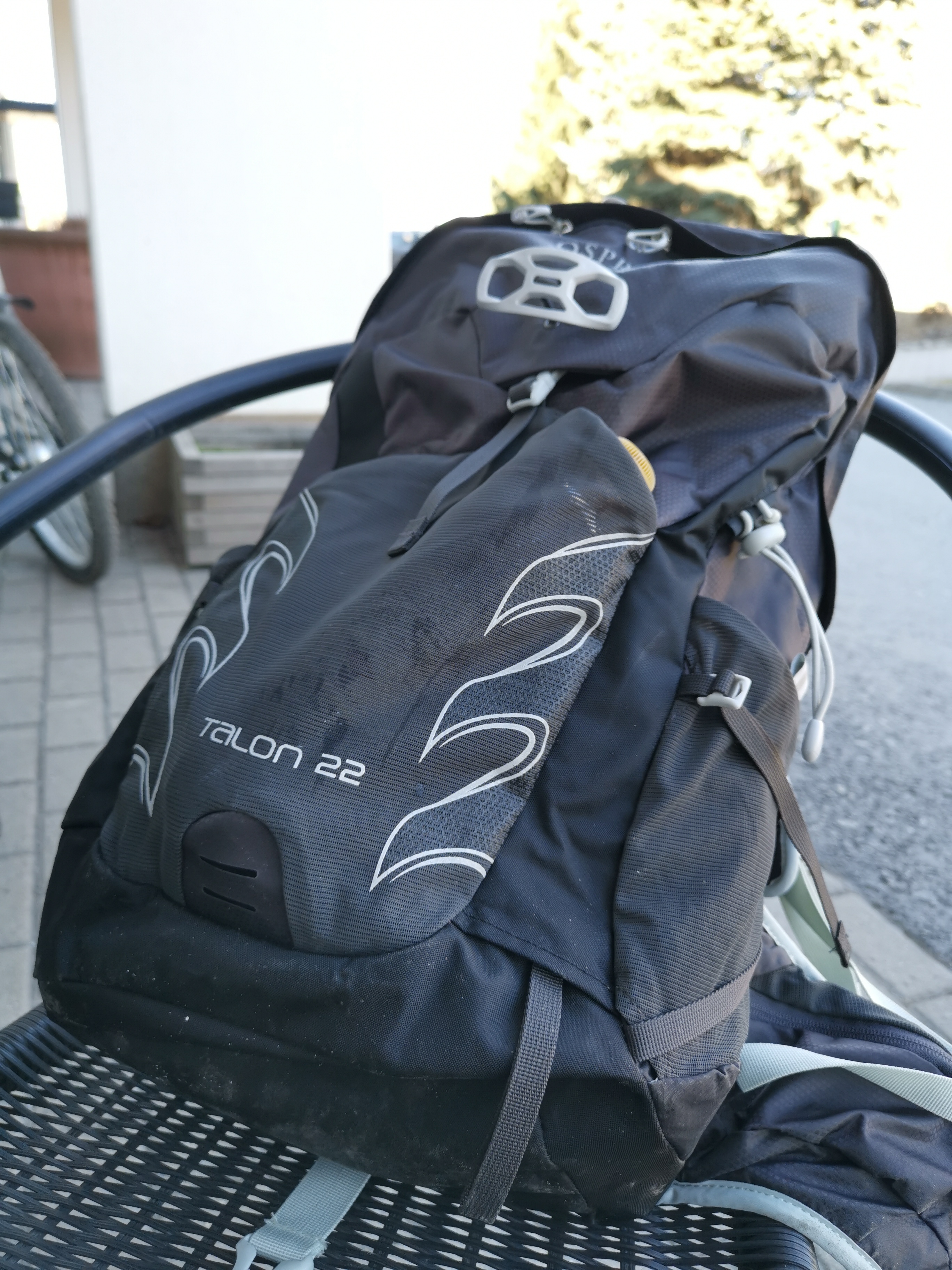
What is pictured here (below) is something a bit different, a compact and lightweight hiking backbag, Osprey Talon 22. It belongs to the “day bag” / “daypack” category, which means that while with its 22 liter dimensions it is probably too small to handle all of your stuff for a longer travel, it is perfect for all those things one is likely to carry around on a short trip.

The reason why I like this model particularly, relates to its carrying system. I have tried all sorts of straps and belts systems, but the one in Talon 22 is really good for the relatively light loads that this bag is designed for. It has an adjustable-length back plate with a foam-honeycomb structure, ergonomic shoulder straps, and the wide hipbelt also has a soft multilayered construction with air-channels. Combine this with a rich selection of various straps that allow adjusting the load into a very close, organic contact with your body, and you have a nice backbag indeed.

There are all kinds of advanced minor details in the Ospray feature list (that you can check from the link below), that might matter to more active hikers, for example, but basic feature set of this comfortable and highly adjustable all-round backbag are already something that many people can probably appreciate.

Link to info page: https://www.ospreyeurope.com/shop/fi_en/hiking/talon-series/talon-22-17

Microblogging

Diablo3.
My updates about e.g. Diablo3, or Pokémon GO, will go into https://frans.game.blog/.

I decided to experiment with microblogging, and set up three new sites: https://frans.photo.blog/https://frans.tech.blog/ and https://frans.game.blog/. All these “dot-blog” subdomains are now offered free by WordPress.com (see: https://en.blog.wordpress.com/2018/11/28/announcing-free-dotblog-subdomains/). The idea is to post my photos, game and tech updates into these sites, for fast updates and for better organisation, than in a “general” blog site, and also to avoid spamming those in social media, who are not interested in these topics. Feel free to subscribe – or, set up your own blog.

Summer Computing

20180519_190444.jpg
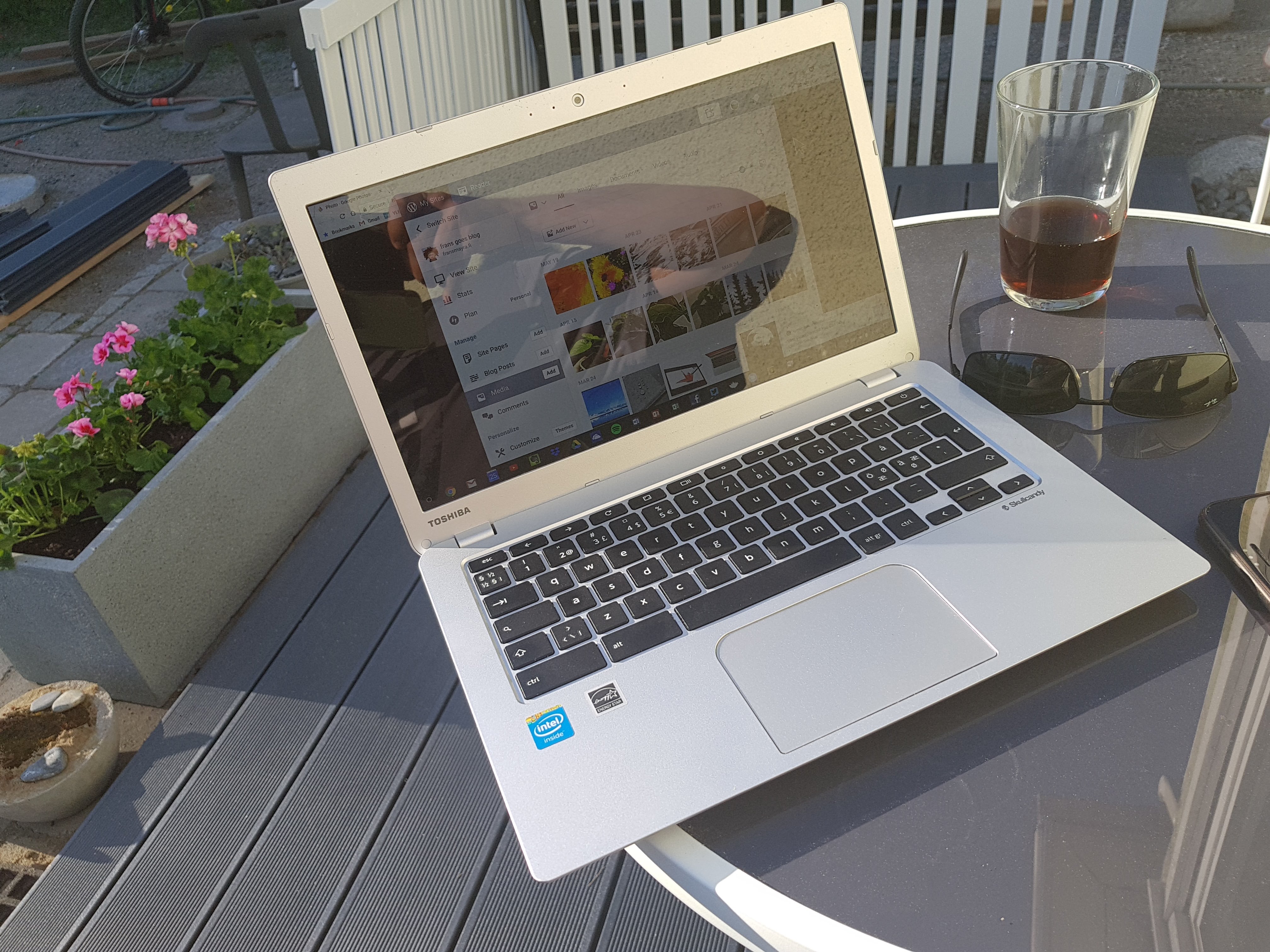
Working with my Toshiba Chromebook 2, in a sunny day.

I am not sure whether this is true for other countries, but after a long, dark and cold winter, Finns want to be outdoors, when it is finally warm and sunny. Sometimes one might even do remote work outdoors, from a park, cafe or bar terrace, and that is when things can get interesting – with that “nightless night” (the sun shining even at midnight), and all.

Surely, for most aims and purposes, summer is for relaxing and dragging your work and laptop always with you to your summer cottage or beach is not a good idea. This is definitely precious time, and you should spend it to with your family and friends, and rewind from the hurries of work. But, if you would prefer (or, even need to, for a reason or another) take some of your work outdoors, the standard work laptop computer is not usually optimal tool for that.

It is interesting to note, that your standard computer screens even today are optimised for a different style of use, as compared to the screens of today’s mobile devices. While the brightest smartphone screens today – e.g. the excellent OLED screen used in Samsung Galaxy S9 – exceed 1000 nits (units of luminance: candela per square meter; the S9 screen is reported to produce max 1130 nits), your typical laptop computer screens max out around measly 200 nits (see e.g. this Laptop Mag test table: https://www.laptopmag.com/benchmarks/display-brightness ). While this is perfectly good while working in a typical indoor, office environment, it is very hard to make out any details of such screens in bright sunlight. You will just squint, get a headache, and hurt your eyes, in the long run. Also, many typical laptop screens today are highly reflective, glossy glass screens, and the matte surfaces, which help against reflections, have been getting very rare.

It is as the “mobile work” that is one of the key puzzwords and trends today, means in practice only indoor-to-indoor style of mobility, rather than implying development of tools for truly mobile work, that would also make it possible to work from a park bench in a sunny day, or from that classical location: dock, next to your trusty rowing boat?

I have been hunting for business oriented laptops that would also have enough maximum screen brightness to scale up to comfortable levels in brighly lit environments, and there are not really that many. Even if you go for tablet computers, which should be optimised for mobile work, the brightness is not really at level with the best smartphone screens. Some of the best figures come from Samsung Galaxy Tab S3, which is 441 nits, iPad Pro 10.5 inch model is reportedly 600 nits, and Google Pixel C has 509 nits maximum. And a tablet devices – even the best of them – do not really work well for all work tasks.

HP ZBook Studio x360 G5
HP ZBook Studio x360 G5 (photo © HP)

HP has recently introduced some interesting devices, that go beyond the dim screens that most other manufacturers are happy with. For example, HP ZBook Studio x360 G5 supposedly comes with a 4k, high resolution anti-glare touch display that supports 100 percent Adobe RPG and which has 600 nits of brightness, which is “20 percent brighter than the Apple MacBook Pro 15-inch Retina display and 50 percent brighter than the Dell XPS UltraSharp 4K display”, according to HP. With its 8th generation Xeon processors (pro-equivalent to the hexacore Core i9), this is a powerful, and expensive device, but I am glad someone is showing the way.

EliteBook-X360-2018
HP advertising their new bright laptop display (image © HP)

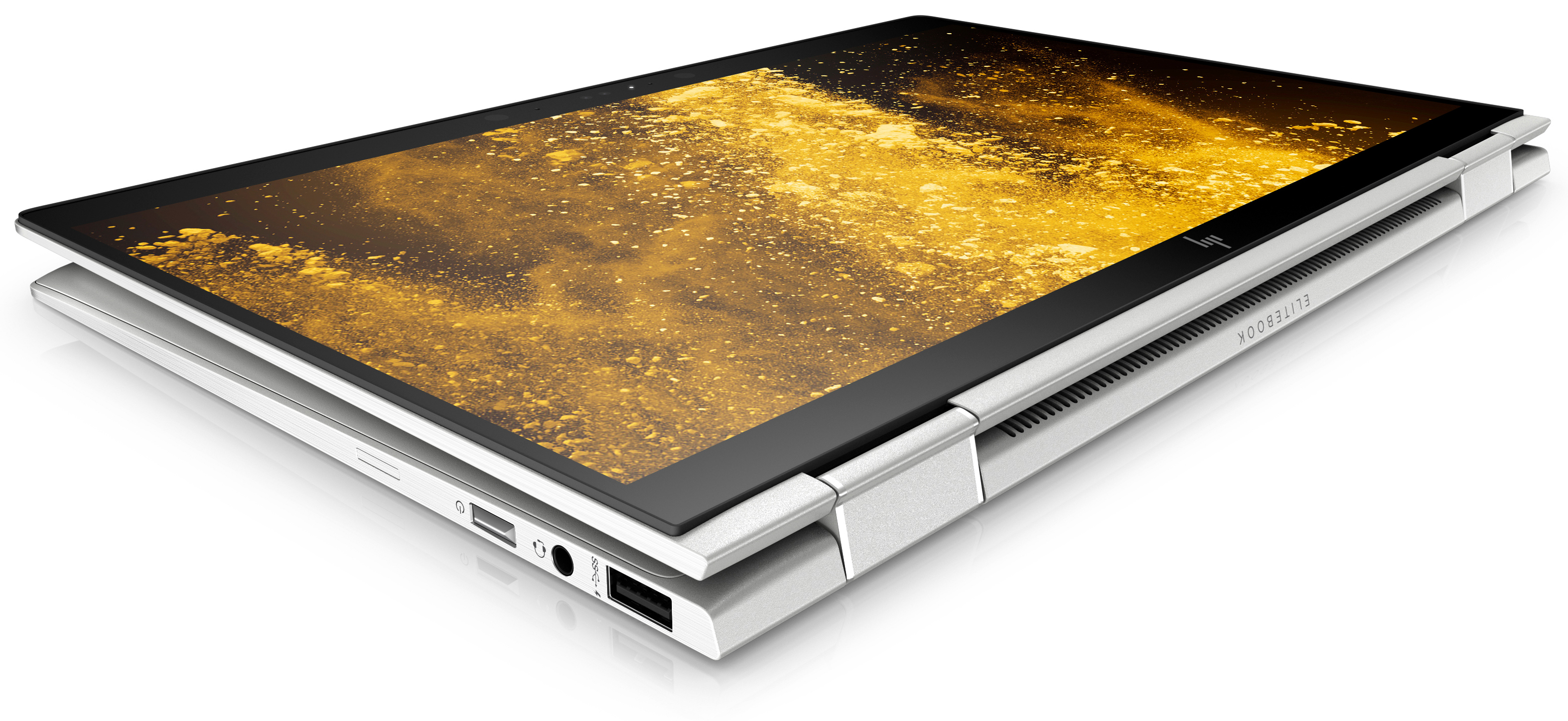
Even better, the upcoming, updated HP EliteBook x360 G3 convertible should come with a touchscreen that has maximum brightness of 700 nits. HP is advertising this as the “world’s first outdoor viewable display” for a business laptop, which at least sounds very promising. Note though, that this 700 nits can be achieved with only the 1920 x 1080 resolution model; the 4K touch display option has 500 nits, which is not that bad, either. The EliteBooks I have tested also have excellent keyboards, good quality construction and some productivity oriented enhancements that make them an interesting option for any “truly mobile” worker. One of such enhancement is a 4G/LTE data connectivity option, which is a real bless, if one moves fast, opening and closing the laptop in different environments, so that there is no reliable Wi-Fi connection available all the time. (More on HP EliteBook models at: http://www8.hp.com/us/en/elite-family/elitebook-x360-1030-1020.html.)

HP-EliteBook-x360-1030-G3_Tablet
EliteBook x360 G3 in tablet mode (photo © HP)

Apart from the challenges related to reliable data connectivity, a cloud-based file system is something that should be default for any mobile worker. This is related to data security: in mobile work contexts, it is much easier to lose one’s laptop, or get it robbed. Having a fast and reliable (biometric) authentication, encrypted local file system, and instantaneous syncronisation/backup to the cloud, would minimise the risk of critical loss of work, or important data, even if the mobile workstation would drop into a lake, or get lost. In this regard, Google’s Chromebooks are superior, but they typically lack the LTE connectivity, and other similar business essentials, that e.g. the above EliteBook model features. Using a Windows 10 laptop with either full Dropbox synchronisation enabled, or with Microsoft OneDrive as the default save location will come rather close, even if the Google Drive/Docs ecosystem in Chromebooks is the only one that is truly “cloud-native”, in the sense that all applications, settings and everything else also lives in the cloud. Getting back to where you left your work in the Chrome OS means that one just picks up any Chromebook, logs in, and starts with a full access to one’s files, folders, browser addons, bookmarks, etc. Starting to use a new PC is a much less frictionless process (with multiple software installations, add-ons, service account logins, the setup can easily take full working days).

20180519_083722.jpgIf I’d have my ideal, mobile work oriented tool from today’s tech world, I’d pick the business-enhanced hardware of HP EliteBook, with it’s bright display and LTE connectivity, and couple those with a Chrome OS, with it’s reliability and seamless online synchronisation. But I doubt that such a combo can be achieved – or, not yet, at least. Meanwhile, we can try to enjoy the summer, and some summer work, in bit more sheltered, shady locations.

Tools for Trade

Lenovo X1 Yoga (2nd gen) in tablet mode
Lenovo X1 Yoga (2nd gen) in tablet mode.

The key research infrastructures these days include e.g. access to online publication databases, and ability to communicate with your colleagues (including such prosaic things as email, file sharing and real-time chat). While an astrophysicist relies on satellite data and a physicist to a particle accelerator, for example, in research and humanities and human sciences is less reliant on expensive technical infrastructures. Understanding how to do an interview, design a reliable survey, or being able to carefully read, analyse and interpret human texts and expressions is often enough.

Said that, there are tools that are useful for researchers of many kinds and fields. Solid reference database system is one (I use Zotero). In everyday meetings and in the field, note taking is one of the key skills and practices. While most of us carry our trusty laptops everywhere, one can do with a lightweight device, such as iPad Pro. There are nice keyboard covers and precise active pens available for today’s tablet computers. When I type more, I usually pick up my trusty Logitech K810 (I have several of those). But Lenovo Yoga 510 that I have at home has also that kind of keyboard that I love: snappy and precise, but light of touch, and of low profile. It is also a two-in-one, convertible laptop, but a much better version from same company is X1 Yoga (2nd generation). That one is equipped with a built-in active pen, while being also flexible and powerful enough so that it can run both utility software, and contemporary games and VR applications – at least when linked with an eGPU system. For that, I use Asus ROG XG Station 2, which connects to X1 Yoga with a Thunderbolt 3 cable, thereby plugging into the graphics power of NVIDIA GeForce GTX 1070. A system like this has the benefit that one can carry around a reasonably light and thin laptop computer, which scales up to workstation class capabilities when plugged in at the desk.

ROG XG Station 2 with Thunderbolt 3.

One of the most useful research tools is actually a capable smartphone. For example, with a good mobile camera one can take photos to make visual notes, photograph one’s handwritten notes, or shoot copies of projected presentation slides at seminars and conferences. When coupled with a fast 4G or Wi-Fi connection and automatic upload to a cloud service, the same photo notes almost immediately appear also the laptop computer, so that they can be attached to the right folder, or combined with typed observation notes and metadata. This is much faster than having a high-resolution video recording of the event; that kind of more robust documentation setups are necessary in certain experimental settings, focus group interview sessions, collaborative innovation workshops, etc., but in many occasions written notes and mobile phone photos are just enough. I personally use both iPhone (8 Plus) and Android systems (Samsung Galaxy Note 4 and S7).

Writing is one of they key things academics do, and writing software is a research tool category on its own. For active pen handwriting I use both Microsoft OneNote and Nebo by MyScript. Nebo is particularly good in real-time text recognition and automatic conversion of drawn shapes into vector graphics. I link a video by them below:

My main note database is at Evernote, while online collaborative writing and planning is mostly done in Google Docs/Drive, and consortium project file sharing is done either in Dropbox or in Office365.

Microsoft Word may be the gold standard of writing software in stand-alone documents, but their relative share has radically gone down in today’s distributed and collaborative work. And while MS Word might still have the best multi-lingual proofing tools, for example, the first draft might come from an online Google Document, and the final copy end up into WordPress, to be published in some research project blog or website, or in a peer-reviewed online academic publication, for example. The long, book length projects are best handled in dedicated writing environment such as Scrivener, but most collaborative book projects are best handled with a combination of different tools, combined with cloud based sharing and collaboration in services like Dropbox, Drive, or Office365.

If you have not collaborated in this kind of environment, have a look at tutorials, here is just a short video introduction by Google into sharing in Docs:

What are your favourite research and writing tools?

Photography and artificial intelligence

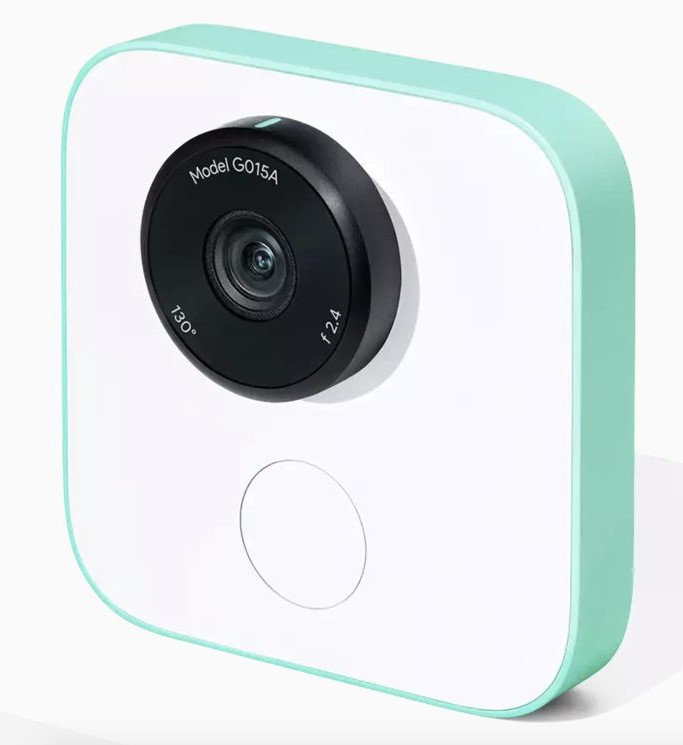
Google Clips camera
Google Clips camera (image copyright: Google).

The main media attention in applications of AI, artificial intelligence and machine learning, has been on such application areas as smart traffic, autonomous cars, recommendation algorithms, and expert systems in all kinds of professional work. There are, however, also very interesting developments taking place around photography currently.

There are multiple areas where AI is augmenting or transforming photography. One is in how the software tools that professional and amateur photographers are using are advancing. It is getting all the time easier to select complex areas in photos, for example, and apply all kinds of useful, interesting or creative effects and functions in them (see e.g. what Adobe is writing about this in: https://blogs.adobe.com/conversations/2017/10/primer-on-artificial-intelligence.html). The technical quality of photos is improving, as AI and advanced algorithmic techniques are applied in e.g. enhancing the level of detail in digital photos. Even a blurry, low-pixel file can be augmented with AI to look like a very realistic, high resolution photo of the subject (on this, see: https://petapixel.com/2017/11/01/photo-enhancement-starting-get-crazy/.

But the applications of AI do not stop there. Google and other developers are experimenting with “AI-augmented cameras” that can recognize persons and events taking place, and take action, making photos and videos at moments and topics that the AI, rather than the human photographer deemed as worthy (see, e.g. Google Clips: https://www.theverge.com/2017/10/4/16405200/google-clips-camera-ai-photos-video-hands-on-wi-fi-direct). This development can go into multiple directions. There are already smart surveillance cameras, for example, that learn to recognize the family members, and differentiate them from unknown persons entering the house, for example. Such a camera, combined with a conversant backend service, can also serve the human users in their various information needs: telling whether kids have come home in time, or in keeping track of any out-of-ordinary events that the camera and algorithms might have noticed. In the below video is featured Lighthouse AI, that combines a smart security camera with such an “interactive assistant”:
https://www.youtube.com/watch?v=erZBQ8nv_M0

In the domain of amateur (and also professional) photographer practices, AI also means many fundamental changes. There are already add-on tools like Arsenal, the “smart camera assistant”, which is based on the idea that manually tweaking all the complex settings of modern DSLR cameras is not that inspiring, or even necessary, for many users, and that a cloud-based intelligence could handle many challenging photography situations with better success than a fumbling regular user (see their Kickstarter video at: https://www.youtube.com/watch?v=mmfGeaBX-0Q). Such algorithms are already also being built into the cameras of flagship smartphones (see, e.g. AI-enhanced camera functionalities in Huawei Mate 10, and in Google’s Pixel 2, which use AI to produce sharper photos with better image stabilization and better optimized dynamic range). Such smartphones, like Apple’s iPhone X, typically come with a dedicated chip for AI/machine learning operations, like the “Neural Engine” of Apple. (See e.g. https://www.wired.com/story/apples-neural-engine-infuses-the-iphone-with-ai-smarts/).

Many of these developments point the way towards a future age of “computational photography”, where algorithms play as crucial role in the creation of visual representations as optics do today (see: https://en.wikipedia.org/wiki/Computational_photography). It is interesting, for example, to think about situations where photographic presentations are constructed from data derived from myriad of different kinds of optical sensors, scattered in wearable technologies and into the environment, and who will try their best to match the mood, tone or message, set by the human “creative director”, who is no longer employed as the actual camera-man/woman. It is also becoming increasingly complex to define authorship and ownership of photos, and most importantly, the privacy and related processing issues related to the visual and photographic data. – We are living interesting times…

Cognitive engineering of mixed reality


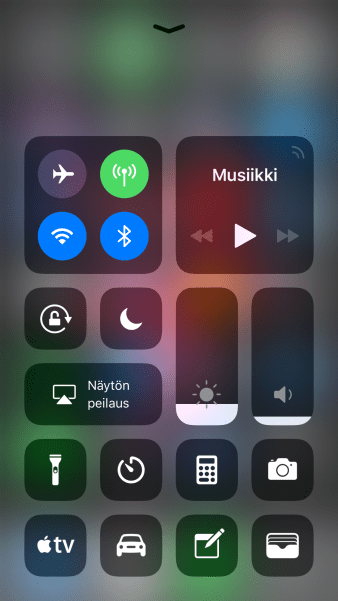
iOS 11: user-adaptable control centre, with application and function shortcuts in the lock screen.

In the 1970s and 1980s the concept ‘cognitive engineering’ was used in the industry labs to describe an approach trying to apply cognitive science lessons to the design and engineering fields. There were people like Donald A. Norman, who wanted to devise systems that are not only easy, or powerful, but most importantly pleasant and even fun to use.

One of the classical challenges of making technology suit humans, is that humans change and evolve, and differ greatly in motivations and abilities, while technological systems tend to stay put. Machines are created in a certain manner, and are mostly locked within the strict walls of material and functional specifications they are based on, and (if correctly manufactured) operate reliably within those parameters. Humans, however, are fallible and changeable, but also capable of learning.

In his 1986 article, Norman uses the example of a novice and experienced sailor, who greatly differ in their abilities to take the information from compass, and translate that into a desirable boat movement (through the use of tiller, and rudder). There have been significant advances in multiple industries in making increasingly clear and simple systems, that are easy to use by almost anyone, and this in turn has translated into increasingly ubiquitous or pervasive application of information and communication technologies in all areas of life. The televisions in our living rooms are computing systems (often equipped with apps of various kinds), our cars are filled with online-connected computers and assistive technologies, and in our pockets we carry powerful terminals into information, entertainment, and into the ebb and flows of social networks.

There is, however, also an alternative interpretation of what ‘cognitive engineering’ could be, in this dawning era of pervasive computing and mixed reality. Rather than only limited to engineering products that attempt to adapt to the innate operations, tendencies and limitations of human cognition and psychology, engineering systems that are actively used by large numbers of people also means designing and affecting the spaces, within which our cognitive and learning processes will then evolve, fit in, and adapt into. Cognitive engineering does not only mean designing and manufacturing certain kinds of machines, but it also translates into an impact that is made into the human element of this dialogical relationship.

Graeme Kirkpatrick (2013) has written about the ‘streamlined self’ of the gamer. There are social theorists who argue that living in a society based on computers and information networks produces new difficulties for people. Social, cultural, technological and economic transitions linked with the life in late modern, capitalist societies involve movements from projects to new projects, and associated necessity for constant re-training. There is necessarily no “connecting theme” in life, or even sense of personal progression. Following Boltanski and Chiapello (2005), Kirkpatrick analyses the subjective condition where life in contradiction – between exigency of adaptation and demand for authenticity – means that the rational course in this kind of systemic reality is to “focus on playing the game well today”. As Kirkpatrick writes, “Playing well means maintaining popularity levels on Facebook, or establishing new connections on LinkedIn, while being no less intensely focused on the details of the project I am currently engaged in. It is permissible to enjoy the work but necessary to appear to be enjoying it and to share this feeling with other involved parties. That is the key to success in the game.” (Kirkpatrick 2013, 25.)

One of the key theoretical trajectories of cognitive science has been focused on what has been called “distributed cognition”: our thinking is not only situated within our individual brains, but it is in complex and important ways also embodied and situated within our environments, and our artefacts, in social, cultural and technological means. Gaming is one example of an activity where people can be witnessed to construct a sense of self and its functional parameters out of resources that they are familiar with, and which they can freely exploit and explore in their everyday lives. Such technologically framed play is also increasingly common in working life, and our schools can similarly be approached as complex, designed and evolving systems that are constituted by institutions, (implicit, as well as explicit) social rules and several layers of historically sedimented technologies.

Beyond all hype of new commercial technologies related to virtual reality, augmented reality and mixed reality technologies of various kinds, lies the fact that we have always already lived in complex substrate of mixed realities: a mixture of ideas, values, myths and concepts of various kinds, that are intermixed and communicated within different physical and immaterial expressive forms and media. Cognitive engineering of mixed reality in this, more comprehensive sense, involves involvement in dialogical cycles of design, analysis and interpretation, where practices of adaptation and adoption of technology are also forming the shapes these technologies are realized within. Within the context of game studies, Kirkpatrick (2013, 27) formulates this as follows: “What we see here, then, is an interplay between the social imaginary of the networked society, with its distinctive limitations, and the development of gaming as a practice partly in response to those limitations. […] Ironically, gaming practices are a key driver for the development of the very situation that produces the need for recuperation.” There are multiple other areas of technology-intertwined lives where similar double bind relationships are currently surfacing: in social use of mobile media, in organisational ICT, in so-called smart homes, and smart traffic design and user culture processes. – A summary? We live in interesting times.

References:
– Boltanski, Luc, ja Eve Chiapello (2005) The New Spirit of Capitalism. London & New York: Verso.
– Kirkpatrick, Graeme (2013) Computer Games and the Social Imaginary. Cambridge: Polity.
– Norman, Donald A. (1986) Cognitive engineering. User Centered System Design31(61).